> ## Documentation Index
> Fetch the complete documentation index at: https://docs.famulor.io/llms.txt
> Use this file to discover all available pages before exploring further.
# Calendar booking with Cal.com
> Cal.com is a tool that allows your AI assistant to book meetings.
## Setup Cal.com
1. Go to the [Cal.com](https://refer.cal.com/bek-group-o4pf) website and sign up for an account (we support Cal.com US, Cal.com EU, and self-hosted Cal.com)
2. Create a new event type, for example "Meeting with AI assistant"
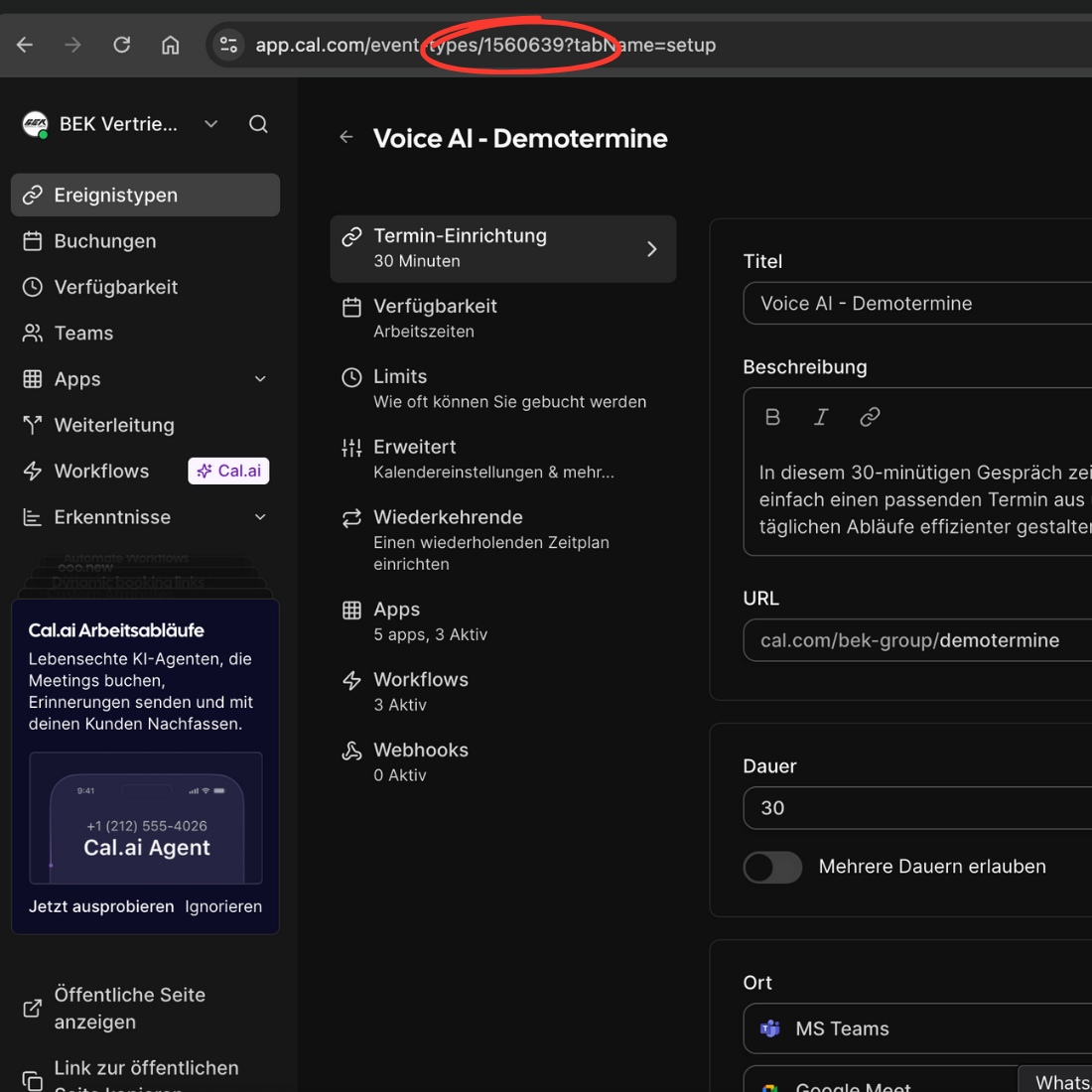
3. Copy the event ID by clicking on the event type and copying this number from the URL
 4. Create an API key on Cal.com
## Add the tool to your assistant
Add this tool to your assistant and pass the event ID and API key.
Related pages: [Introduction](/en/automation-platform/introduction) and [Building Flows](/en/automation-platform/building-flows), and [Debugging Runs](/en/automation-platform/debugging-runs).
4. Create an API key on Cal.com
## Add the tool to your assistant
Add this tool to your assistant and pass the event ID and API key.
Related pages: [Introduction](/en/automation-platform/introduction) and [Building Flows](/en/automation-platform/building-flows), and [Debugging Runs](/en/automation-platform/debugging-runs).