> ## Documentation Index
> Fetch the complete documentation index at: https://docs.famulor.io/llms.txt
> Use this file to discover all available pages before exploring further.
# Outbound limits
> How Famulor’s daily outbound limit works, what stays unlimited, and how to ask for a higher limit.
**Done for you — any region, any country (our EU partner carrier)**
If you prefer not to configure a SIP trunk or import numbers yourself, our **EU partner carrier** can supply **local numbers in any region and any country**, set up the **SIP trunk**, and **import the connection into Famulor** for you. Provisioning runs **end-to-end through the partner** (carrier-side), so you skip DIY trunk and number import in Famulor.
* **Custom number region / full-service onboarding:** [Famulor Custom Number Region form](https://tally.so/r/w4bN2Y)
* **More detail or bespoke options:** [support@famulor.de](mailto:support@famulor.de)
We want everyone to understand limits in plain language—no telecom jargon required.
## The idea in one sentence
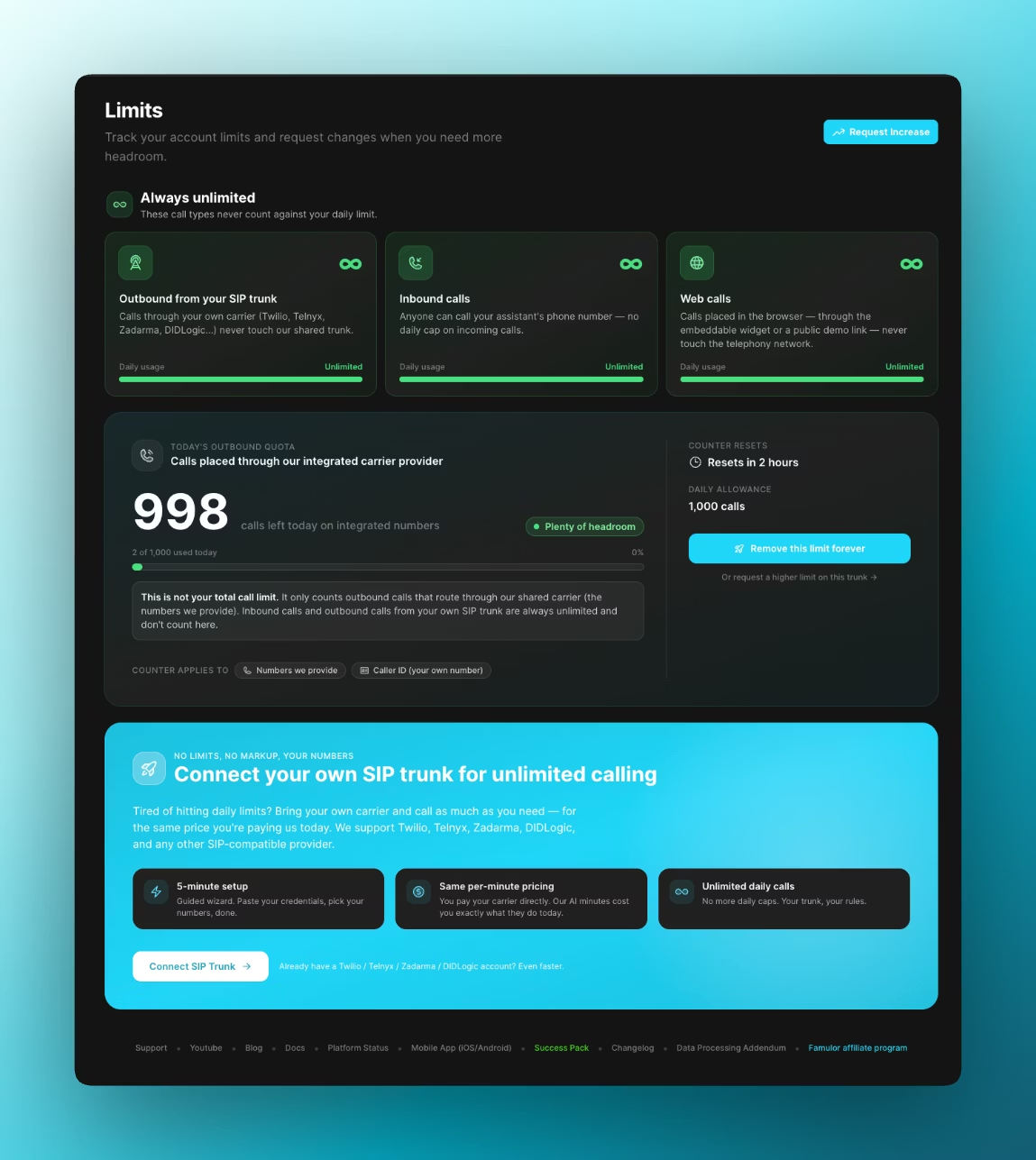
Famulor enforces a **daily outbound quota only for calls that leave through our integrated (shared) carrier**. Traffic on **your own SIP trunk**, **inbound** PSTN traffic, and **browser-based web calls** are **not** subject to that same daily cap.
Your workspace’s live counters and renewal time are under **[Limits](https://app.famulor.de/limits)**.
 ## What the integrated-carrier daily quota is
**Integrated carrier** means: Famulor provisions PSTN connectivity for you (for example a number from us plus routing over our built-in provider). For that path, outbound calls draw from a **shared daily pool** per workspace so the platform stays fair and predictable.
* **Allowance** — the maximum number of those integrated outbound calls in the current period (often around **1,000 per day**; your workspace may differ).
* **Usage** — how many of those calls you have already placed in the period; **remaining** is allowance minus usage.
* **Renewal** — the quota rolls forward on a **rolling \~24 hour** basis; the moment of renewal is per account and is the one Famulor applies for enforcement.
**What counts toward the quota**
* Outbound calls from **numbers supplied by Famulor** on the integrated path.
* Outbound calls where **your own number appears as caller ID**, when that setup still goes out through the **integrated** carrier (you are using our trunk while presenting your CLI).
**What does not count**
Anything that does **not** use that integrated outbound trunk for PSTN—see the next section.
## What stays outside the daily outbound quota
These categories are **not** limited by Famulor’s integrated daily outbound cap:
* **Inbound PSTN calls** — calls **to** your assistant’s number are not debited against integrated outbound allowance.
* **Outbound via your SIP trunk** — signaling and media go to **your** carrier (Twilio, Telnyx, Zadarma, DIDLogic, etc.). Famulor does not apply its integrated **per-day outbound** cap there; your carrier’s own limits and billing apply.
* **Web calls** — sessions started in the **browser** (embeddable widget or public demo) use a different access pattern than “dial out over our integrated PSTN trunk,” so they are **not** tallied like integrated outbound for this quota.
## Need more outbound capacity? Send a request
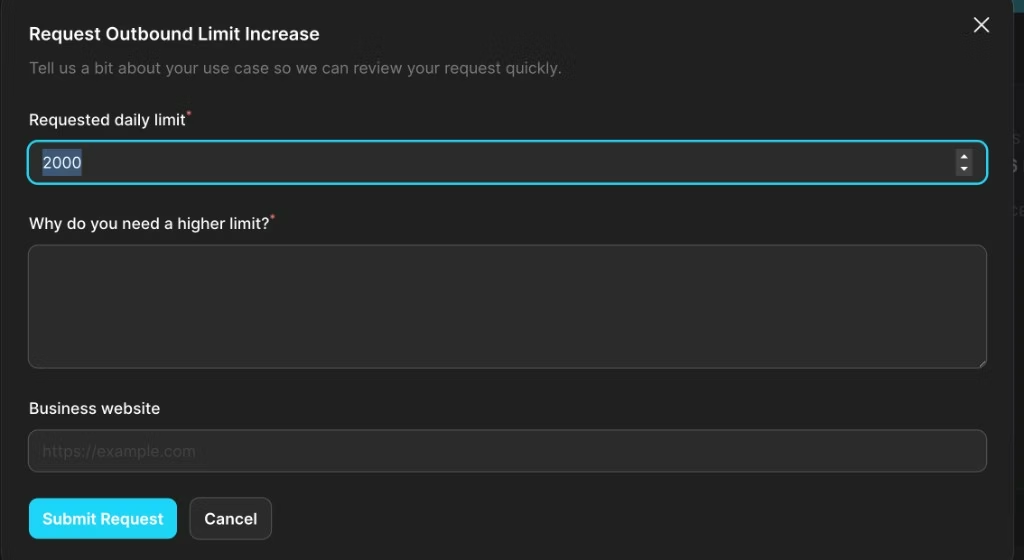
Yes. If your volume grows and you need a **higher daily limit** on the **integrated** trunk, use **Request increase** in the dashboard (linked from **[Limits](https://app.famulor.de/limits)**). A short form opens—we use your answers to review the change quickly.
You’ll be asked for:
* **Requested daily limit** — the number of outbound calls per day you’re aiming for (required).
* **Why you need a higher limit** — a few sentences about your use case (required). Honest context helps us say yes faster.
* **Business website** — optional, but useful if we want to learn how you use Famulor.
Then choose **Submit request** or **Cancel**.
## What the integrated-carrier daily quota is
**Integrated carrier** means: Famulor provisions PSTN connectivity for you (for example a number from us plus routing over our built-in provider). For that path, outbound calls draw from a **shared daily pool** per workspace so the platform stays fair and predictable.
* **Allowance** — the maximum number of those integrated outbound calls in the current period (often around **1,000 per day**; your workspace may differ).
* **Usage** — how many of those calls you have already placed in the period; **remaining** is allowance minus usage.
* **Renewal** — the quota rolls forward on a **rolling \~24 hour** basis; the moment of renewal is per account and is the one Famulor applies for enforcement.
**What counts toward the quota**
* Outbound calls from **numbers supplied by Famulor** on the integrated path.
* Outbound calls where **your own number appears as caller ID**, when that setup still goes out through the **integrated** carrier (you are using our trunk while presenting your CLI).
**What does not count**
Anything that does **not** use that integrated outbound trunk for PSTN—see the next section.
## What stays outside the daily outbound quota
These categories are **not** limited by Famulor’s integrated daily outbound cap:
* **Inbound PSTN calls** — calls **to** your assistant’s number are not debited against integrated outbound allowance.
* **Outbound via your SIP trunk** — signaling and media go to **your** carrier (Twilio, Telnyx, Zadarma, DIDLogic, etc.). Famulor does not apply its integrated **per-day outbound** cap there; your carrier’s own limits and billing apply.
* **Web calls** — sessions started in the **browser** (embeddable widget or public demo) use a different access pattern than “dial out over our integrated PSTN trunk,” so they are **not** tallied like integrated outbound for this quota.
## Need more outbound capacity? Send a request
Yes. If your volume grows and you need a **higher daily limit** on the **integrated** trunk, use **Request increase** in the dashboard (linked from **[Limits](https://app.famulor.de/limits)**). A short form opens—we use your answers to review the change quickly.
You’ll be asked for:
* **Requested daily limit** — the number of outbound calls per day you’re aiming for (required).
* **Why you need a higher limit** — a few sentences about your use case (required). Honest context helps us say yes faster.
* **Business website** — optional, but useful if we want to learn how you use Famulor.
Then choose **Submit request** or **Cancel**.
 We review requests manually. If something is unclear, we may reach out through your usual support channel.
## Prefer no daily cap on outbound?
Connecting **your own SIP trunk** means outbound PSTN is originated by **your** carrier. Famulor’s integrated **daily outbound** quota no longer applies to that traffic; you keep the same **per-minute AI** usage model while voice minutes are between you and the carrier. Setup is guided in the product, or start in the docs: [SIP integration](/en/provisioning/sip-ai/sip-integration).
Allowance, usage, and renewal time are **per workspace**. The values under [app.famulor.de/limits](https://app.famulor.de/limits) are what Famulor enforces.
We review requests manually. If something is unclear, we may reach out through your usual support channel.
## Prefer no daily cap on outbound?
Connecting **your own SIP trunk** means outbound PSTN is originated by **your** carrier. Famulor’s integrated **daily outbound** quota no longer applies to that traffic; you keep the same **per-minute AI** usage model while voice minutes are between you and the carrier. Setup is guided in the product, or start in the docs: [SIP integration](/en/provisioning/sip-ai/sip-integration).
Allowance, usage, and renewal time are **per workspace**. The values under [app.famulor.de/limits](https://app.famulor.de/limits) are what Famulor enforces.