

app.famulor.de), kept for reference. It ends on August 16, 2026, the day before Famulor 2.0 launched — everything from the 2.0 launch onward is in the current changelog.Stronger protection on login, signup, and password reset
Login, registration, and password reset now run behind bot protection, so automated attempts are blocked before they ever reach your account — with no extra steps for real users in the normal case.Sign in with Apple & Google One Tap
Two faster ways to get into your account: Sign in with Apple (also available in the mobile app) and Google One Tap for a one-click sign-in on the web.Safer contact merging
Adding a phone number, email, or channel that already belongs to another contact no longer silently merges the two — you’re now offered to open the existing contact instead, so nobody’s data gets mixed up by accident.CRM Sync — now two-way
CRM Sync used to be import-only. You can now choose the direction for every connection:- Inbound — bring CRM contacts into Famulor (as before)
- Outbound — push Famulor contact updates back into your CRM
- Bidirectional — both directions, kept in sync on the same schedule
Famulor is now on your phone
The Famulor mobile app is live on the App Store and Google Play — run your operation from your phone, not just your desk.- Milian, your AI copilot, on mobile — the same rich replies (charts, tables, clarifying questions) you know from the web
- Assistants, Audience, Campaigns, History, and Knowledge — manage the essentials on the go
- Live-call push notifications — know the moment something needs your attention
- Sign in with Apple and social login built in
Choose where your AI runs: Global, EU, or US
Workspaces can now pin backend AI processing to a specific inference region — Global, EU, or US — under workspace settings. Useful if your business or your customers need a data-residency guarantee.White-Label Platform API & MCP toolset
Whitelabel and reseller partners can now manage their entire platform programmatically — accounts, notifications, and more — through a dedicated Platform API v1 and a matching MCP toolset, alongside the existing per-account API and MCP tools.Campaign API: call, WhatsApp & SMS
The Campaigns API is no longer call-only. You can create and run call, WhatsApp, and SMS campaigns from the same endpoints, with shared schedule windows and optional call-to-text fallback.What changed:- Create moved to
POST /user/campaign(singular) and acceptschannel(call|whatsapp|sms) plus channel-specific fields (assistant / WhatsApp template / SMS body). - List and new Get (
GET /user/campaign/{id}) return channel,schedule_windows, text config, and fallback fields. - Start/stop validates channel config (assistant, template, or SMS number), schedule, and balance. Response includes
channel. - Prefer
schedule_windows([{ "start": "HH:MM", "end": "HH:MM" }]) over the legacy single window. Overnight windows are supported whenendis earlier thanstart. - Call campaigns can set
fallback_channel(whatsapp/sms) after max call retries.
Connect AI builds your automations too
Connect AI already let you build and fix assistants by chatting with ChatGPT or Claude. It can now build your automations too — the workflows that run before, during, and after a call.You describe what should happen in plain language. The AI picks the trigger, wires the steps, finds your sheets, campaigns, and numbers by name, runs a real test, and switches the automation on only if it passes. No builder screens, no field names, no IDs to copy.What that looks likeThings you can now ask for, word for word:- “After every call, if the caller was qualified, add a row to my Google Sheet with their name, phone and summary.”
- “If a customer asks to be called back later, call them back at the time they asked for.”
- “Give me a link my website form can post leads to, and call every new lead automatically.”
- “During a call, let the assistant look up an order number in my system and read the status back to the caller.”
- “Let callers cancel or reschedule their appointment while they’re on the phone.”
- “Before the assistant offers a discount, text my supervisor and only continue once they approve.”
- Save qualified leads to a spreadsheet, or log every call to your CRM
- Call the customer back at the exact time they asked for
- Hot lead alerts, SMS or WhatsApp follow-ups, and transcript emails after a call
- Call new leads automatically from a web form, ad platform, or spreadsheet
- Confirm or remind before a booking, and cancel or reschedule mid-call
- Recognise returning callers and greet them by name
- Ask a human for approval before the assistant does something sensitive
- A real test run, not a preview — the automation is executed end to end with a realistic sample of your own data. Only a green run gets attached to your assistant.
- You approve anything that really sends — if the test would send a message, place a call, or send an email for real, you’re told first and asked to confirm — using your own number or address.
- Safe repairs — if a change to a live automation fails its test, the previous working version is restored automatically so the automation keeps running. You can roll back any change yourself too.
- No silent overwrites — an assistant that already has an automation for the same event won’t get it quietly replaced.
- Available on your API too — if you’d rather build from your own code than by chatting, the same create, test, update, roll back, and run history operations are exposed as endpoints.
- Where to find it — open Connect AI from the top bar to link your account, then just ask. Everything the AI builds also appears on your Automate page, where you can open and edit it visually at any time.
Facebook Messenger and Instagram messages
Your assistant can now answer people who write to you on Facebook Messenger and Instagram, the same way it already handles WhatsApp and web chat.- Connect in a few clicks — link your Facebook Page or Instagram account, pick the assistant that should reply, and you’re live.
- Everything in one inbox — Messenger and Instagram conversations land in the same inbox as your other channels. You can read the full thread, jump in yourself, and take over from the assistant at any point.
- Open in Meta — one click takes you straight to the original conversation on Facebook or Instagram when you need to handle something there.
- Connection health at a glance — each connection shows its current status, and reconnecting after a password or permission change is a single button.
Two-factor authentication and a real Security Center
Your account now has proper protection against someone getting in with just a stolen password.- Two-factor authentication — turn on a second step at login using an authenticator app, or get a one-time code by email if you’d rather not install anything.
- Trusted devices — mark the computer you use every day as trusted so you’re not asked for a code on every login. Remove a device any time and it starts asking again.
- Active sessions — see every browser and device currently signed in to your account, with location and last activity, and sign any of them out with one click.
- Security activity — a running log of logins, password changes, and security settings changes, so you can spot anything you don’t recognise.
- Identity confirmation — sensitive actions now ask you to confirm it’s really you before going through.
Campaigns now send text messages too
Campaigns are no longer calls only. You can now run the same lead lists through SMS and WhatsApp.- Pick a channel — when you create a campaign, choose whether it places calls, sends WhatsApp messages, or sends SMS.
- Schedule it in advance — set a start date and time and the campaign switches itself on when the moment arrives. No need to be at your desk.
- Track every message — sent messages and replies show up on the campaign and on each lead, so you can see exactly what went out and what came back.
- Better date and time picker — choosing when a campaign runs is now clearer and harder to get wrong.
New Channels hub
All your messaging channels now live in one place. Voice, WhatsApp, SMS, web chat, Messenger, and Instagram are grouped under a single Channels page, each with its own color and status, so connecting a new one or checking what’s already active takes seconds instead of hunting through menus.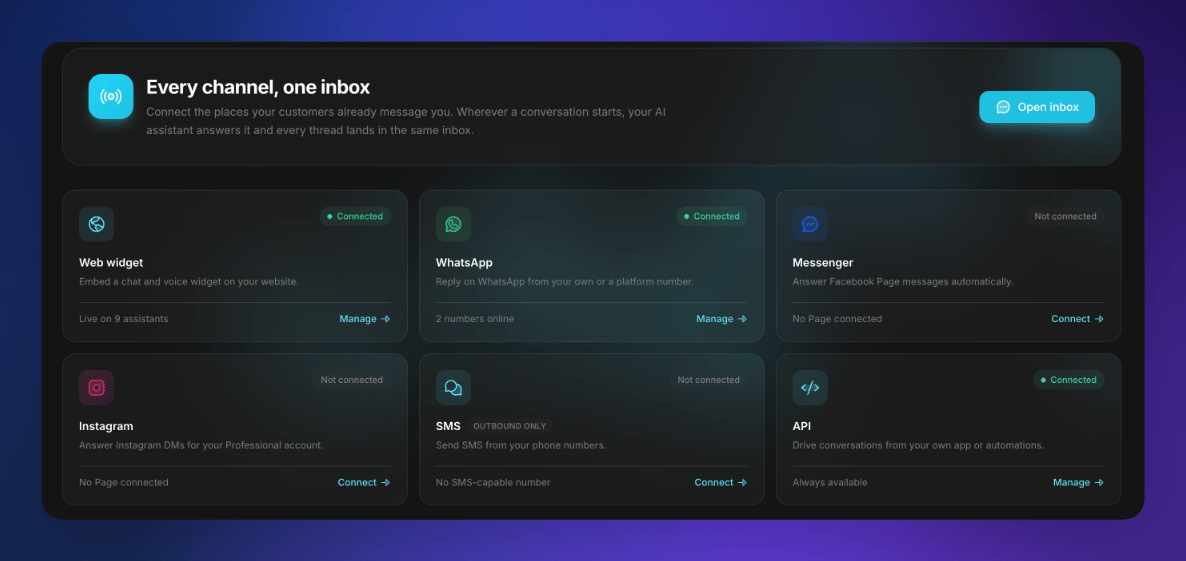
Channels hub — every channel, one inbox: web widget, WhatsApp, Messenger, Instagram, SMS, and API
New conversation model options
Your assistants can now run on a new generation of conversation model — the AI that understands each request and decides how your assistant responds. Expect sharper reasoning, better instruction-following, and more natural handling of longer, multi-step conversations.Available in two variants, both live now in pipeline mode. Pick either one from the model list when you create or edit an assistant.Allow interruptions — now in every conversation mode
The Allow interruptions setting now works in every conversation mode, not just Pipeline.Until now, speech-to-speech and Dualplex (today: Half-Cascade) assistants were always interruptible: if the caller made any noise while the assistant was talking, it would stop mid-sentence. You can now switch interruptions off in those modes too, so the assistant finishes what it’s saying without being cut short by background noise, TV sound, or someone talking in the room.Where to find it: Assistant settings → Allow interruptions? toggle. Leave it on for natural back-and-forth conversations. Turn it off when the assistant has to deliver something in full — like disclaimers, confirmations, opening hours, or a list of options.New voice model options
Your speech-to-speech and Dualplex assistants can now run on a new generation of voice model. The standard option follows your prompt more reliably and sounds more natural on names, numbers, and interruptions; a lighter, faster variant is available for high-volume or simpler assistants.Both are live now. Pick either one from the model list in any speech-to-speech or Dualplex assistant.Send media on WhatsApp
You can now send images, audio, video, and documents in your WhatsApp messages, not just text. Add a caption or filename and send straight from the inbox or the API.Your whole AI calling stack — in ChatGPT and Claude
This is a big one. You can now connect your Famulor account to ChatGPT and Claude and run your entire AI calling setup just by chatting — no dashboards, no setup screens. Tell the AI what you want in plain language and it does the work for you, from start to finish.What you can do once it’s connected- Build a new assistant from scratch — describe what you need (“an assistant that books appointments”) and the AI creates it for you: it writes the prompt, picks a natural voice, sets a greeting, and even adds the tools the assistant needs — like checking a calendar and booking slots.
- Fix and improve an existing assistant — ask it to review an assistant’s prompt and settings. It points out what’s weak and applies the fixes for you.
- Analyze your calls — “Look at my last call and tell me what went wrong.” It reads the full transcript and the call evaluation, explains what to improve, then updates the assistant to match.
- Learn from your history — ask it to study your last 30 calls, spot patterns, and tune your assistant so it performs better next time.
- Launch calling campaigns — it walks you through setting up an outbound campaign from your leads and starts it for you.
- Handle the day-to-day — manage phone numbers, leads, and knowledge bases, or send a message — all from the same chat.
- Open the new Connect AI button in your dashboard and copy your secure connection link.
- In ChatGPT or Claude, go to connector settings and choose Add custom connector, then paste the link. A built-in, step-by-step guide with screenshots walks you through both apps.
- Sign in to your account and approve. Your tools appear in the AI app — you’re connected.
Reliability & fixes
- Smoother call transfers — more reliable transfers between assistants, including when an assistant hands off to book a meeting.
- Faster chat under load — increased capacity for handling chat conversations during busy periods.
- Independent dashboard tables — dashboard tables now load and scroll independently for a snappier experience on busy accounts.
Famulor MCP Client — fully overhauled
The Famulor MCP server was rebuilt from the ground up: all 76 tools were redesigned — clearer descriptions, structured outputs, and better compatibility with directory-capable clients. Control assistants, calls, campaigns, leads, knowledge bases, conversations, WhatsApp, and more directly from your AI client — in plain language.OAuth instead of API keys in config filesNew: MCP OAuth 2.1 (PKCE). Paste the server URL, complete OAuth sign-in in the browser, enter your API key — done. Your key never goes intomcp.json or environment variables; it lives encrypted inside an access token on your device. Tokens expire after 30 days; your client will prompt you to sign in again.Connect to ChatGPT, Claude, Cursor & moreFamulor now plugs cleanly into the MCP clients you already use:- ChatGPT — as a custom app with OAuth (Developer mode)
- Claude — Desktop connector and Claude Code (CLI)
- Cursor, Windsurf, VS Code, Cline, Continue, Zed — and any other MCP-compatible client
- Codex and other clients with HTTP MCP support
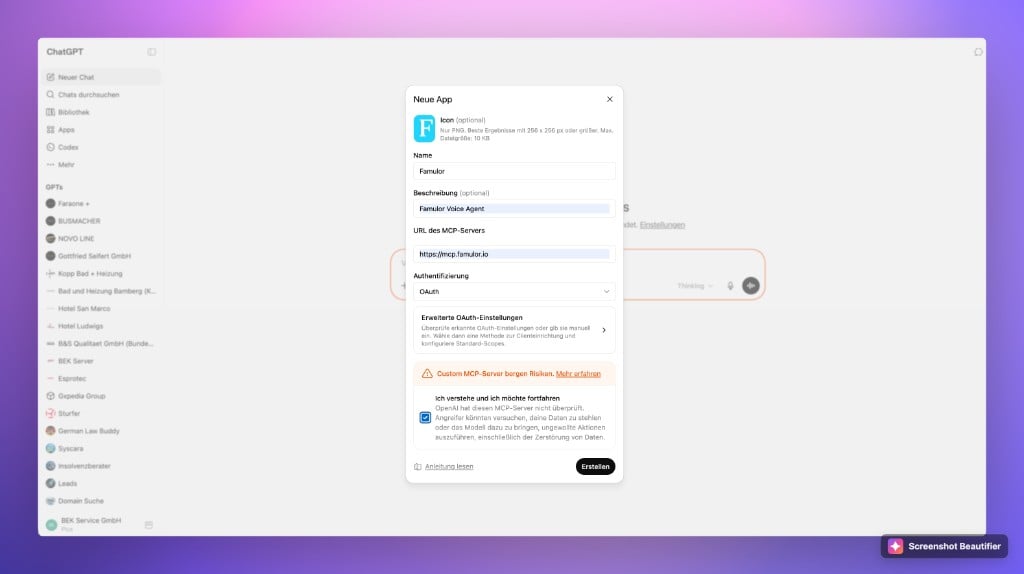
Add Famulor as an MCP app in ChatGPT with OAuth
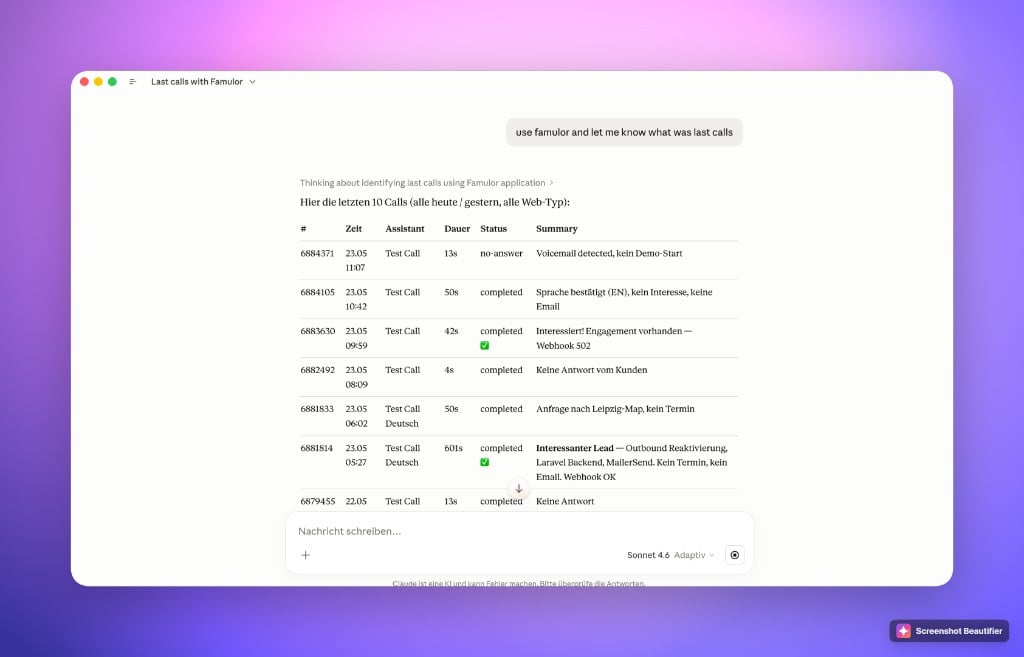
Claude using the Famulor MCP server to list recent calls
- “Show my last 10 calls”
- “Create a German sales assistant using a fast, low-cost model and the Susi voice”
- “Start campaign #42 and add these 50 leads”
Connect external tools with MCP
Your assistant can now plug into outside tools and live data through MCP (Model Context Protocol) — the open standard for connecting AI to external systems. Instead of building tools one at a time, you connect a whole toolset in a single step. Point your assistant at a compatible server (a CRM, your internal APIs, a knowledge tool) and it can look things up and take action right in the middle of a conversation — on voice calls, the web widget, and chat alike.- Add a server in minutes, no code — paste the server address and (if needed) an authentication header. Nothing to install, nothing to build
- Tools discovered automatically — the moment you connect, every tool the server offers is detected and listed with its description and parameters, so you see exactly what your assistant can do
- Pick precisely what’s exposed — turn individual tools on or off per server, so an assistant only gets the abilities you want it to have
- Connect once, reuse everywhere — assign one server to a single assistant or to many, and manage them all from a dedicated page
- Always know the status — each server shows a live “connected” indicator, lists its available tools, and gives a clear message (with a one-click re-test) if anything needs attention
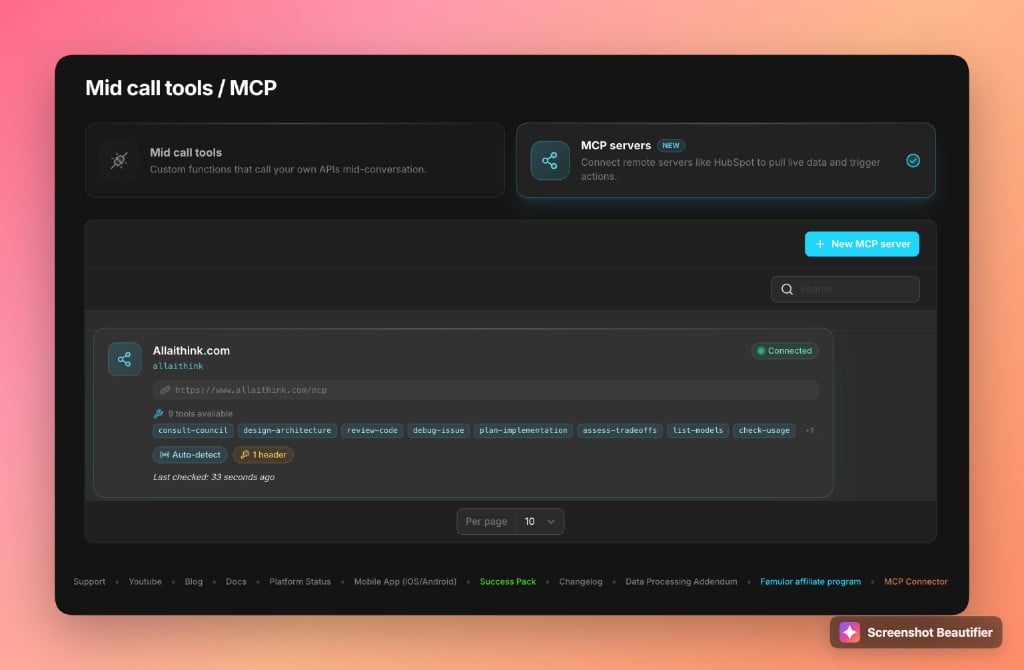
MCP servers page — connect external tool servers to your assistant
Redesigned mid-call tools — easier to build, easier to understand
The tools that let your assistant do things during a conversation — look up an order, send an SMS, book an appointment, check availability, submit a form — got a full redesign. The whole experience is built so anyone can set up a working action, even with no technical background and no coding.- Visual flow card — a new step-by-step layout shows exactly how an action works, from the information the assistant collects to the response it gets back, all in one clear view
- “How it works” guidance built in — plain-language explanations sit right next to each setting, so you always understand what an action does and when your assistant will reach for it
- System variables at your fingertips — drop in live details like the caller’s phone number or the current date and time straight into your action, with a handy reference so you never have to guess the right name
- One home for everything — custom actions and connected MCP servers now live together on a single, redesigned Tools page that’s far easier to work with
Build call actions with no-code automations
This is the big one. You no longer need an API or a developer to give your assistant a custom action. When you create an action, choose the Automation Platform option — and the platform builds the entire technical connection for you.- The connection is created automatically — pick “Automation Platform” and a linked automation is generated and wired up instantly. The web address that connects it to your assistant is set and locked behind the scenes — no IDs to copy, paste, or keep in sync
- Build the logic visually — open the linked automation and drag together whatever steps you need: look up a record, check a calendar, send a message, run several actions in a row. Finish with a “Return Response” step to hand the result back to the assistant on the call
- Multi-step workflows made simple — anything that used to require custom code — chaining several systems together, transforming data, conditional logic — can now be assembled with no code at all
- Smart linking for existing automations — paste in an automation you’ve already built and the platform recognizes the workflow on its own and pulls in its details automatically, so connecting it takes seconds
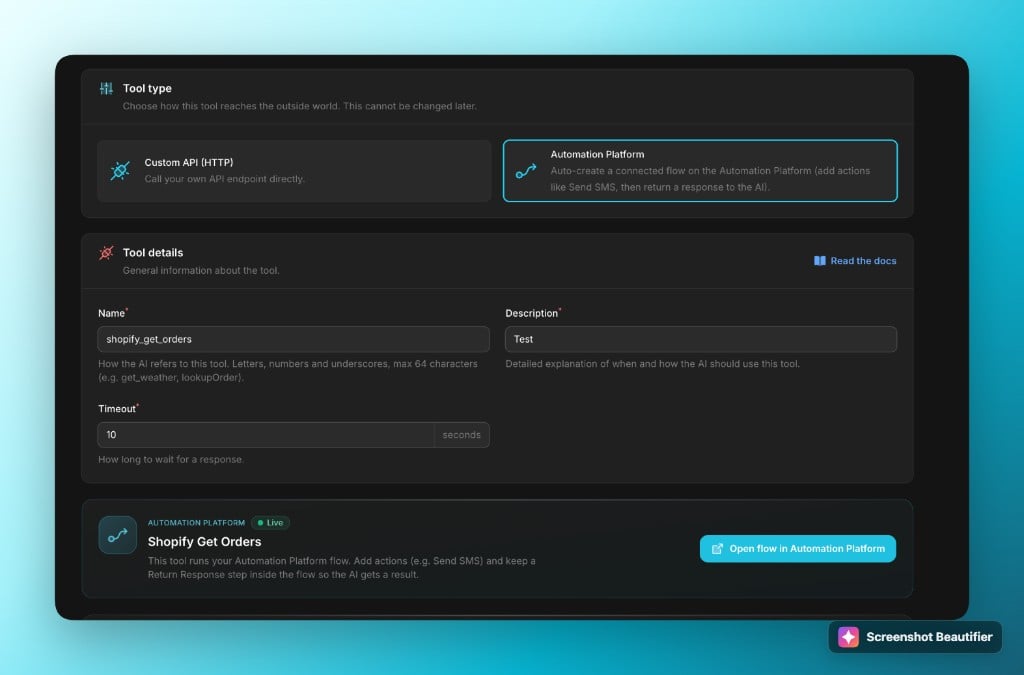
Mid-call tool with Automation Platform — the linked flow is created automatically
Voice & call reliability
- Cleaner call endings — fixed a case where the assistant could repeat itself or hesitate when wrapping up a call
- Voice picker polish — follow-up fixes to the new voice picker for smoother selecting
Assistant folders & labels — organize your workspace
If you manage more than a handful of assistants, finding the right one just got much easier. You can now organize assistants into folders and tag them with color-coded labels.- Folder tabs — the assistants list shows tabs for each folder (plus an “All” view), with a searchable dropdown when you have many folders
- Labels for cross-cutting tags — each assistant can carry multiple labels (for example “Production”, “Testing”, “Client X”), shown as badges on assistant cards and filterable from the list
- Bulk actions — select multiple assistants and move them to a folder or add/remove labels in one go
- Create on the fly — new folders and labels can be created right from the assistants page, no detour through settings
- Full API support — folders and labels can be managed via the API, and assistants can be assigned on create or update
New voice picker — find the perfect voice in seconds
The voice dropdown is gone. Choosing a voice now opens a full picker built for browsing hundreds of options without scrolling through an endless list.- Filter by gender, age, and accent — narrow the catalog to exactly the kind of voice you’re looking for, with free-text search on top
- Provider tabs — voices are grouped by speech engine, and each card shows a provider badge so you always know what you’re selecting
- Language-aware — the picker follows your assistant’s language and warns you before selecting a voice that doesn’t support it
- Clone voices in place — voice cloning now lives inside the picker, and deleting a cloned voice uses a proper styled confirmation
- Smarter syncing — selecting a voice automatically sets the matching speech engine on the assistant, so there’s nothing to configure twice
Phone number nicknames
Phone numbers can now have a nickname and a color, so “the support line” stops being “+1 555 0182 — which one was that again?”- Visible everywhere — nicknames show up in the phone numbers list, assistant cards, call details, SMS history, and every place you select a number (assistant setup, warm transfers, campaign pools)
- Searchable selectors — find a number by its nickname or by the number itself
- API support — nicknames are included in all phone number responses and can be set via the API, including for SIP trunks
WhatsApp coexistence — automatic human takeover
Coexistence mode gets its biggest quality-of-life upgrade yet: when someone on your team replies to a customer directly from the WhatsApp Business app, the AI now detects it and automatically steps aside for that conversation.- No more talking over each other — the moment a human takes over from the phone, the AI stops responding in that chat
- Clear audit trail — a system note appears in the conversation explaining why the AI paused, so everyone knows what happened
- Voice notes & images fixed — audio messages and images from customers now come through reliably in coexistence mode
- No charges for synced history — when you connect an existing WhatsApp account, old conversations that stream in during setup are never billed
Webhook & integration upgrades
The conversation ended webhook got a major upgrade for anyone building automations on top of chat conversations.- Media attachments included — images, audio, and files exchanged in the conversation are now part of the webhook payload
- Conversation ID & timestamps — the payload now carries the conversation ID and per-message timestamps (human-readable and unix), so transcripts can be reconstructed precisely
- Re-send with one click — every conversation now has a “Re-send webhook” action, and the delivery result (status and response) is stored so you can see exactly what your endpoint received
- Bulk actions — re-evaluate or re-send webhooks for many conversations at once, straight from the conversations list
Other improvements & fixes
- No more technical data read out loud — in rare cases the AI could speak fragments of raw technical output mid-call when using tools; this is now stripped from both speech and transcripts
- Day separators in conversations — long chat histories now show date dividers, making it much easier to scan past conversations
- Chat widget button fix — the small launcher button no longer appears clipped on some sites
- Webhook reliability — fixed a timing issue that could cause the conversation ended webhook to silently skip for some WhatsApp chats
- Template sender display — WhatsApp templates now show their sender more clearly in the templates list
Whitelabel platform — major update
The Whitelabel platform gets a broad refresh: more flexible assistants, stronger login branding, new languages, and finer-grained access control — all in one release for your customers.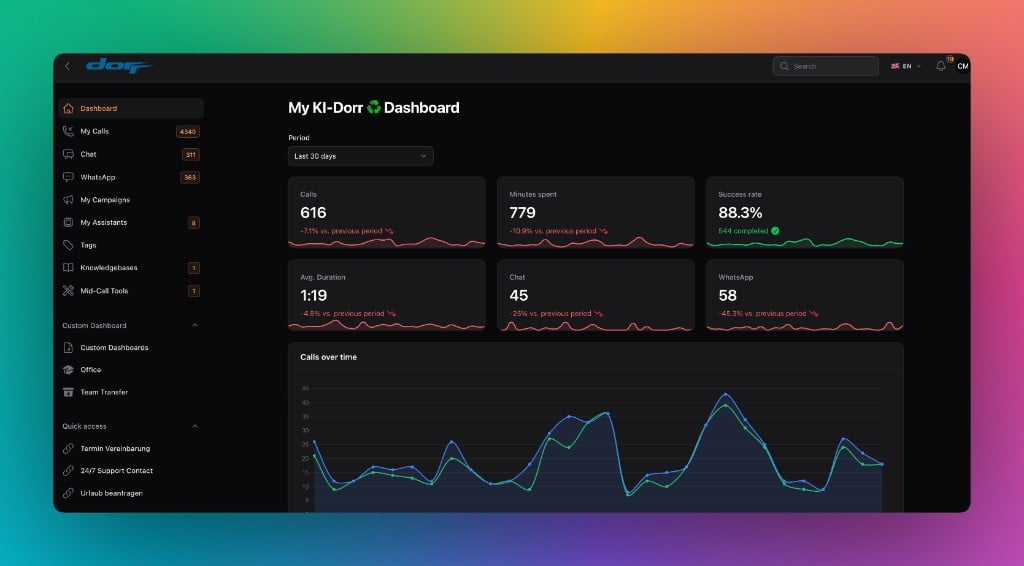
Whitelabel dashboard with custom dashboard and expanded navigation
Add & edit assistants — refreshed
Creating and editing assistants has been fully reworked. Clearer forms, faster navigation, and a more consistent setup flow — fewer clicks from first draft to live assistant.Login page — more branding
The login page now supports deeper customization:- Custom image — upload your logo or hero graphic
- Custom text — write your own welcome message and hints
Logout redirect URL — control where users land
New: a logout redirect URL. When set, users are redirected there after logging out — for example your marketing site. Leave it empty to return users to the login page.Eight languages supported
The Whitelabel platform is now available in eight languages: DE, EN, FR, NL, ES, HR, EL, DA.Teams and end users can work in their language — no workarounds needed.Tags — more colors
Tags got a color upgrade. A wider palette, better distinction in lists, and faster scanning across calls, chats, and WhatsApp.Knowledgebases — update fix
A bug when updating knowledgebases has been fixed. Documents and content can be edited and saved reliably again.Mid-call tools — test with parameters
You can now test mid-call tools with test parameters — no live call required. Validate configuration, run through payloads, and catch issues before the assistant goes live.Custom dashboard — now in Whitelabel
Custom dashboards are available on the Whitelabel platform. Build tailored views with the metrics that matter to your customers — directly in the sidebar under Custom Dashboards.Access control — admin manages every user
Admins can now set per-user access to sections and features. Fine-grained permissions instead of one-size-fits-all access — ideal for teams with different roles and tenants.WhatsApp Coexistence — keep the Business app on your phone
You can now connect a WhatsApp sender in Coexistence mode. Your team keeps using the official WhatsApp Business app on their phones — your AI assistant runs on Famulor in parallel.Chats, contacts, and labels stay where they are. No migration, no re-training the team.Pick Coexistence with WhatsApp Business app when creating a sender — no phone number entry required.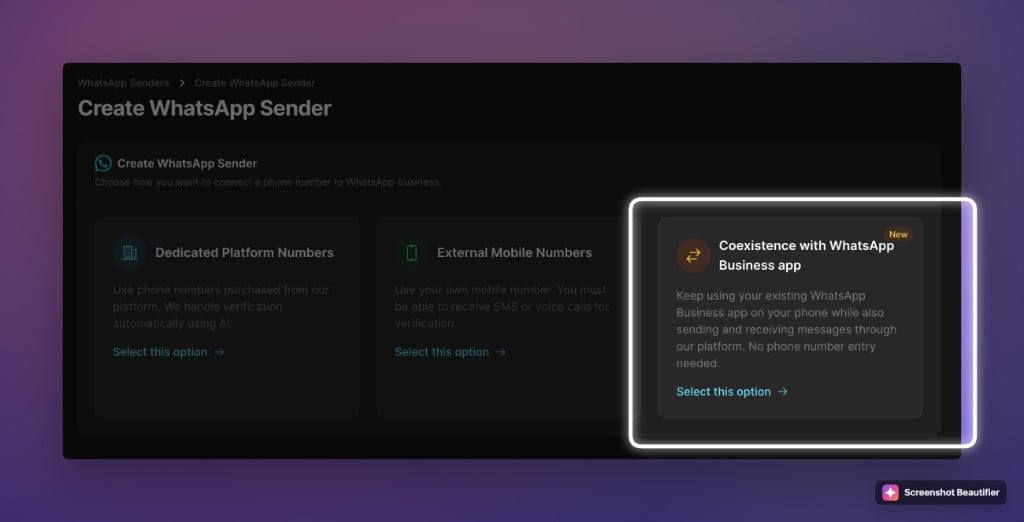
Create WhatsApp sender — Coexistence with WhatsApp Business app option
Response delay for WhatsApp — wait for the full message
Customers rarely send one clean message. It’s three quick texts, a photo, then a question. Until now, the assistant replied to each piece separately.With response delay (0–300 seconds), the assistant waits before replying so the full thought lands in one turn.- Per assistant — set the delay in the assistant form; leave at 0 for instant replies
Outbound limits — clear view, fair rules
Shared platform numbers follow carrier daily limits. The new Limits page in the user menu (next to My profile) shows your allowance, today’s usage, and your trust tier.- Inbound & SIP trunk — not counted against the daily outbound cap
- Request an increase — workflow on the page; verified accounts can move up tiers
- Your own carrier — banner links to BYO Telephony for unlimited outbound on your trunk
- Campaigns — hit the cap today, resume automatically tomorrow
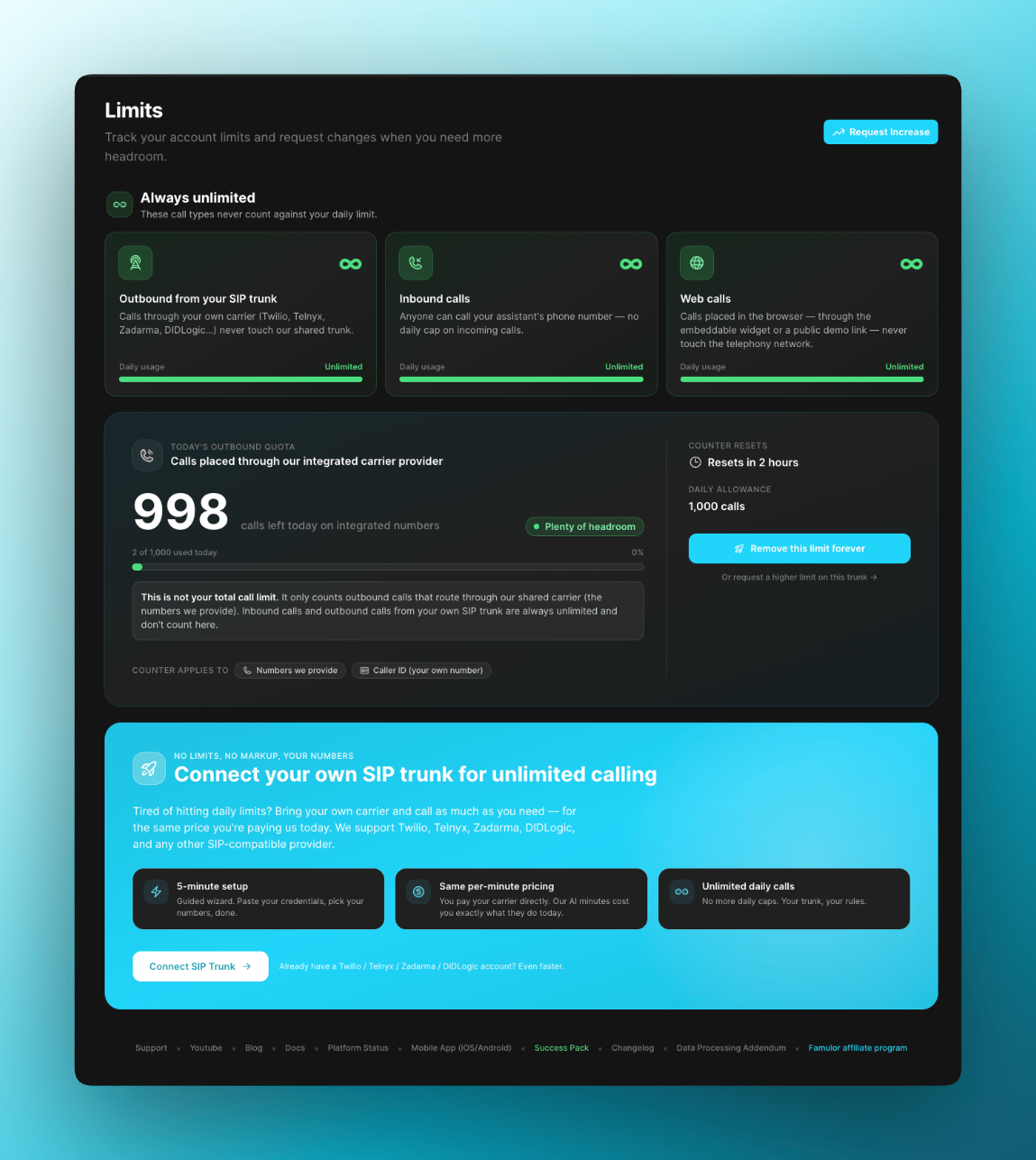
Outbound call limits overview in Famulor
Voice engine upgrade — smoother calls everywhere
The core voice engine has been upgraded. Expect smoother audio, fewer mid-call drops, and faster turn-taking — across every voice mode.Other improvements & fixes
- Delete campaigns via API — new
DELETE /user/campaign/{id}endpoint; running campaigns stop automatically before deletion - Assistant transfer over API —
assistant_transfernow persists when configured via the assistant API; self-transfers are blocked - Mid-call tool test — test tool configs during a live call without leaving the assistant setup
A new voice model — better prompt following
Speech-to-speech and Dualplex mode now include a new voice model. The biggest gain: far more reliable prompt following. Your assistant stays on script, follows instructions more consistently, and handles complex multi-step conversations without drifting.Combined with Famulor’s Dualplex technology, this delivers high voice quality, low latency, and reliable instruction following.Voice engine upgrade
The voice engine received a quality upgrade. Expect noticeably more natural voices, better stability on long calls, and stronger consistency on tricky words and names.This upgrade is applied automatically to every assistant using the affected voices — no configuration changes required.A new conversation model — now available in pipeline mode
You can now select a new conversation model for assistants in pipeline mode. It is a strong all-rounder: fast responses, solid reasoning, and excellent prompt following — ideal when you want both speed and intelligence without flagship-model cost.Available right now in your assistant’s pipeline mode configuration.Bring Your Own Telephony — self-service carrier imports
You can now connect your own carrier accounts through a guided import wizard — no support ticket and no manual SIP setup.- Twilio SIP trunks — full self-service import plus a step-by-step onboarding help panel
- Telnyx support — connect Telnyx accounts through the same wizard experience
- Zadarma & DIDLogic — two additional carriers in the picker for more regional and pricing flexibility
Post-call re-transcription for Dualplex & multimodal calls
You can now automatically re-transcribe completed calls from the original recording at any time. This is useful when you want to re-run transcription with the most capable speech-to-text model.Re-transcription is available for both Dualplex and multimodal assistants, with clear billing transparency directly in the assistant view.Split-view detail panels — calls & conversations
The calls and conversations list pages now include side-by-side detail panels. Click any record on the left and see full details on the right — no more back-and-forth navigation.- Performance indexes added — significantly faster record-to-record navigation, even on very high-volume accounts
- Extracted variables section — conversation variables are now shown in a dedicated section in conversation details
Disable & enable AI per conversation
Two new API endpoints let you programmatically pause and resume AI for a specific conversation — ideal for human handoff workflows across WhatsApp and chat.When AI is disabled, your team can take over. Re-enable AI whenever you’re ready to hand control back.Auto top-up for chat credits
Chat credits can now refill automatically when balances run low, with email notifications sent for every refill.That means fewer interrupted chat experiences caused by depleted balances overnight.Telephony & call flow improvements
- Initial message on AI-to-AI transfers — the destination AI assistant now speaks its initial message immediately for smoother handoffs
- Transfer caller details visible — transfer destination and client phone numbers are now shown on transfer calls in the call view
- Single-character tool parameter names — tool parameters now support one-character names, useful for compact JSON schemas
Other improvements & fixes
- WhatsApp pre-verified number deletion — deleting pre-verified WhatsApp numbers now works correctly
- Phone number deletion reliability — deletion jobs now run reliably with proper failure logging
Bring Your Own Carrier (BYOC): direct Twilio and Telnyx integration
You can now use Bring Your Own Carrier (BYOC) in Famulor with direct integrations for Twilio and Telnyx. Connect your existing carrier credentials and configure numbers directly in your setup.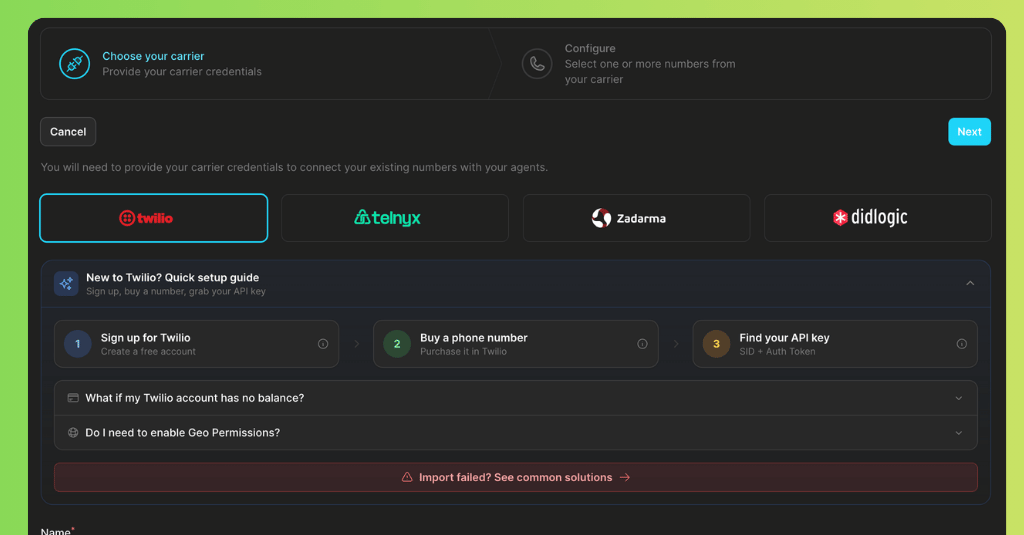
BYOC carrier selection with Twilio and Telnyx in Famulor
Re-transcribe recording: higher-accuracy transcripts after calls
You can now run Re-transcribe recording after a call to generate a higher-accuracy transcript from an upgraded speech-to-text model.- This run is billed at 1.5x minutes
- Available now for Dualplex and S2S models
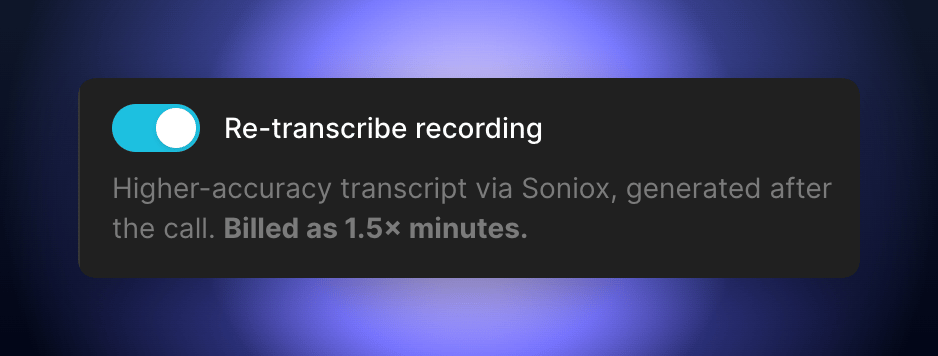
Re-transcribe recording toggle, with billing note
Default Dashboard: set your custom dashboard as login default
You can now set a custom dashboard as your default Famulor dashboard. After login, you will land directly on your own dashboard. You can change this anytime under My Account.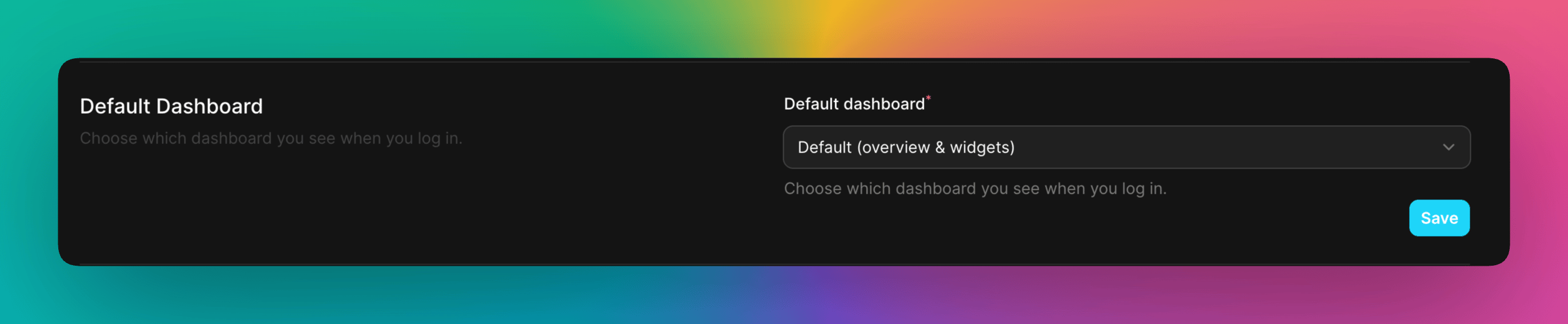
Default dashboard selection in account settings
Whitelabel platform: Analytics Webhook expanded
A dedicated Analytics Webhook section in Whitelabel settings, with flexible scheduling, configurable scopes, and direct send controls.New additions- New Analytics Webhook section in settings
- Toggle activation: Enable Analytics Webhook
- Configurable fields: Webhook URL, Frequency (Weekly / Monthly), Weekday (for weekly), Day of month (for monthly), Time, Report mode (Last X days / Current calendar month), Report period in days (only for Last X days), Assistant scope (all / selected), User scope (all / selected)
- “Send Analytics Webhook now” button moved directly into the section (no longer in the global footer)
- Field order optimized: Report mode now appears before Report period
- New monthly Day of month options: first day of month, last day of month, specific days (2–31)
- Added info hints for key fields (frequency, day, time, report mode/period, scopes)
SIP Trunks API endpoints are now live
New SIP Trunks API endpoints, with a dedicated SIP Trunks group in the API Reference covering complete request/response examples and cross-links.New live endpoints:- List SIP trunks —
GET /api/user/phone-numbers/sip-trunks - Get SIP trunk —
GET /api/user/phone-numbers/sip-trunks/{id} - Create SIP trunk —
POST /api/user/phone-numbers/sip-trunks - Update SIP trunk —
PUT /api/user/phone-numbers/sip-trunks/{id} - Delete SIP trunk —
DELETE /api/user/phone-numbers/{id}
A new speech-to-speech voice model
You can now run voice calls using a new speech-to-speech voice model. This gives you another top-tier real-time voice option with excellent multilingual support and fast response times.A faster realtime voice model — now with Dualplex
The realtime voice model got a major update and now fully supports Dualplex mode — Famulor’s technology for natural-sounding AI phone calls. You get a newer real-time model combined with better interruption handling, smoother turn-taking, and lower perceived latency.Per-turn latency metrics
Every conversation now tracks detailed latency metrics for each turn — how long the assistant took to respond, broken down by processing step. Use this to spot slow turns, compare model performance, and fine-tune your setup for the fastest possible calls.Custom dashboard widgets
Build your own dashboard with customizable stat widgets. Choose what data to display, apply percentage calculations, filter by time of day, and format with prefixes, suffixes, and abbreviations — all without writing code.Other improvements
- Cleaner transcripts — control tokens and SSML tags are now automatically stripped from call transcripts for a cleaner read, with an optional toggle to show them for debugging.
- Better transcription for WhatsApp voice notes — WhatsApp audio message transcription now uses an upgraded speech-to-text model for better accuracy.
- Widget auto-open fix — reliability improvement for dashboard widgets.
Mid-call transfer to another AI assistant — seamless handoff
Your AI voice agent can now transfer a live call to a different AI assistant mid-conversation, with zero interruption. The target assistant takes over with its own voice, language model, and transcription provider, so each step of the call gets the right specialist.- Seamless mid-call handoff — the caller stays on the line while the conversation transfers to another AI assistant with full context.
- Full provider swap — each assistant can use its own voice, language model, and transcription engine, set independently per assistant.
- Rich assistant selector — pick the target assistant from a dropdown showing avatar, language, voice, and mode at a glance.
- Works with the Flow Builder — add assistant transfers as actions in your visual call flows alongside warm transfers, DTMF, and keypad collection.
- Plus proven use cases — GDPR fallback flows when a caller declines recording, language routing to dedicated assistants, and scalable assistant teams with structured handoffs.
Warm call transfers — variable injection
Warm transfers are smarter: when your AI transfers a call to a human supervisor, it can inject call variables — like the caller’s name, reason for calling, or qualification score — into the briefing. The supervisor picks up already knowing who’s on the line and why.Two new conversation models — lighter and faster
Two new conversation model options are available for your assistants:- A lighter model — faster responses at lower cost, ideal for simple call flows like appointment booking and FAQ handling.
- The fastest option — for high-volume, low-complexity calls where speed matters most.
Flow builder improvements
- New action types — warm transfer, assistant transfer, DTMF input, and collect keypad are available as flow actions.
- Smarter action dropdown — shows which tools are configured on your assistant, with warnings for unconfigured ones.
- Edge delete on hover — remove connections between nodes by hovering over the edge and clicking delete.
- Import/export — save flows as files and import them into other assistants or accounts.
- UI fixes — miscellaneous interface improvements.
- Open your assistant and go to Prompt & Tools.
- In Integrated Tools, choose the call-forwarding / assistant transfer tool.
- Select the target assistant.
- Describe clearly when the call should transfer (for example: “If the caller speaks Spanish, forward immediately to the Spanish assistant”).
A new, faster conversation model is now available
A new conversation model landed, and it’s now available in Famulor.You can now select it under Models for your:- WhatsApp assistants
- Phone assistants
- Chat assistants
- Response quality
- Reasoning
- Tool usage
- Reaction speed
AI Agent Coach for assistants — your personal call optimization coach
Your AI assistants now have their own optimization coach. The Famulor AI Agent Coach automatically analyzes your assistant configuration and live call performance, then gives you clear, actionable recommendations to improve call quality — with one-click fixes built in.Open any assistant in Famulor and you will see a smart banner at the top telling you exactly how many settings could be improved. Click “View & fix” to open the full coach panel and review all recommendations in one place.How the AI Agent Coach worksBehind the scenes, the coach runs 41 intelligent rules across all key areas of your voice setup:- Voice parameters (e.g. speaking rate, silence thresholds, endpoint sensitivity)
- Reasoning settings (e.g. temperature, response behavior, interruption logic)
- Call flow & quality (e.g. early hangups, double interruptions, echo risk)
- Recommendations — settings that are not optimal for your use case. Examples: voice speed too fast/slow, temperature too high/low, overly aggressive endpointing, silence timeouts that cut calls short.
- Troubleshoot — guided help when something feels off. If you are experiencing echo, interruptions, the AI not following your prompt, or calls ending too early, simply select the problem in the coach. You will see exactly which settings to adjust and why they matter.
- Best Settings — curated profiles for each voice mode. For Pipeline, Multimodal, and Dualplex, Famulor provides curated “best settings” that have been battle-tested across real-world deployments, including recommended defaults for each mode.
- Apply the optimal value with a single click for each setting.
- Use “Fix All” to apply all recommendations in a category at once.
- The coach updates in real time as you accept or manually change settings, so you always see the current health of your configuration.
Docs, API, dashboard & integrations
Documentation and platform updates: refreshed docs, new API endpoints, redesigned dashboard and menu structure, and integration fixes.Documentation updatedThe Famulor documentation has been updated with the latest endpoints, examples, and guides. Find everything in the API Reference and platform guides.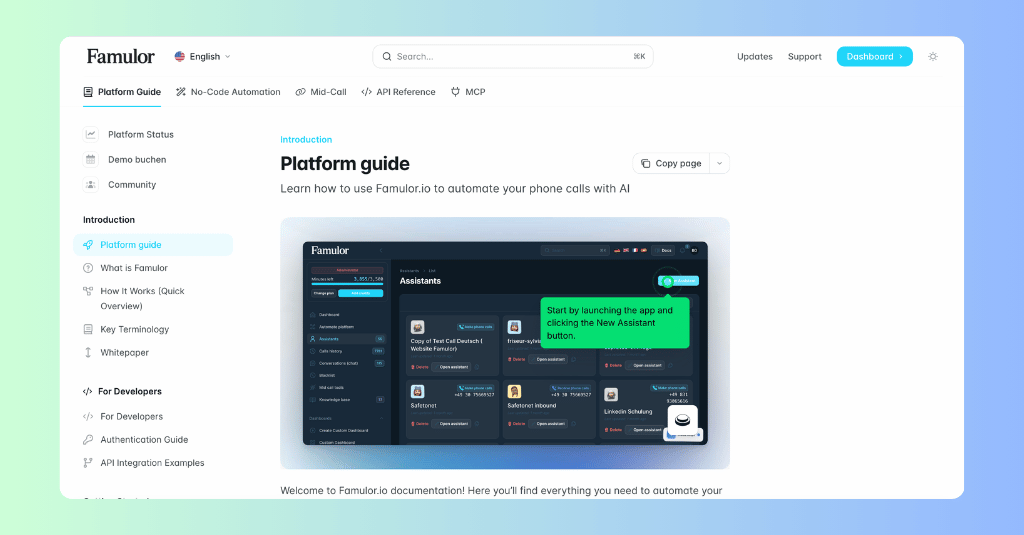
Famulor documentation update
- Create campaign — create a new outbound calling campaign with the specified configuration.
- Disable conversation ended webhook — disable conversation ended webhook notifications for an assistant.
- GoHighLevel (GHL) — fixed an issue with login via GHL.
- HubSpot — fixed a bug affecting the HubSpot integration.
Pipeline & speech-to-speech upgrade, plus an expanded API
Famulor’s platform gets a major boost: a new speech-to-text option in pipeline mode, an upgraded speech-to-speech voice model, new conversation models in pipeline mode, and a significantly expanded API for full programmatic control.A new speech-to-text option in pipeline modeFamulor now supports an additional speech-to-text engine in pipeline mode, delivering improved transcription accuracy across multiple languages with noticeably lower latency — your voice assistants understand callers faster and respond more naturally.Select it as your transcription provider when configuring any assistant in pipeline mode and compare the results with your current setup.Speech-to-speech mode upgradeFamulor’s speech-to-speech mode now runs on an upgraded voice model, with major improvements across the board:- Better call quality — more natural, fluid conversations and improved voice output on Famulor’s voice engine
- Lower latency — faster responses for a smoother caller experience
- Improved prompt following — the assistant stays on script more reliably and handles complex instructions better
- The more factual model — with 33% fewer factual errors than its predecessor. Significantly better at following complex instructions, staying on script, and handling multi-step conversations. Your assistants will give more accurate, reliable answers and follow your prompts more precisely.
- The balanced model — a strong all-rounder with excellent speed and reasoning balance. Ideal for assistants that need fast, smart responses.
- AEC warmup — a new parameter that pre-warms the acoustic echo cancellation, reducing audio artifacts at the start of calls on Famulor’s voice engine
- Expanded API — new endpoints for campaigns, WhatsApp, warm transfers, keypad collection, filler phrases, voice settings, and provider discovery — build your own integrations with full programmatic control via Famulor’s API
- Voice preview fix — voice previews now play correctly
- Web widget improvements — fixed mobile height and form input collection on auto-open
WhatsApp files and audio, Cal.com EU and teams, GDPR data retention, chat webhooks, and widget customization
Famulor’s platform gets a major upgrade: smarter WhatsApp agents, EU-ready Cal.com booking, GDPR-compliant data retention, and more control over chat automation and your widget.WhatsApp gets smarter: vision, audio transcription & media attachmentsYour WhatsApp AI agents can now see images, transcribe voice messages, and handle file attachments from your customers.- Vision support — when a customer sends an image via WhatsApp, your assistant can analyze it and describe or respond to what’s in the image as part of the conversation. Perfect for reading documents, analyzing property photos, diagnosing issues from images, or identifying products.
- Automatic voice message transcription — customers who send WhatsApp voice notes no longer get ignored. Agents now automatically transcribe audio messages based on your assistant’s language settings.
- Full media attachment support — all inbound media (images, audio, video, documents) are now securely stored as attachments. A new attachments gallery in the conversation detail view lets operators browse received files. Operators can also send files back to customers from the chat UI.
- Region selector — choose from EU, US, or a custom Cal.com endpoint
- Dynamic booking fields — reads your Cal.com event type’s custom fields as-is; no more overwriting your configuration
- Team event types — book into team calendars, not just personal ones
- Full backward compatibility — existing configs continue working without changes
- Smart event picker — grouped personal/team events and auto-fetched booking fields

Cal.com EU region selector (cal.eu)
- Extra large layout — half-screen panel, full-screen on mobile
- Translatable tab labels — rename Voice/Chat tabs to match your brand
- Auto-open on page load — widget expands automatically
- Custom avatar — upload your own widget avatar
- Hide function calls — tool calls hidden from chat by default
- Auto top-up locking — prevents duplicate charges during concurrent top-up attempts
- WhatsApp logo sync fix — resolved an issue where profile logos weren’t syncing correctly
Warm transfers and keypad digit collection
Famulor’s platform extends the capabilities of your AI phone agents with two features built for more reliable support and sales scenarios — seamless handoff to human agents, and faster, more precise data capture.Warm Call Transfer (Hold + Brief + Connect)When a caller wants to speak with a human, your Famulor assistant can now perform a true warm transfer: the caller is placed on hold (with music or silence), a supervisor or agent is called and given a context briefing, and only then are both sides connected.Why Famulor’s warm transfer stands out:- Context is preserved — agents don’t start cold; they already know what the caller needs, thanks to Famulor’s context-handoff technology.
- A professional experience — the caller hears a hold message plus hold music while the agent is being reached.
- Broader compatibility — web calls can now be transferred to real human phone agents (the initial interaction no longer has to be a phone call), and for SIP trunks without SIP REFER, warm transfer now works by creating a new SIP INVITE and merging the calls — no REFER required.
- Runs in the background — no awkward pauses
- Automatic submission after a configurable timeout (default 5s)
- Immediate submission when the caller presses # or *
- Works alongside speech — customers can speak or type
Happy New Year! Major AI chat update and WhatsApp integration
Famulor now supports WhatsApp, expanding your communication channels to include phone calls, live chat, web voice, and now WhatsApp messaging.Complete WhatsApp integration- Inbound messages — receive and respond to WhatsApp messages automatically
- Outbound messages — send messages to your contacts via WhatsApp
- Template messages — create and send Meta WhatsApp Business templates
- AI chat replies — your AI assistant can automatically respond to WhatsApp conversations
Famulor WhatsApp integration
- Manage WhatsApp sender configuration
- Customize your WhatsApp Business profile
- Create Meta WhatsApp Business templates
- Enable outbound messaging capabilities
- Select number — choose your WhatsApp-enabled phone number
- Configure sender — set up your WhatsApp sender settings
- Connect assistant — link your AI assistant to WhatsApp
- Start conversations — begin managing WhatsApp conversations
- Multi-channel support — manage WhatsApp and live chat conversations in one place
- AI toggle — enable or disable AI responses for individual conversations
- Manual responses — answer messages yourself when you want to take over
- Unified interface — seamless experience across all messaging channels
AI Prompt Editor V2 — enhanced prompt creation with a thinking mode
Two weeks after its first release alongside the Flow Builder, the AI Prompt Editor gets a significantly improved version with new capabilities.Thinking mode — more considered answersA new thinking mode lets the prompt reason for longer before responding. This leads to noticeably better, more considered answers through deeper reflection before the response is generated.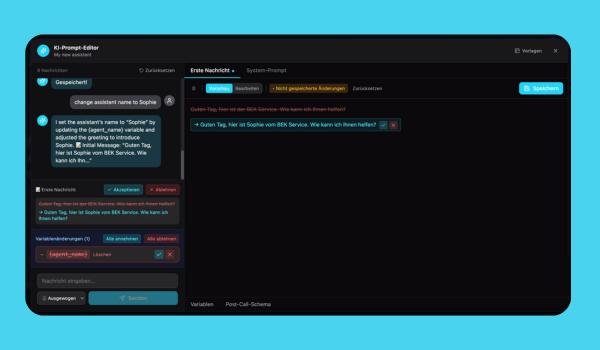
AI Prompt Editor V2 with thinking mode
- Various stability improvements in the prompt editor
- Optimized performance in the prompt preview
- Improved usability and error handling
Flow Builder — new lock function with a More Action node
The Flow Builder gains a new lock function that adds further action options.Lock function with More Action node- New lock function for finer flow control
- More Action node — additional action nodes for more complex workflows
- More flexibility when building automated flows
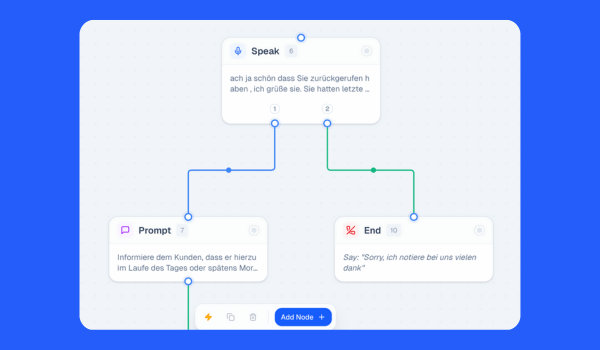
Flow Builder with the new lock function and More Action node
New & updated conversation and voice models
This release brings together powerful new AI models, chat-based automation triggers, and advanced call behavior controls — another step forward for both voice and text experiences on the Famulor platform.A new conversation modelA new conversation model is now available, delivering improved reasoning and better instruction-following through Famulor’s pipeline optimization. For faster responses, the previous generation model remains a strong, optimized choice for high-performance workflows.Realtime mini model upgradeFamulor’s lightweight realtime voice model has been upgraded, improving stability and responsiveness in low-latency voice interactions.New speech-to-speech voice modelA new speech-to-speech voice model has been integrated, offering:- Better handling of complex workflows and function calls
- The previous version remains available alongside it in the model list
- Available in speech-to-speech mode only
New Conversation Created trigger
Famulor’s automation platform now supports triggering automations the moment a new chat conversation starts on the web widget:- Instant data capture — automatically capture pre-form input variables such as name, email, phone number, or any custom fields you’ve defined in Famulor’s system
- Seamless CRM integration — use this data to create leads, sync contacts to your CRM, send notifications, or start any custom automation flow
- Chat automation — works seamlessly with Famulor’s chat web widget, making text interactions just as automatable as voice calls
Smarter call prompts & behavior
End call on voicemail — custom promptFamulor’s voicemail handling now lets you define a custom prompt the AI uses when leaving a voicemail — full control over tone, content, and messaging instead of a generic message, for brand consistency across every voice interaction.Re-engagement prompt settingWhen the re-engagement interval is reached, assistants can now use a custom re-engagement prompt, so you can fine-tune how the AI follows up after silence, making interactions more natural and context-aware.Multiple ambient sound optionsFamulor’s audio engine now offers multiple ambient sound choices for voice calls, giving you even more control over the call experience.Simplified data injection for automations — a faster setup experience
Setting up automations is now significantly simpler and more intuitive. Famulor’s data-injection technology reduces the complexity of building automation workflows considerably.Previously, you had to build a complete flow, run a test call, and only then reference the latest data to configure your automations.With Famulor’s new “Load data” function when adding a trigger, the platform automatically fetches every custom variable defined in your assistant settings — including input variables, post-call evaluations, and extracted variables — giving you a complete and accurate data structure from the start.The result: faster setup, fewer test calls, and a noticeably smoother experience building automations.Calendly integration — expanded scheduling capabilities
You can now connect Calendly calendars directly to your assistants. Famulor’s Calendly integration enables seamless appointment booking through your AI flows.Famulor’s Calendly features:- Direct calendar connection — connect Calendly calendars directly to your Famulor assistants
- Seamless appointment booking — book appointments seamlessly through your AI flows
- Ideal for a range of use cases — perfect for sales calls, consultations, demos, or service-based businesses
- Flexible integration — works alongside existing calendar integrations, giving you more flexibility in scheduling
Famulor Calendly integration
Voice library: a new voice engine option
Famulor’s voice engine now offers a new, flagship-grade voice model — one of the most advanced generative speech technologies available today.A real win for users: the new voices are included in your existing Famulor plan at no extra cost. You can choose between two premium voice catalogs directly in the Voice Library menu, depending on the style, emotion, or brand you’re going for.Why it stands out- Extremely fast — a time-to-first-audio of around 90ms, among the fastest generative speech models built for real-time interaction
- Excellent quality — top-ranked for voice quality in independent evaluations, with ultra-realistic AI-generated voices
- Fine control — adjust pitch, speed, emotion, and pronunciation for a fully customized voice response
- Multilingual support — supports 15+ languages, including English, Spanish, French, Japanese, and German, with localized accents for seamless communication
- Scalability & reliability — built for enterprise-grade voice AI applications, with low latency and high accuracy in speech synthesis
- Fully GDPR-compliant — full compliance with data protection regulation

Voice library — a new flagship-grade voice engine option
Voice emotion control
The voice library also gains advanced emotion controls, giving you precise real-time control over volume, speed, and emotion — so you can craft the perfect voice for any context and any brand.This integration expands the ways businesses can find the perfect voice for their brand and their specific use cases.Next-generation conversation model in pipeline mode
A next-generation conversation model is now available in pipeline mode, with better context understanding, faster response times, and higher accuracy across every pipeline assistant.Key improvements:- Stronger reasoning — better handling of multi-step requests
- Better context awareness — improved understanding of complex conversations
- Faster response times — smoother call flows
- Higher accuracy — more precise responses and better decisions mid-call
Campaign timezone management — global precision
Campaign timezone settings give you precise scheduling control for international campaigns. You can now configure a custom timezone for each campaign individually, so automated calls and workflows run at exactly the right local time for your target audience.- Per-campaign configuration — assign a timezone to each campaign
- Global reach — optimize outbound calling times for any region
- Local time precision — reach prospects during business hours in their own timezone
- Better compliance — avoid calling outside permitted hours
Platform enhancements
This update includes stability improvements, performance optimizations, and UI refinements across the platform:- Improved stability in the core voice engine
- Performance optimizations across automation workflows
- UI/UX refinements throughout the interface
- Various bug fixes and quality improvements
Famulor Test Assistant — chat-based testing
The Test Assistant chat interface is now available — test your AI assistants directly in a conversation, without placing a call.The chat interface- Interactive conversations — hold natural conversations with your assistants
- Start a new conversation — begin a fresh chat any time for isolated tests
- Real-time responses — replies arrive instantly
- Intuitive controls — Enter to send, Shift + Enter for new lines
- Built for pipeline assistants — full compatibility with pipeline mode
- Full feature support — tools, knowledge bases, and automations all work
- Direct connection — the test talks to the same assistant configuration as a live call
- Welcome interface — a clear onboarding screen with instructions
- Live testing — test prompts, instructions, and behaviors in real time
- Fast iteration — ideal for tightening an assistant before it goes live
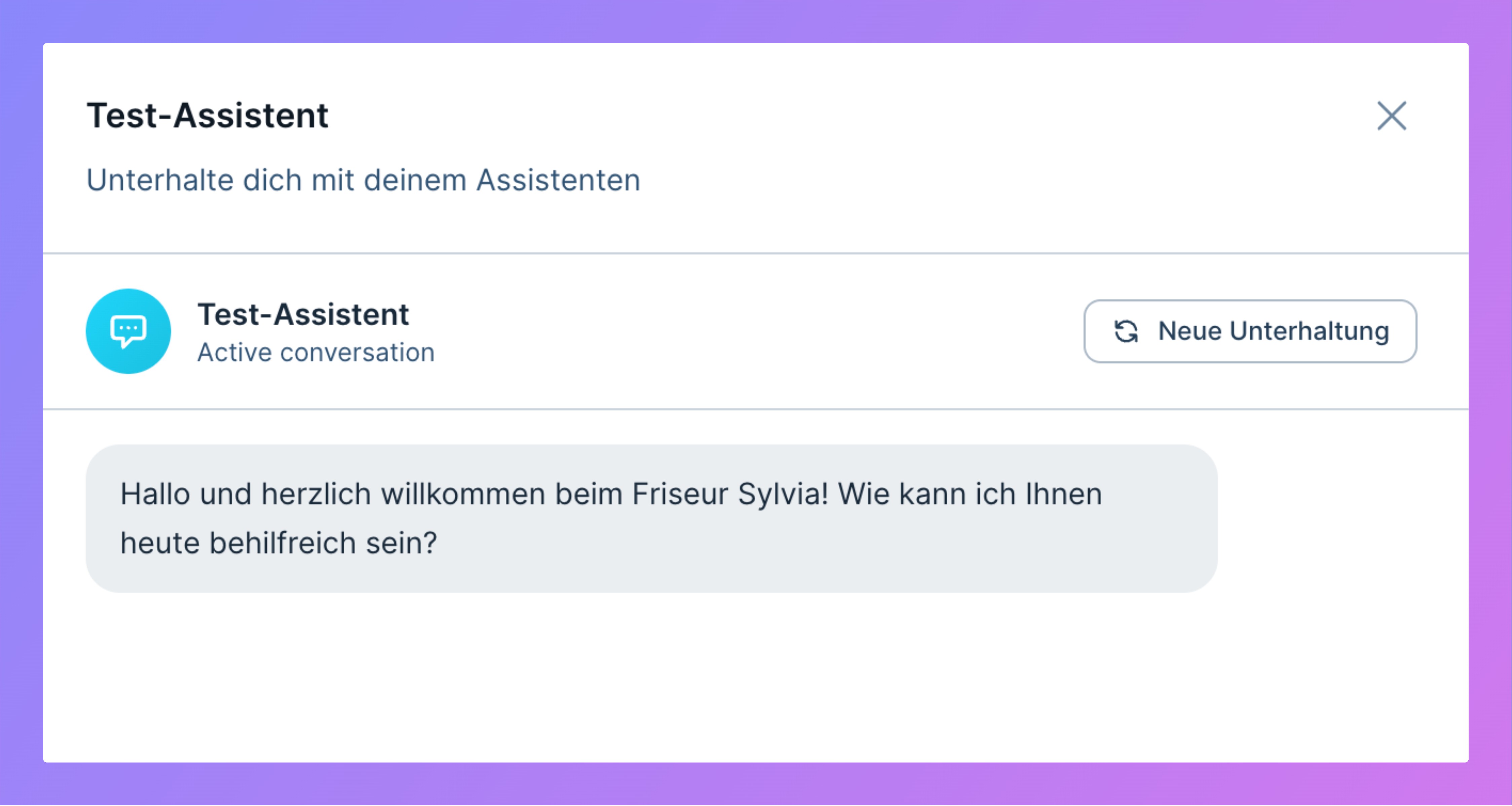
Famulor Test Assistant chat interface
Custom dashboards — build your own analytics view
Custom dashboards are now available: assemble your own dashboard from widgets and get real-time insight into your Voice AI performance.Widget typesThree widget types are available:- Statistics widgets — single metrics like total calls or average duration, with mini-charts and comparison features
- Chart widgets — interactive line, bar, and pie charts with real-time updates
- Table widgets — detailed datasets with sorting and pagination
- Advanced queries — complex filter logic with IN/NOT IN operators
- Evaluation data — filter on AI call evaluations
- Real-time updates — automatic data refresh
- Call analytics — call distribution, duration, and status
- Lead performance — lead tracking metrics
- Campaign insights — campaign analytics with ROI tracking
A refreshed speech-to-speech model
An updated speech-to-speech voice model is now available in Famulor — delivering smarter, more accurate conversations with improved function-calling for complex workflows.Highlights:- Higher accuracy in live voice interactions
- Improved function-calling for tools and automations
- Better contextual continuity across multi-turn conversations
Phone number pool for campaigns — intelligent caller-ID rotation
Famulor’s phone number pool feature lets you assign multiple phone numbers to a single campaign. The system automatically rotates through the assigned numbers for each outbound call, helping increase answer rates and improve campaign performance.Key features:- Multiple number assignment — assign multiple phone numbers to any campaign
- Automatic rotation — outgoing caller ID automatically rotates for each call to leads
- Easy configuration — assign numbers directly from the campaign overview or during campaign setup
- Improved answer rates — different caller IDs increase the likelihood that recipients will answer
- Go to Outbound / Campaigns and create or edit a campaign
- In the campaign settings or overview, click Assign Phone Numbers
- Select multiple phone numbers from your available pool
- Save the campaign — the system will automatically rotate through the numbers for each call
Blacklist entries with DNC compliance notice
Famulor’s blacklist feature has been enhanced with DNC (Do Not Call) compliance functionality. When creating a blacklist entry, the system now displays a clear notice that this is an internal DNC list. Phone numbers added to this list are automatically excluded from all AI-powered and manual calls.New blacklist features:- DNC compliance notice — clear indication that the blacklist functions as an internal Do Not Call list
- Automatic call exclusion — phone numbers on the blacklist are automatically excluded from all campaigns and call activities
- Optional reason field — add context for why a number was blacklisted (e.g. opt-out, complaint, internally blocked)
- Enhanced compliance — better protection against calling numbers that have requested to be excluded
- Audit trail — track and document why specific numbers were added to the DNC list
DNC compliance notice on a blacklist entry
Automated response detection
Famulor’sdetected_answering_machine function is now available in the Voice Agent. This lets your AI assistant automatically detect when a call is answered by automated systems — including answering machines, voicemail systems, IVR systems, and other AI agents — for intelligent campaign control and optimized call strategies.Benefits:- Automatic detection of voicemail systems, IVR menus, and other AI agents
- Distinction between human conversations and automated systems
- Intelligent call control based on detection status
- Optimized campaign performance through better lead management
- Integration with Famulor’s Automation Platform
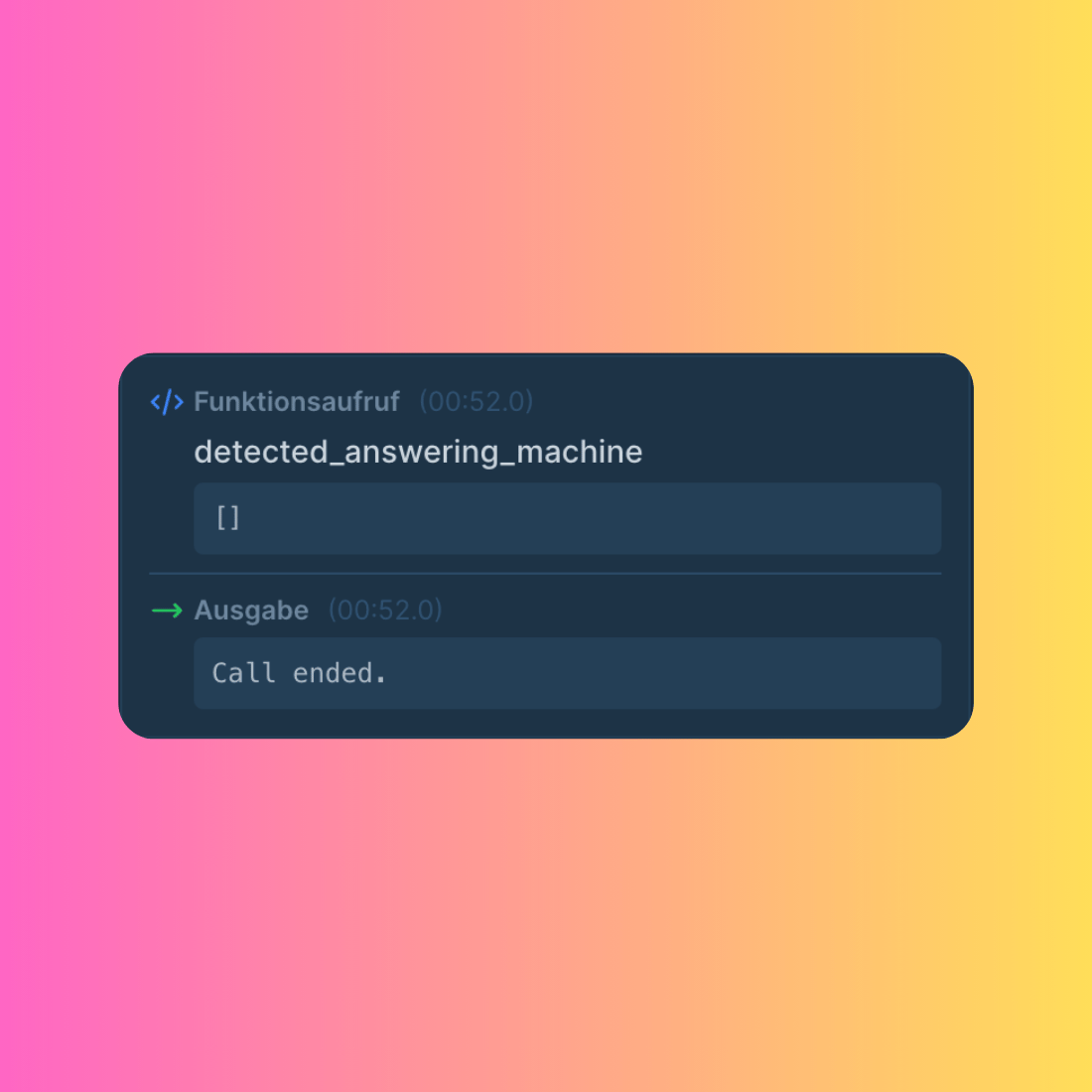
Automated answering-machine detection in the Famulor voice agent
A lighter, faster voice model
A smaller voice model is now available, offering strong voice AI capabilities. Pricing is included in the Famulor Phone Agent Plan.
A lighter, faster voice model in the Famulor voice library
Multi-Calendar support for assistants
Famulor’s Multi-Calendar Tools make scheduling smarter and more flexible than ever before, letting your AI assistants seamlessly manage multiple calendars.Team & service calendar managementFamulor’s team calendar technology lets you assign different calendars to the same assistant — perfect for businesses where customers choose a specific team member or service.Industry-specific applications:- Beauty salons & spas — customers can directly book appointments for hair, nails, skincare, or massage
- Medical practices — patients automatically book with the right doctor or specialist
- Consulting firms — clients are automatically routed to the appropriate advisor or coach
- Fitness studios — members can book personal trainers, classes, or therapy sessions
- Law firms — clients are automatically directed to attorneys with the right specialization
- Real estate — prospects book viewings with the appropriate agent
- Restaurants & events — guests can choose between regular table reservations and event planning
- Educational services — students book sessions with tutors specialized in their subject
- Financial advisory — clients are routed to advisors with the right expertise (investments, insurance, loans)
Famulor Dualplex assistant mode (Beta)
Dualplex mode is now available — a hybrid assistant architecture that combines speech-to-speech and pipeline modes.Speech-to-speech engineFamulor’s speech-to-text and language-model stack, with real-time processing for natural, fluid conversations at very low latency.Premium voice synthesisFamulor’s voice engine adds premium text-to-speech, with voice cloning and high-quality voices.Hybrid modeDualplex connects the responsiveness of speech-to-speech mode with the flexibility and voice quality of pipeline mode, for more fluid, human-sounding calls.Beta note: Dualplex is in beta. We are collecting feedback to tune it — test it now.A new realtime voice model
A new generation of realtime voice model is now available on the Famulor platform, for faster and higher-quality conversations.Realtime speech-to-speechThe new realtime voice model in speech-to-speech mode delivers natural, fluid conversations at very low latency.Lighter conversation models for Pipeline modeTwo lighter conversation models are now available in Pipeline mode, optimized for minimal reasoning effort — faster response times and smoother call flows.Complete API documentation
Famulor’s API documentation has been fully expanded, providing a comprehensive developer resource for Voice AI integration.Leads management APIs- Create Lead — add new leads
- Update Lead — modify existing lead data
- List Leads — retrieve all leads, with pagination
- Delete Lead — safely remove leads
- List Calls — comprehensive call history with filter options
- Make Call — instant calls through Famulor’s Voice AI engine
- Delete Call — remove call records
- List Assistants — retrieve all AI assistants with 50+ configuration fields
- Create Assistants — build new Voice AI assistants
- Update Assistants — customize existing assistants
- Delete Assistants — secure removal of assistants
- Available Languages — 35+ languages for international assistants
- Available Voices — 1000+ professional voices for Pipeline and Multimodal
- Language models — the latest language models available for your assistants
- Phone Numbers — available numbers for assistant assignment
- Send SMS — messages through Famulor’s SMS engine
- List Campaigns — all campaigns with detailed configurations
- Update Campaign Status — start/stop control via the API
- Post-Call Webhooks — real-time notifications with data extraction
- Webhook Management — activation/deactivation for inbound and outbound assistants
- Advanced Data Structure — transcripts, variables, evaluations, and recordings
Campaign intelligence enhanced
New control mechanisms elevate your outbound campaigns to a new level, optimizing every call and maximizing the ROI of your lead generation.Campaign controlThree controls available in the Famulor platform:- Intelligent goal tracking — Famulor’s algorithm automatically detects when a lead has achieved the desired goal. Calls continue intelligently until the selected goal variable is confirmed.
- Voicemail intelligence — voicemail detection prevents leads from being marked as completed when only a voicemail is reached, distinguishing human responses from automated messages.
- Dynamic goal variables — define custom success metrics that go beyond traditional call status.
- Real-time status updates via webhooks
- Seamless data transfer between automation tools and the campaign engine
Famulor mobile app
The Famulor mobile app is now available for iOS and Android, letting you manage your AI assistants, calls, and automations from anywhere. Get it from the download page.A new, more capable conversation model
Famulor is among the first Voice AI providers to integrate a new generation of conversation model. Experience the most advanced AI yet — faster, smarter, and more precise responses now drive your Famulor workflows. New parameters for customizing thinking effort will be added soon; currently, the default value makes responses very intelligent but slower.DTMF input tool
Famulor’s DTMF input tool makes it easy to send keypad inputs during outbound calls, allowing smooth navigation through IVR menus and automated workflows.Leads Kanban board
A Kanban board has been added to the leads area for a more visual workflow. Drag and drop leads between stages, quickly update status, and track progress at a glance.Knowledge base improvements
Famulor’s knowledge bases gained new capabilities. You can now:- Search inside your knowledge base documents
- Delete individual documents
- View all processed chunks in each document
Phone call action
A new “Make Phone Call” action was added to Famulor’s automation platform that instantly dials a single number as soon as the API endpoint is called. No campaign setup required — perfect for one-off or time-critical calls.Secondary contacts
Famulor’s secondary contacts system lets you add multiple backup contacts to each lead. If the primary contact doesn’t answer, calls automatically cascade to the next contact in the list — for higher connection rates.Stable SIP proxy server
A new stable SIP proxy server provides enterprise-grade connection and stability for outbound SIP trunk connections, letting customers connect from a fixed IP with better connectivity than the previous beta version.GoHighLevel calendar integration
Fetch available slots and book appointments with GoHighLevel calendars via Famulor’s API.New speech-to-speech model (Beta)
A new speech-to-speech model, optimized for quality and latency.Famulor application
Interface- Account-level timezone setting
- Minimum words interruption option in assistant settings
- Volume slider for background ambient audio
Automation Platform
- New action: Delete Lead — delete leads programmatically via the API
- New action: Start/Stop Campaign — control campaign status programmatically
- Improved — the automation platform loads 10x faster
API
- Delete Lead — new API endpoint to permanently delete leads
- Start/Stop Campaign — control campaign status programmatically with new API endpoints
Famulor’s new 2.0 voice engine
The long-awaited new engine has been deployed across the Famulor platform, with improvements across the entire conversation.Real-time speech-to-speech mode
Skip text-to-speech round trips and give callers instant, more natural responses via Famulor’s engine.Emotion-aware filler audios
Select different filler audios based on customer response sentiment, for even faster-feeling responses.Knowledge management
Build a living knowledge base in minutes- Point to any website and scrape it automatically
- Drag & drop PDFs and files for processing