HubSpot Lead Creation Template

Automatically transform incoming calls into qualified leads in your HubSpot CRM. This tool enables your AI assistant to create, qualify, and enrich new contacts with relevant information in real time during the conversation.

Overview & Features

Automatic Lead Capture

  • Real-time contact creation from conversation
  • Intelligent data extraction (name, email, company)
  • Lead score calculation based on conversation
  • Automatic categorization and tagging

BANT Qualification

  • Budget assessment through conversation analysis
  • Authority level determination
  • Need analysis and pain point identification
  • Timeline detection for purchase decision

Configure Lead Creation Tool

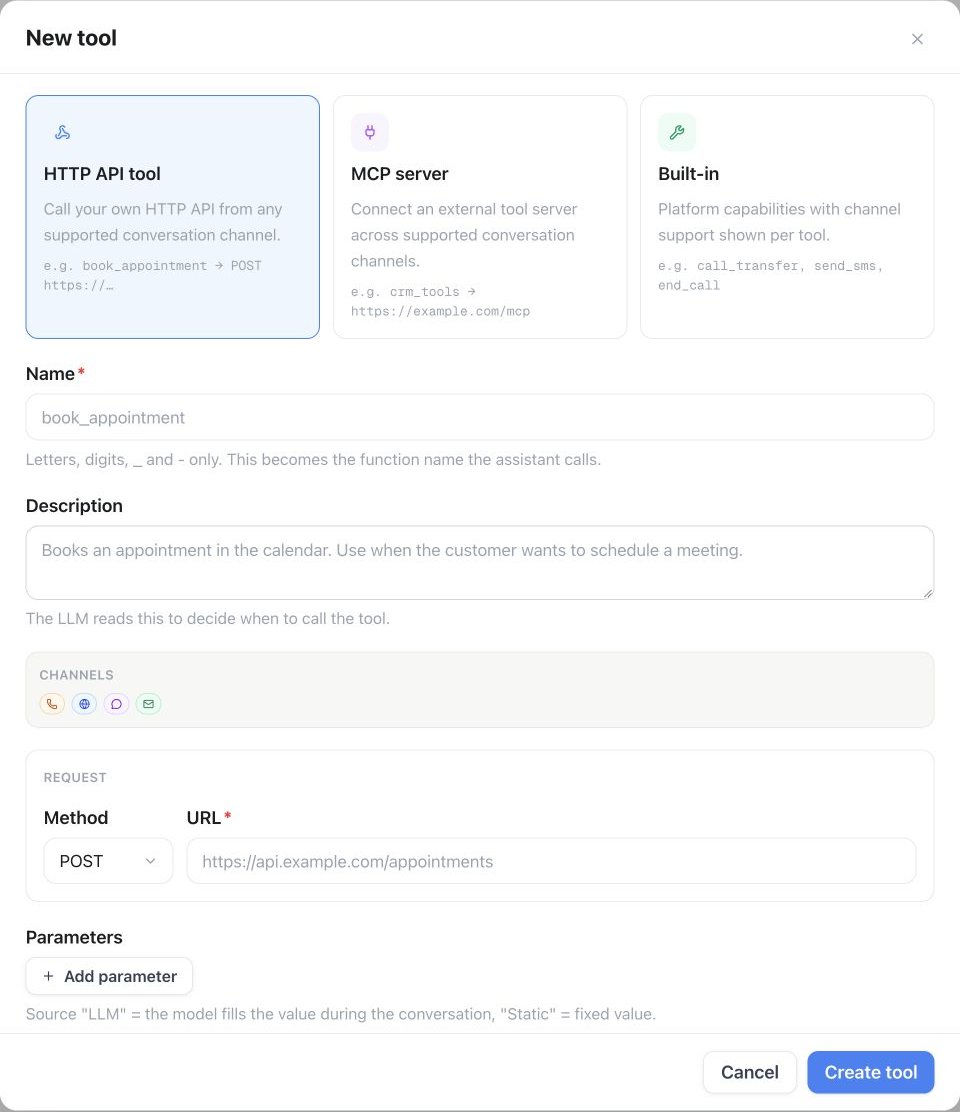
1. Basic Tool Setup

ParameterValue
Function Namecreate_hubspot_lead
Description”Creates a new lead in HubSpot based on conversation information. Use when a potential customer shows interest and is not yet in the system.”
HTTP MethodPOST
Timeout7000ms
URLhttps://api.hubapi.com/crm/v3/objects/contacts

2. Request Body Template

{
  "properties": {
    "firstname": "{first_name}",
    "lastname": "{last_name}",
    "email": "{email_address}",
    "phone": "{phone_number}",
    "company": "{company_name}",
    "jobtitle": "{job_title}",
    "website": "{company_website}",
    "lifecyclestage": "lead",
    "leadsource": "phone_call",
    "hs_lead_status": "NEW",
    "lead_score": "{calculated_score}",
    "notes_last_updated": "{conversation_summary}",
    "budget_range": "{estimated_budget}",
    "timeline": "{buying_timeline}",
    "pain_points": "{identified_challenges}",
    "interest_level": "{engagement_score}",
    "hs_analytics_source": "famulor_ai_call",
    "createdate": "{current_timestamp}"
  }
}

3. Parameter Schema

{
  "type": "object",
  "properties": {
    "first_name": {
      "type": "string",
      "description": "Contact's first name"
    },
    "last_name": {
      "type": "string", 
      "description": "Contact's last name"
    },
    "email_address": {
      "type": "string",
      "format": "email",
      "description": "Lead's email address"
    },
    "phone_number": {
      "type": "string",
      "description": "Contact's phone number"
    },
    "company_name": {
      "type": "string",
      "description": "Company name"
    },
    "job_title": {
      "type": "string",
      "description": "Contact's position/job title"
    },
    "company_website": {
      "type": "string",
      "description": "Company website (if mentioned)"
    },
    "calculated_score": {
      "type": "integer",
      "description": "Lead score based on conversation quality (0-100)",
      "minimum": 0,
      "maximum": 100
    },
    "conversation_summary": {
      "type": "string",
      "description": "Summary of key conversation points"
    },
    "estimated_budget": {
      "type": "string",
      "description": "Estimated or stated budget range"
    },
    "buying_timeline": {
      "type": "string",
      "description": "Time frame for purchase decision"
    },
    "identified_challenges": {
      "type": "string",
      "description": "Challenges/pain points identified during conversation"
    },
    "engagement_score": {
      "type": "string",
      "enum": ["low", "medium", "high"],
      "description": "Interest level based on conversation engagement"
    }
  },
  "required": ["first_name", "last_name", "phone_number"]
}

Intelligent Lead Qualification

BANT Framework Implementation

Automatic Budget Detection:
Direct Statements:
  "Our budget is 50,000€" → budget_range: "50k-60k"
  "We have about ten thousand euros planned" → budget_range: "10k-15k"

Indirect Hints:
  "We are a small startup" → budget_range: "under_10k"
  "Budget is not an issue" → budget_range: "flexible"
  "We need to see..." → budget_range: "limited"

Lead Score Impact:
  High Budget (>50k): +25 points
  Medium Budget (10-50k): +15 points  
  Low Budget (<10k): +5 points
  Unknown: 0 points
Decision Authority Classification:
Decision Maker:
  Indicators: "I am the CEO", "I can decide this"
  Lead Score: +30 points
  Tag: "decision_maker"

Influencer:
  Indicators: "I am the IT manager", "I will recommend this"
  Lead Score: +20 points
  Tag: "influencer"

Gatekeeper:
  Indicators: "I’m just gathering information first", "I need to forward this"
  Lead Score: +10 points
  Tag: "gatekeeper"

User/Stakeholder:
  Lead Score: +5 points
  Tag: "stakeholder"
Pain Point Categorization:
Technical Challenges:
  Keywords: "Integration", "Performance", "Scaling"
  Category: "technical_needs"
  Urgency: high

Business Challenges:  
  Keywords: "Efficiency", "Costs", "Growth", "Competition"
  Category: "business_needs"
  Urgency: medium-high

Compliance/Security:
  Keywords: "GDPR", "Security", "Audit", "Compliance"
  Category: "compliance_needs"
  Urgency: high

Process Optimization:
  Keywords: "Automation", "Workflow", "Process"
  Category: "process_needs"
  Urgency: medium
Buying Timeline Classification:
Immediate (0-1 month):
  Indicators: "immediately", "urgent", "as soon as possible"
  Timeline: "immediate"
  Lead Score: +25 points

Short-term (1-3 months):
  Indicators: "in the next months", "by end of quarter"
  Timeline: "1-3_months"
  Lead Score: +20 points

Medium-term (3-6 months):
  Indicators: "this year", "mid-term"
  Timeline: "3-6_months" 
  Lead Score: +15 points

Long-term (6+ months):
  Indicators: "next year", "long-term planning"
  Timeline: "6+_months"
  Lead Score: +10 points

Undefined:
  Timeline: "undefined"
  Lead Score: +5 points

Advanced Lead Enrichment

Company Enrichment Tool

Function Name: enrich_hubspot_company
Description: "Enriches lead with company data based on company name or website"
HTTP Method: POST
URL: https://api.hubapi.com/crm/v3/objects/companies

Lead-Company Association

{
  "associations": [
    {
      "to": {
        "id": "{company_id}"
      },
      "types": [
        {
          "associationCategory": "HUBSPOT_DEFINED",
          "associationTypeId": 1
        }
      ]
    }
  ]
}

Practical Implementation

Scenario 1: Inbound Lead from Cold Call

1

First Contact & Data Collection

AI Assistant: "May I ask who I am speaking with?"
Customer: "This is Max Mustermann from Beispiel GmbH"

→ Automatic Data Extraction:
  first_name: "Max"
  last_name: "Mustermann"  
  company_name: "Beispiel GmbH"
2

Needs Exploration

AI: "How can I assist you?"
Customer: "We're looking for a new CRM solution. Our current system 
          is too slow and integration doesn't work."

→ Pain Point Analysis:
  pain_points: "Performance issues, integration challenges"
  category: "technical_needs"
  urgency: "high"
3

BANT Qualification

Budget: "What budget range are you considering?"
Authority: "Who makes software decisions at your company?"
Need: "What features are most important to you?"
Timeline: "By when do you want to implement a solution?"

→ Lead score calculation based on answers
4

Lead Creation & Follow-up

create_hubspot_lead(
  first_name: "Max",
  last_name: "Mustermann",
  company_name: "Beispiel GmbH", 
  calculated_score: 75,
  timeline: "1-3_months",
  pain_points: "CRM performance & integration issues"
)

→ Automatic follow-up task creation  
→ Sales team notification

Scenario 2: Warm Lead with High Intent

Response Handling & Follow-up

Successful Lead Creation

{
  "id": "lead12345",
  "properties": {
    "firstname": "Max",
    "lastname": "Mustermann",
    "email": "max@beispiel.de",
    "company": "Beispiel GmbH",
    "lifecyclestage": "lead",
    "hs_lead_status": "NEW",
    "lead_score": "75",
    "createdate": "2024-01-15T10:30:00.000Z"
  },
  "createdAt": "2024-01-15T10:30:00.000Z"
}

Automatic Follow-up Workflows

Right after lead creation:
1. Send lead confirmation email  
2. Notify sales team (if score >70)  
3. Create CRM task: "Lead follow-up within 24 hours"  
4. Add lead to appropriate HubSpot list  
5. Start marketing automation sequence  
24-48 hours later:
If no sales contact made:
  → Automated follow-up email  
  → SMS reminder (for high score leads)  
  → Manager escalation (if score >80)

After 1 week:
  → Lead nurturing email series  
  → LinkedIn connection request  
  → Schedule re-engagement call  
Continuous score adjustment:
Email engagement: +5 points  
Website visits: +3 points per session  
Content downloads: +10 points  
Demo request: +25 points  
Pricing page visits: +15 points  

Duplicate Management

Intelligent Duplicate Detection

Tool: check_existing_contact
Method: GET
URL: https://api.hubapi.com/crm/v3/objects/contacts/search

Search Criteria:
  - Email address (exact match)
  - Phone number (normalized comparison)
  - Company name + last name (fuzzy match)

If match found:
  → update_existing_contact instead of create_new  
  → add lead score instead of overwriting  
  → append conversation history

Advanced Configurations

Industry-Specific Lead Templates

Additional_Fields:
  tech_stack: "Current software landscape"
  integration_requirements: "Needed integrations" 
  user_count: "Planned number of users"
  compliance_requirements: "GDPR, SOC2, etc."
  current_solution: "Existing solution"
  
Custom_Scoring:
  Enterprise_Size (+20): >500 employees
  High_Tech_Stack (+15): Modern APIs mentioned
  Compliance_Needs (+10): Security/privacy concerns
Additional_Fields:
  platform_current: "Current e-commerce platform"
  monthly_revenue: "Monthly revenue"
  product_count: "Number of products"
  international_sales: "International sales?"
  growth_challenges: "Main growth obstacles"
  
Custom_Scoring:
  High_Revenue (+25): >100k monthly
  Growth_Stage (+15): "fast-growing"
  Multi_Channel (+10): "Omnichannel"
Additional_Fields:
  service_focus: "Main service area"
  client_size_focus: "Target customer group"
  current_tools: "Currently used tools"
  team_size: "Team size"
  billing_model: "Billing model"
  
Custom_Scoring:
  Established_Practice (+20): >3 years
  Growing_Team (+15): Hiring mentioned
  Process_Pain (+10): Efficiency issues

Multi-Language Support

German_Localization:
  field_labels:
    firstname: "Vorname"
    lastname: "Nachname" 
    company: "Unternehmen"
    jobtitle: "Position"
  
  pain_point_detection:
    efficiency: ["Effizienz", "Produktivität", "Zeitersparnis"]
    cost: ["Kosten", "Budget", "Einsparung", "ROI"]
    growth: ["Wachstum", "Skalierung", "Expansion"]
    competition: ["Konkurrenz", "Wettbewerb", "Marktposition"]

Quality Assurance & Monitoring

Lead Quality Metrics

MetricDescriptionTarget
Data Completeness% of leads with complete key data>90%
Lead Score AccuracyCorrelation of score vs. actual conversion>0.7
Duplicate Rate% of duplicates created by the tool<5%
Sales Acceptance Rate% of leads accepted by sales>80%
Speed-to-LeadTime from call to sales contact<2 hours

Automated Quality Checks

1

Data Validation

Pre-Creation Checks:
  - Validate email format  
  - Normalize phone numbers  
  - Check company name against blacklist  
  - Detect spam patterns
2

Score Validation

Score Plausibility:
  - Check score vs. data completeness  
  - Validate timeline vs. budget consistency  
  - Check authority vs. company size logic
3

Post-Creation Verification

Automated Follow-up:
  - Email deliverability test  
  - Phone number validation  
  - Company website verification  
  - Social media profile enrichment

Integration Recommendations

Optimize your lead generation with additional tool combinations:
Pro Tip: Start with a conservative lead scoring algorithm and optimize based on actual conversion data. Overly aggressive scoring can overwhelm the sales team with leads.
Privacy Notice: Ensure all collected leads have explicitly consented to contact and implement GDPR-compliant opt-out mechanisms.