

Tool groups
The catalog is organized into 14 groups. Custom connections use the plain MCP endpoint by default; OAuth consent determines the approved groups. Selecting every group no longer silently reduces the selection. See Connect an AI client.
The MCP client receives the current input schema, permissions, and safety hints for every tool it is allowed to use. This live discovery is the authoritative reference for individual tool arguments.
Model catalog access and selected model names require AI Safety & Control in the active workspace, in addition to the tool scope. Whitelabel access alone does not grant this permission. Ordinary assistant and call responses omit internal model identities; voice selection and language controls remain available.
Choosing which tools to expose
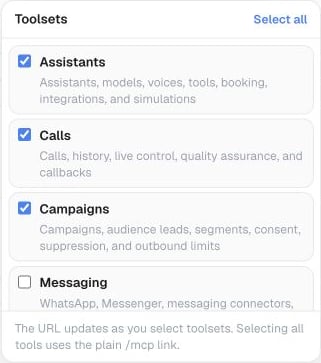
For a custom connection, open Settings → API & MCP → Customize toolsets and select the groups to include in its MCP URL.
X-MCP-Toolsets: assistants,calls. The header takes precedence over the query parameter. In a custom connection, use list_mcp_toolsets to see the groups available to your account — it remains available regardless of which groups you’ve selected. The public directory profile does not expose this tool.
Filtering is optional. A custom OAuth connection can use all explicitly approved groups with the plain /mcp URL. A filter can narrow its saved grant, but cannot add permissions. Workspace API keys retain their existing scope and role checks.
Public directory profile
The official Famulor plugin for ChatGPT and the reviewed Claude directory connection use this read-only profile:https://app.famulor.io/mcp?profile=assistant-management. It offers the 11 read tools plus create_assistant and update_assistant and requests assistants:read, assistants:write, and calls:read. It cannot place calls, send messages, manage phone numbers, or delete assistants. This profile is separate from the reviewed read-only directory listing.
Long-running tasks
Website imports, simulations, history exports, and large campaign preparations may continue as MCP tasks. A compatible client can show progress, retrieve the result, or request cancellation. Cancellation stops remaining work when possible; an action already accepted by an external service may still complete. Exports use short-lived private download links. Tasks and their results remain limited to the workspace and credential that created them. Call-history tools return a provider-neutralfailure object when a call cannot complete. Use its code, customer-safe message, retry guidance, and suggested action instead of relying on infrastructure-specific details.