

Default plan limits
Whitelabel Admin → Default plan limits controls registration, prepaid access, and the defaults a prepaid customer starts with — before they ever choose a paid plan.Registration and prepaid access
Open Whitelabel Admin → Default plan limits → Registration and prepaid access. Set Allow self-service registration and Allow prepaid accounts independently, then select Save.
Default plan limits — separate switches for registration and prepaid access
- Allow self-service registration — whether new customers can create an account from your verified custom-domain login page. Existing customers can still sign in when it’s off, and customers you create yourself through the dashboard, REST API, or MCP remain available either way.
- Allow prepaid accounts — independent of registration. It controls whether a customer without a paid plan can use prepaid credits. When it’s off, registration may stay open, but a new customer must choose a paid plan before using the platform.
- Prepaid account extra minutes cost (EUR) — the per-minute rate used to price prepaid credit consumption, shown against your platform cost and the resulting margin. This also sets the basis for prepaid credit top-up pricing.
- Welcome credits — a one-time, non-expiring credit grant funded from your reseller wallet, given to each new prepaid customer automatically. Recommended starting value: 800 credits. Set it to 0 to turn off automatic grants. If your wallet can’t cover a grant, the signup still succeeds with 0 welcome credits — the shortfall is not applied later automatically; transfer credits to that customer manually once your wallet is funded.
Prepaid account default limits
-1 means unlimited, 0 means not available. Defaults include:
On the same page, scroll to Prepaid account default limits and Features for prepaid accounts. Adjust the editable limits and feature switches, then select Save. Verified caller IDs remain unavailable for prepaid accounts; that field is fixed at zero.
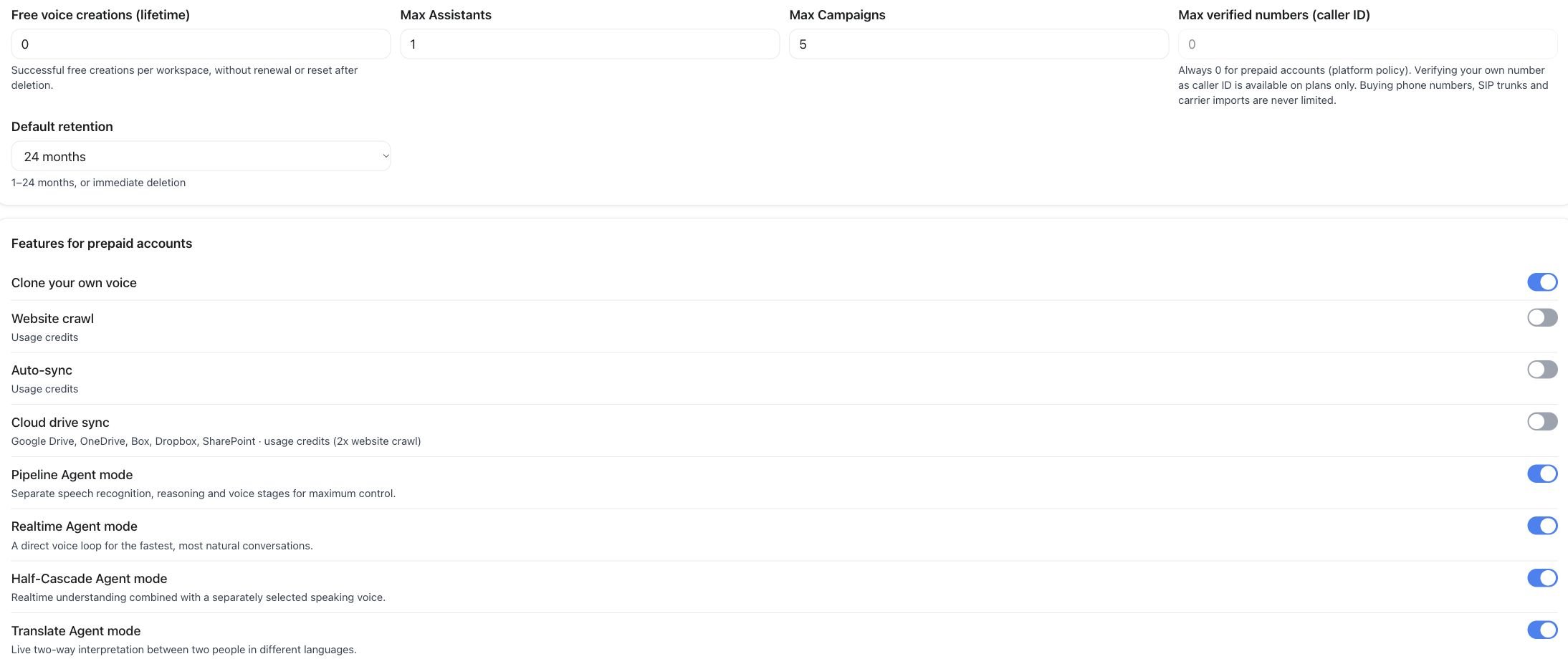
Prepaid defaults — editable limits and the first feature switches
Features for prepaid accounts
A long list of toggles decides which capabilities a prepaid customer has before subscribing to a plan — the engine modes (Pipeline, Realtime, Half-Cascade, Translate), every messaging channel (WhatsApp, Telegram, Slack, Teams, Discord, and more), the web widget and AI Avatar, Flow Builder, Connect AI / MCP, Automations, Live Monitoring, Simulations, Caller Memory, data retention and consent & compliance controls, AI QA (scorecards and cohort analysis), and whether prepaid customers can connect their own Stripe to collect payment cards. Paid plans configure the same kind of capabilities independently — see Plans & Pricing Setup. Default plan limits only govern customers who haven’t subscribed to one of your plans yet.Per-customer overrides
Open Whitelabel Admin → Users, select the customer workspace, then use its Limits or Appearance tab. These settings affect that one workspace, independently of the default configuration.Custom User Limits
In Limits, turn on Enable Custom Limits, adjust the permitted limits, and select Save. This overrides individual values, such as the number of assistants or campaigns, for one customer. An override here takes priority over whatever that customer’s subscribed plan specifies. Leave a field empty to fall back to the plan’s own limit.Custom User Appearance
In Appearance, turn on Enable Custom Appearance, then choose which navigation pages or product features to hide under Hide Pages, and select Save. These choices hide them from that one customer, independent of your global white-label branding and navigation. Use it when a particular customer shouldn’t see a feature the rest of your customers have access to.Both overrides are scoped to a single customer workspace. To change what’s available to every customer, use Plans & Pricing Setup (for subscribed customers) or Default plan limits above (for prepaid customers).
API and MCP
Registration, prepaid access, the prepaid extra-minute price, and prepaid defaults are available throughGET / PATCH /api/v1/platform/default-limits, or the MCP tools get_platform_default_limits and update_platform_default_limits. Welcome credits have their own endpoint — see White Label API. Custom User Limits and Custom User Appearance are currently dashboard-only actions.
See also White Label Program for the customer-workspace model these limits apply to, and Data Migration if a moved resource needs to respect a customer’s limits.