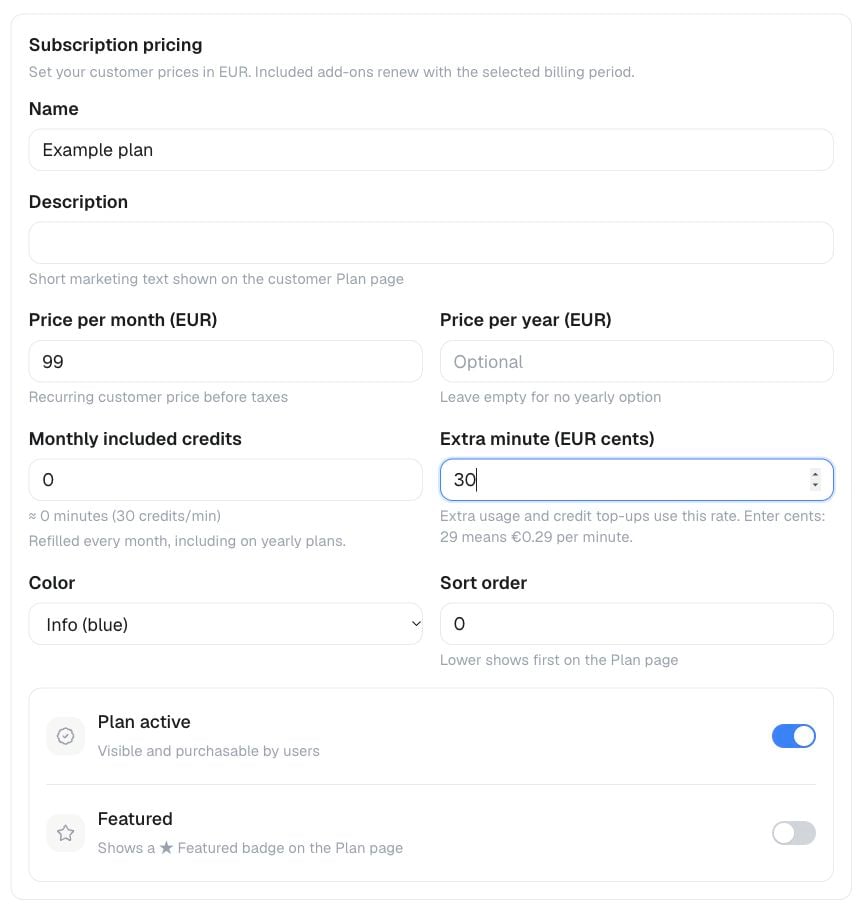
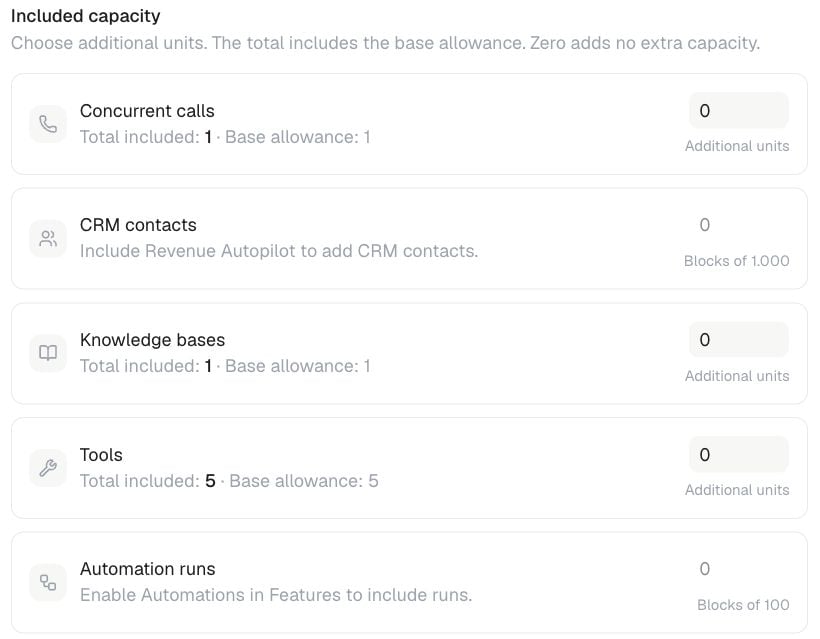
White-label resellers can create plans for their own customer workspaces. Each plan combines pricing, included minutes, usage rules, workspace limits, and product capabilities.

Plan contents

Pricing

Choose a monthly or yearly price, the included minutes, and the price for additional usage. The plan card previews what the customer sees before checkout.

Workspace limits

Common limits include: Use Unlimited only where the plan editor offers it. A value of zero means the capability is not included. Add-on-backed capacity cannot be included free in a reseller plan, free-account default, or customer override. This includes extra Concurrent Lines, cloned-voice slots, knowledge bases, tools, CRM sync capacity and contacts, automation runs, and extra workspaces. Every workspace still has its one-line baseline; all additional add-on capacity must be purchased.

Included capabilities

Plans can include capabilities such as Flow Builder, the web widget, AI Avatar, Connect AI / MCP, additional languages, calendar integrations, custom dashboards, live monitoring, simulations, data retention, website imports, and automatic knowledge sync. Customers see the included capabilities and limits on the plan card. Actions outside the plan remain unavailable throughout the product and API.

Add-ons

Optional add-ons are selected from the plan card and billed with the same interval when supported. Platform add-ons are not offered to your customers until you explicitly enable Offer to my users. Add-on-backed features such as Fallbacks & Guardrails, Clone your own voice, and Revenue Autopilot, together with their related capacity, are sold here rather than included through Plans or Default plan limits. API Access follows the same add-on-only rule: it cannot be bundled into a reseller plan, free-account defaults, or a customer override. Offer it explicitly as a recurring add-on. Connect AI / MCP remains a separate capability that may still be included in a plan. When you enable an add-on for resale, set the customer-facing price shown at checkout. Recurring add-on prices are configured separately from usage pricing. Some usage-based capabilities, such as website imports and automatic sync, are charged in credits according to your usage pricing rather than as recurring add-ons.

Usage pricing

Beyond the recurring plan price, usage-based actions — call minutes, email, web chat, messaging channels, knowledge-base crawl and sync, re-transcription, SMS, simulator messages, history re-evaluation, and automation runs — are billed in credits at rates you set on the Usage pricing page. Set the customer-facing rates for credit-metered actions on the Usage pricing page. These rates are separate from subscription and recurring add-on prices. Your customers see the resulting rates on their own Usage page.

Free accounts

If you allow free registration on your white-label domain, configure the limits and pay-as-you-go minute price under Default plan limits. These settings apply to new customer workspaces that have not selected a paid plan.

Publishing and changing plans

Review the customer-facing name, description, limits, prices, and checkout before publishing a plan. Paid plan changes take effect through the billing flow. Included minutes are credited according to the customer’s billing cycle. The plan editor prevents incomplete or invalid pricing combinations. Existing customers keep access according to their active subscription and any changes shown in the billing flow. See How minutes are billed and Billing setup for the customer billing experience.