Every trigger and step in the Automation builder, with its fields and behavior
This is the field-level reference for the Automation builder — every trigger, every step, and how data moves between them. For what Automations are for, how runs are billed, and worked examples, start with Automations overview.
Every workflow in the workspace — connected app icons, name (with its trigger, and the bound assistant if the trigger has one), tags, run count, when it last fired, and status. Search, filter by tag, and activate/pause/delete from the row menu.
Runs
Every run across every automation — which automation, trigger, status, credits charged, when, and the error if it failed. The same list, scoped to one automation, also lives in that automation’s own Runs tab in the editor.
Connections
Saved, reusable credentials for CRMs, SMTP, and MCP servers. Each row shows a provider icon, a kind badge (API or MCP), and a status pill (ok / pending / error) — test or edit one without touching the automations that use it.
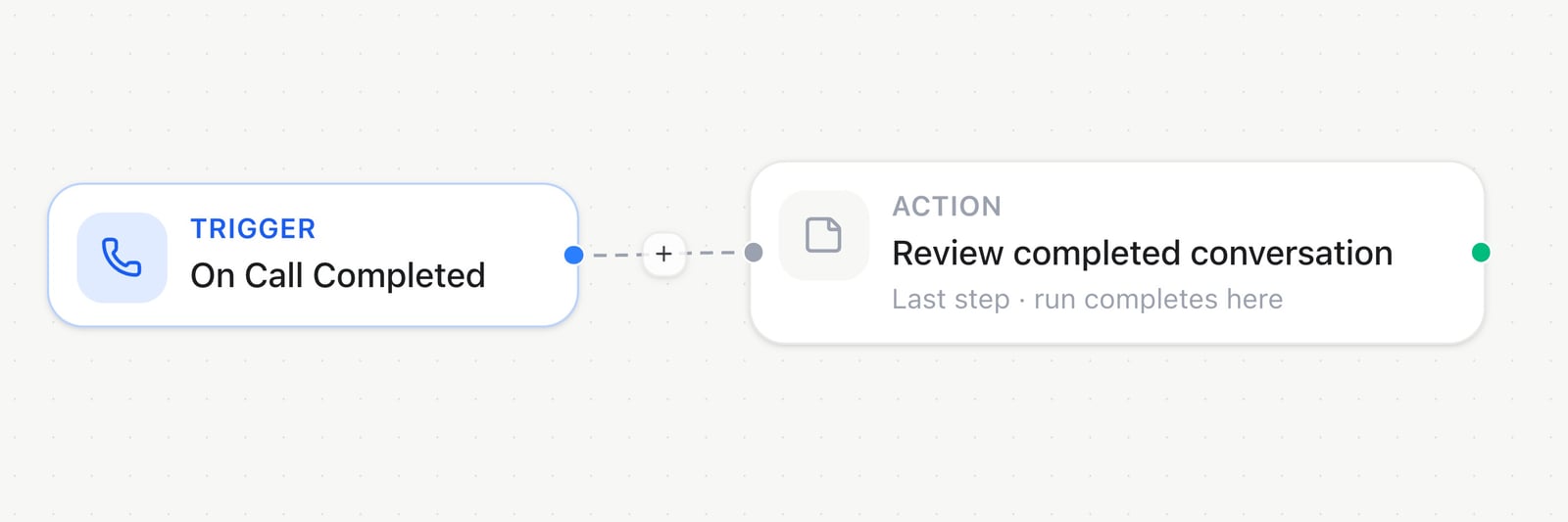
In the Automation builder, On Call Completed starts this example; use the + on the connection to add another step.
Every trigger starts from a specific event. Assistant-bound triggers (On Call Completed, On Inbound Call, Inject input variables) require picking a specific assistant. Booking, conversation, and email triggers take an optional Assistant filter instead; conversation triggers can also be narrowed to one messaging connection or platform, and booking triggers to a single booking page.For conversation triggers, Platform and Channel or widget show only active, connected channels assigned to the selected assistant. Without an assistant filter, they show the workspace’s connected channels. Web chat widgets are available for Conversation started. Choosing a connection sets its platform automatically. Saved filters remain visible as unavailable if their connection is removed, disabled or reassigned; review them before saving. Leaving the connection filter empty also includes future matching connections. REST and MCP use the same assistant, platform and connection filters.
Trigger
Fires when
On Call Completed
A voice call ends and its post-call analysis is ready.
On Inbound Call
An inbound call starts ringing, before it’s answered or analyzed.
Inject input variables
A call from the selected assistant is starting — this replaces that assistant’s variable webhook for the duration this automation is Live. Pair it with Return variables.
Conversation started
A new messaging or web chat conversation opens, including widget previews.
Conversation ended
A messaging conversation closes or times out.
Message received
Every inbound message on a channel, not just the first one — optionally filter by platform.
Email received
An inbound email arrives on a workspace address.
Booking created / cancelled / rescheduled
A booking-page event happens.
Contact created
A new Audience contact is added. Choose which sources count — created manually (on by default), CSV/file import, API, CRM sync — so a bulk import can’t fire thousands of runs by accident.
Manual
Runs only when you click Run now, call the API, or ask Milian.
Schedule
Cron-based, on a timezone (coming soon — selectable today for drafts).
A generic or CRM webhook trigger gets its own inbound URL and secret, shown directly in the trigger’s settings once the automation is saved. HighLevel and connected apps deliver events through a shared, pre-authenticated endpoint instead — set up once for the workspace, not per automation:
Trigger
Fires when
Incoming Webhook
Something POSTs JSON to this automation’s inbound URL, with the automation’s secret in an X-Automation-Secret header.
The connected CRM POSTs an event to this trigger’s own inbound URL — same mechanics as Incoming Webhook, just filed under that provider in the catalog.
HighLevel webhook
HighLevel sends a signed CRM or appointment event from its Marketplace app. One Marketplace webhook URL is reused across every HighLevel automation; you scope each automation by picking a HighLevel connection and one HighLevel event.
App event
A connected app delivers a signed event — a new commit, an inbox message, and so on. Pick the app and event from the catalog.
A run also ends cleanly whenever a step has no outgoing connection. These three end it explicitly, and two of them hand back a specific answer.
Step
What it does
Key fields
Example
Stop
Ends the run successfully, right here.
Reason (optional, logged)
Bail out early once a case is already handled
Return variables
Hands variables back to the call at start time — pairs with the Inject input variables trigger. Ends the run.
Variables (key/value map)
Return customer_name and tier before the call begins
Respond to webhook
Answers the caller of an Incoming Webhook trigger with a status and body — the only way that caller gets a real response instead of a generic acknowledgement. Ends the run.
Mode (JSON object / raw text / forward last step), status code, body
Return { "ok": true, "id": "{{last.id}}" }
When an assistant calls this automation mid-conversation, every path must end at Respond to webhook, with no Delay or Loop step first.
Grouped under Milian AI in the catalog. These actions use workspace credits based on token usage at your workspace’s rates. The charged amount appears on the run and in the step’s Test panel.
Add Node → Milian AI lists the analysis actions, including Classify Text, Custom Prompt, and Extract Fields. Select an action to configure its inputs.
Step
What it does
Key fields
Example
Custom Prompt
Runs a free-form prompt against a transcript, message, or any prior step’s output, and returns text.
Prompt, optional system prompt
Summarize {{data.transcript}} into two sentences
Extract Fields
Pulls named, typed fields out of a block of text. Each field is a row in the panel: name, type (text / email / number / boolean / enum), and whether it’s required.
Add a step in Automations → Milian AI to classify text, check a condition, score content, detect multiple labels or build a custom analysis. Custom Prompt and Extract Fields remain available.
Classify Text → Configure: choose Input Data, an Answer key, the Question, and the Categories. The shown values are editable examples.
Five new actions. Turn transcripts, messages and previous step outputs into categories, yes/no decisions, scores or labels.
Three editable templates. Start Custom Analysis with Analyze a call, Qualify a lead or Prioritize a message, then adjust the questions.
Clear uncertainty. Insufficient evidence produces an uncertain answer instead of a guessed value. Use the result status in a Condition before continuing.
Your workspace, your workflow. Preview inputs without spending credits, run a live test with workspace credits, and reuse the same configuration through REST or MCP.
Actual analysis uses workspace credits. Scores use your scoring levels and are displayed on a 0–100 scale.Choose Custom Analysis to mix question types or apply one of the three templates. Give each answer a unique key. Categories need 2–32 options with descriptions; scores need 2–10 ordered levels. An analysis can include up to 32 questions. Provide text up to 32 KB; split longer inputs deliberately rather than dropping part of a transcript.Use Minimum probability for category and yes/no decisions, and Minimum confidence for categories and scores. Every question also checks whether the input provides enough information. These thresholds are configurable controls, not guarantees of correctness.Each answer has a value and a status. An uncertain answer returns null; a supported negative answer returns false. In Detect Labels, the label list contains only accepted matches; check individual results for uncertain labels. A technical failure stops the step instead of becoming a negative answer. Multiple independent questions share one evaluation request.Use the variable picker to reference answers in subsequent steps. Check the status first, then compare the value with a Condition. A Milian AI evaluation step does not itself create extra routing branches. Summaries, translations and open-ended extraction continue to use Custom Prompt or Extract Fields.
Text a booking-confirmation template right after Booking created
Send SMS
Sends a text from a workspace number that has SMS enabled.
From number, to, message
Text a missed-call follow-up to {{data.from_number}}
Send Email
Sends from the platform mail server or a verified assistant address.
Sender, to, subject, email format, body
Email the transcript to a support inbox
Send Email (SMTP)
Sends through your own saved SMTP relay instead of the platform mail server.
SMTP connection, to, subject, email format, body
Send a receipt through your company’s own mail server
Email format on both email steps decides how the body is sent:
Format
What the recipient gets
Auto (recommended)
HTML bodies go out as HTML. Any other body goes out as formatted text that keeps every line break, blank line, - list and link. Email steps created before this option use Auto.
Text
A plain-text email, exactly as written.
HTML
The body is HTML. A plain-text version is added for email apps that don’t show HTML.
Both
Formatted text plus plain text — the recipient’s email app picks the version it shows.
For mail apps such as Gmail or Outlook, Execute app tool offers the same Email format choice (Text or HTML). When an Extract Fields text field fills an email body, it puts each detail on its own line (Label: value), so the email keeps the same layout from call to call.
Suppression actions are idempotent — re-adding or re-removing the same identity never fails a run.
Step
What it does
Key fields
Example
Create or Update Contact
Upserts an Audience lead by phone and/or email.
Phone, email, name, attributes
Save a caller as a lead right after the call ends
Get Contact by Phone Number
Looks up a lead by phone.
Phone
Check whether {{data.from_number}} is already a known lead
Get All Contacts
Lists recent leads (max 100).
Limit
Pull the newest leads for a digest email
Add Tags to Contact
Appends tags to a lead.
Contact ID, tags
Tag a lead hot after a qualifying call
Add Attributes to Contact
Merges custom attribute values onto a lead.
Contact ID, attributes
Save a deal size onto the matched lead
Add to blocklist
Suppresses a phone or email so campaigns and outbound messages skip it.
Phone, email, channel (optional — auto-selects voice or email), reason
Suppress a number the moment someone says “stop”
Remove from blocklist
Restores a previously suppressed phone or email.
Phone, email
Un-suppress after a fresh opt-in
Call Phone Number
Starts an outbound call with a chosen assistant.
Assistant, to (E.164), optional Variables
Call a lead back automatically after a missed inbound call
Call Phone Number also accepts optional Variables as a flat JSON object, for example { "auftrag": "{{data.task}}" }. Values may be text (up to 2000 characters), numbers or booleans. You can also use an entire mapping from a previous step, such as {{data.inputs}}. These are inputs for this call and do not edit the assistant or contact. Invalid or oversized resolved values fail the step before dialing. Check the resulting call’s expected inputs and actual outcome separately; creating a call is not proof that the task succeeded.
Neither of these needs a saved connection — paste a URL and go.
Step
What it does
Key fields
Example
HTTP Request
Calls any HTTPS endpoint with the trigger payload or a custom JSON body.
URL, method, headers, body
POST the call summary to an internal ops endpoint
Slack (Webhook)
Posts to a Slack channel via an Incoming Webhook URL.
Webhook URL, message
Drop a one-line alert in an ops channel when a run fails
Discord (Webhook)
Posts to a Discord channel via a webhook URL.
Webhook URL, message
Post a heads-up for every new booking
Microsoft Teams (Webhook)
Posts text to a Teams Incoming Webhook.
Webhook URL, title, message
Notify a Teams channel when a high-value lead comes in
HTTP Request actions retry temporary HTTP and connection failures up to twice within the configured timeout, using the same Idempotency-Key. Temporary failures are HTTP 408, 425, 429, 5xx and network errors. Permanent errors stop immediately. The timeout covers the whole action; retries stop when that budget is exhausted. The receiver must honor Idempotency-Key to prevent duplicate effects after a lost response.
CRM, MCP, and connected-app steps all read or write an external system through a saved credential — add one under Automations → Connections before using any of them. Each shows up in the catalog as Provider · Action (for example Airtable · Create record).CRM providers. See CRM sync for the recurring-sync setup and the HighLevel authorize flow — these action nodes write one record at a time, independent of any sync schedule.
Provider
What you can do
Airtable
List, find, search, find-or-create, get, create (single or up to 10 at once), update, and delete records — base/table/field/view pickers load from your schema automatically.
HubSpot
Get, create, update, and search contacts; create a deal; create a note.
Salesforce
Run a SOQL query, or get, create, and update any object record.
Close.io
Create or update a lead, create a contact, create an opportunity, create a note, and search.
HighLevel
List/get/create/update contacts, create an opportunity, create a note, plus calendar reads and appointment writes — list calendars, get free slots, create, update/reschedule, and cancel.
Pipedrive
List/search/get/create/update persons, create a deal, add a note.
Zoho CRM
List, search, get, create, and update records in any module.
Attio
List/filter, get, create, and update people, companies, or custom-object records.
Keap
List/search/get/create/update contacts, create an opportunity, create a note.
Twenty CRM
List/filter, get, create, and update records — hosted or self-hosted.
Example: after On Call Completed, use a HubSpot update to log {{data.analysis.success}} on the matched contact, or branch on it first with Condition.Vendor & generic MCP. Instead of fixed fields, these hand a prompt and the run’s context to an agent that picks the right tool and arguments itself — useful when the exact call varies run to run. Both bill workspace AI credits for the agent’s reasoning.
”List overdue Jira tickets and note the oldest one”
MCP · Call tool
Same agent-picks-the-tool pattern, for any MCP server saved as a connection.
Connection, allowed tools, agent prompt
”Add {{last.email}} to the CRM as a new contact”
Connected apps. Beyond the platforms above, the catalog also carries every app your workspace has connected over OAuth. Connect one under Connections → App marketplace, then pick it as a trigger or action like any built-in platform. See App Catalog for the full list and how connecting works. Apps with many actions load more as you scroll; type in Search actions… above the list to find any action by name or keyword, such as send message.
Step
What it does
Key fields
Example
Execute app tool
Runs one tool from a connected app; its fields load from the tool’s own schema.
App connection, tool
Create a row in a connected spreadsheet
App event(trigger)
Fires when a connected app delivers a signed event.
Every field marked with a ⚡ accepts {{ }} templates pulled from the run’s current data.
Pattern
Resolves to
{{data.from_number}}
A field from the trigger’s payload
{{steps.<nodeId>.<field>}}
An output field from a specific earlier step
{{last.<field>}}
An output field from the step immediately before this one
{{item}} / {{index}}
The current item / position inside a Loop on Items body
Extract Fields returns its values twice — nested under fields ({{steps.step1.fields.email}}) and flattened onto the step itself ({{steps.step1.email}}) — use whichever reads more clearly.
Set variable writes into the run itself rather than a step’s own output — reference the path you chose the same way afterward, e.g. {{vars.summary}}.
Condition, Switch, and Loop on Items also decide which connected path runs next — drag separate connections out of their true/false, per-case, or Loop/Done handles.
Use Insert Variable to browse what’s available instead of typing paths by hand. For longer text, click the expand icon on any field to open the large editor: earlier steps’ fields on the left (click or drag them in), the expression in the middle, and the result with your test data on the right — for email bodies including a preview of the email exactly as it will be sent. Each step’s Test panel has two levels: Connect Test only checks your fields are valid; Run test executes the step for real and fills Insert Variable with live outputs for every later step.
Run test is a real execution, not a simulation — on connected apps, email, SMS, HTTP, and CRM steps it can create or change real data.
Classify Text → Test prompts you to load sample data on the trigger first. Review the input before running an action; a live test uses workspace credits.
Not live — triggers never start a run. Safe to keep editing.
Live
Active — matching trigger events start real runs.
Paused
Temporarily off. Switch it back to Live to resume.
Archived
Retired. Reactivate it the same way as Paused if you need it again.
An automation that fails five runs in a row is paused automatically, so a broken graph can’t keep firing. Check the Runs tab for the error, fix it, then switch it back to Live.
Open an automation and ask Milian, the AI copilot, to build or change it in plain language — add a trigger and steps, wire a condition’s true/false branches, rename or retag it, switch it Live, or debug a failed run, the same things you’d do by hand. Try “add an email step after the trigger,” “add a condition branch and wire true/false,” or “debug the last failed run.”Milian applying a change directly shows Milian saved changes; updating the canvas without saving shows Milian updated the canvas — click Save to persist, and the change stays a draft until you click Save.
Keep Audience and a connected CRM aligned on a schedule
{"docsConfig":{"theme":"mint","$schema":"https://mintlify.com/docs.json","name":"Famulor","description":"Famulor documentation — build, deploy, and operate AI voice assistants.","colors":{"primary":"#1FD5FA","light":"#67E8FC","dark":"#0BA8C9"},"logo":{"light":"https://mintcdn.com/ouraicall/baoJp-MLrp4Nh8VX/logo/lockup-light.svg?fit=max\u0026auto=format\u0026n=baoJp-MLrp4Nh8VX\u0026q=85\u0026s=fd2b4cadd4821a549ba9fa5783ed619d","dark":"https://mintcdn.com/ouraicall/baoJp-MLrp4Nh8VX/logo/lockup-dark.svg?fit=max\u0026auto=format\u0026n=baoJp-MLrp4Nh8VX\u0026q=85\u0026s=8c5966ded7ffff8de6db3a09bd55f712"},"favicon":"https://mintcdn.com/ouraicall/2UgcT6Kzg4NlgPC2/favicon.svg?fit=max\u0026auto=format\u0026n=2UgcT6Kzg4NlgPC2\u0026q=85\u0026s=b7b1116d604f04ce5ebedef057e0580f","navbar":{"links":[{"href":"https://status.famulor.io","label":"Platform Status"}],"primary":{"type":"button","label":"Dashboard","href":"https://app.famulor.io"}},"footer":{"socials":{"linkedin":"https://www.linkedin.com/company/Famulor"}},"seo":{"metatags":{"twitter:card":"summary_large_image"},"organization":{"name":"Famulor","logo":"https://docs.famulor.io/logo/lockup-light.svg"}},"integrations":{"clarity":{"projectId":"sop2kcwotx"},"ga4":{"measurementId":"G-WPTBT13HB0"}},"banner":{"content":"For AI agents: see the complete **[llms.txt](https://docs.famulor.io/llms.txt)** documentation index.","dismissible":true,"color":{"light":"#000000","dark":"#000000"}},"styling":{"latex":false},"navigation":{"languages":[{"language":"en","href":""},{"language":"fr","href":"fr"},{"language":"es","href":"es"},{"language":"de","href":"de"}]}},"deployment":{"deploymentMetadataValue":{"subdomain":"ouraicall","hasAudioNarration":false,"actualSubdomain":"ouraicall","customDomains":["docs.famulor.io"],"gitSource":{"type":"github","owner":"bekservice","repo":"famulor-multi-tenancy","deployBranch":"main","contentDirectory":"mintlify","isPrivate":true,"mountPath":"","label":""},"chroma":{"collectionId":"837052af-37d0-49a0-b690-4af7a4b0dde2","liveDeploymentHistoryId":"6addaf84aa71df2f0249f4d9","schemaVersion":"v3","latestBuiltDeploymentHistoryId":"6addaf84aa71df2f0249f4d9"},"feedback":{"thumbs":true,"agentFeedback":true},"entitlements":{},"buildId":"6addaf84aa71df2f0249f4d9","clientVersion":"0.0.3966","searchFilterCounts":[{"language":"default","tag":"API Reference","count":425},{"language":"en","tag":"Documentation","count":132},{"language":"de","tag":"Dokumentation","count":132},{"language":"es","tag":"Documentación","count":132},{"language":"fr","tag":"Documentation","count":132},{"language":"en","tag":"API 1.0 (Legacy)","count":102},{"language":"de","tag":"API 1.0 (Legacy)","count":102},{"language":"es","tag":"API 1.0 (Legacy)","count":102},{"language":"fr","tag":"API 1.0 (Legacy)","count":102},{"language":"default","tag":"Famulor Loop","count":37},{"language":"en","tag":"API Reference","count":35},{"language":"en","tag":"Assistants","count":35},{"language":"default","tag":"Messaging","count":35},{"language":"de","tag":"Assistenten","count":35},{"language":"es","tag":"Asistentes","count":35},{"language":"fr","tag":"Assistants","count":35},{"language":"en","tag":"Channels","count":32},{"language":"de","tag":"API-Referenz","count":32},{"language":"de","tag":"Kanäle","count":32},{"language":"es","tag":"Canales","count":32},{"language":"fr","tag":"Canaux","count":32},{"language":"default","tag":"Knowledge Bases","count":31},{"language":"default","tag":"Automations","count":28},{"language":"en","tag":"Automation","count":27},{"language":"default","tag":"Settings","count":27},{"language":"de","tag":"Automatisierung","count":27},{"language":"es","tag":"Automatización","count":27},{"language":"es","tag":"Referencia de la API","count":27},{"language":"fr","tag":"Automatisation","count":27},{"language":"fr","tag":"Référence API","count":27},{"language":"en","tag":"Telephony","count":25},{"language":"de","tag":"Telefonie","count":25},{"language":"es","tag":"Telefonía","count":25},{"language":"fr","tag":"Téléphonie","count":25},{"language":"en","tag":"AI Assistants","count":24},{"language":"de","tag":"KI-Assistants","count":24},{"language":"es","tag":"Asistentes de IA","count":24},{"language":"fr","tag":"Assistants IA","count":24},{"language":"default","tag":"Assistants","count":20},{"language":"default","tag":"White Label","count":20},{"language":"default","tag":"Tools","count":18},{"language":"en","tag":"Shopify","count":16},{"language":"default","tag":"Integrations","count":16},{"language":"de","tag":"Shopify","count":16},{"language":"es","tag":"Shopify","count":16},{"language":"fr","tag":"Shopify","count":16},{"language":"en","tag":"Getting started","count":11},{"language":"de","tag":"Erste Schritte","count":11},{"language":"es","tag":"Primeros pasos","count":11},{"language":"fr","tag":"Bien démarrer","count":11}],"searchSettings":{"showContentSnippets":true}},"assistantConfig":{"enableAskAiButton":false,"enableStarterQuestions":false,"enableContextualStarterQuestions":false,"enableAskAiSearchBar":true},"hasChatPermissions":false,"hasWebMcpPermissions":false,"toggles":[{"name":"kill-isr","enabled":true,"variant":{"name":"disabled","enabled":false,"feature_enabled":true},"impressionData":false},{"name":"agent-mintlify-slack","enabled":true,"variant":{"name":"disabled","enabled":false,"feature_enabled":true},"impressionData":false},{"name":"editor-v7-file-tree","enabled":true,"variant":{"name":"disabled","enabled":false,"feature_enabled":true},"impressionData":false},{"name":"agent-integrations-settings","enabled":true,"variant":{"name":"disabled","enabled":false,"feature_enabled":true},"impressionData":false},{"name":"automations-pr-grouping","enabled":true,"variant":{"name":"disabled","enabled":false,"feature_enabled":true},"impressionData":false},{"name":"custom-prefix","enabled":true,"variant":{"name":"disabled","enabled":false,"feature_enabled":true},"impressionData":false},{"name":"analytics-v7","enabled":true,"variant":{"name":"disabled","enabled":false,"feature_enabled":true},"impressionData":false},{"name":"user-flows-analytics","enabled":true,"variant":{"name":"disabled","enabled":false,"feature_enabled":true},"impressionData":false},{"name":"no-publish-flow","enabled":true,"variant":{"name":"disabled","enabled":false,"feature_enabled":true},"impressionData":false},{"name":"workos-onboarding","enabled":true,"variant":{"name":"disabled","enabled":false,"feature_enabled":true},"impressionData":false},{"name":"llms-txt-v2","enabled":true,"variant":{"name":"disabled","enabled":false,"feature_enabled":true},"impressionData":false},{"name":"pause-universal-search-reconcile","enabled":true,"variant":{"name":"disabled","enabled":false,"feature_enabled":true},"impressionData":false},{"name":"snapshot-serving-live","enabled":true,"variant":{"name":"disabled","enabled":false,"feature_enabled":true},"impressionData":false},{"name":"stripTemperatureMiddleware","enabled":true,"variant":{"name":"disabled","enabled":false,"feature_enabled":true},"impressionData":false},{"name":"per-site-search-delta","enabled":true,"variant":{"name":"disabled","enabled":false,"feature_enabled":true},"impressionData":false},{"name":"support-platform-pylon-zendesk","enabled":true,"variant":{"name":"disabled","enabled":false,"feature_enabled":true},"impressionData":false},{"name":"snapshot-serving","enabled":true,"variant":{"name":"disabled","enabled":false,"feature_enabled":true},"impressionData":false},{"name":"instant-rollback","enabled":true,"variant":{"name":"disabled","enabled":false,"feature_enabled":true},"impressionData":false},{"name":"granular-notifications-server","enabled":true,"variant":{"name":"disabled","enabled":false,"feature_enabled":true},"impressionData":false},{"name":"granular-notifications","enabled":true,"variant":{"name":"disabled","enabled":false,"feature_enabled":true},"impressionData":false},{"name":"editor-private-page-search","enabled":true,"variant":{"name":"disabled","enabled":false,"feature_enabled":true},"impressionData":false},{"name":"automations-fable","enabled":true,"variant":{"name":"disabled","enabled":false,"feature_enabled":true},"impressionData":false},{"name":"fixed-ai-action-pricing","enabled":true,"variant":{"name":"disabled","enabled":false,"feature_enabled":true},"impressionData":false},{"name":"automation-resolve-merge-conflict","enabled":true,"variant":{"name":"disabled","enabled":false,"feature_enabled":true},"impressionData":false},{"name":"scoped-publishing","enabled":true,"variant":{"name":"disabled","enabled":false,"feature_enabled":true},"impressionData":false},{"name":"mintql","enabled":true,"variant":{"name":"disabled","enabled":false,"feature_enabled":true},"impressionData":false},{"name":"page-level-analytics","enabled":true,"variant":{"name":"disabled","enabled":false,"feature_enabled":true},"impressionData":false},{"name":"editor-version-history-v2","enabled":true,"variant":{"name":"disabled","enabled":false,"feature_enabled":true},"impressionData":false},{"name":"editor-nav-generations","enabled":true,"variant":{"name":"disabled","enabled":false,"feature_enabled":true},"impressionData":false},{"name":"billing-page-v2","enabled":true,"variant":{"name":"disabled","enabled":false,"feature_enabled":true},"impressionData":false},{"name":"workspace-projects","enabled":true,"variant":{"name":"disabled","enabled":false,"feature_enabled":true},"impressionData":false},{"name":"assistant-v5","enabled":true,"variant":{"name":"disabled","enabled":false,"feature_enabled":true},"impressionData":false},{"name":"byok-sep-25","enabled":true,"variant":{"name":"disabled","enabled":false,"feature_enabled":true},"impressionData":false},{"name":"fork-pr-previews","enabled":true,"variant":{"name":"disabled","enabled":false,"feature_enabled":true},"impressionData":false},{"name":"revalidation-jwt","enabled":true,"variant":{"name":"disabled","enabled":false,"feature_enabled":true},"impressionData":false},{"name":"vite-origin","enabled":true,"variant":{"name":"disabled","enabled":false,"feature_enabled":true},"impressionData":false},{"name":"editor-agent-model-picker","enabled":true,"variant":{"name":"disabled","enabled":false,"feature_enabled":true},"impressionData":false},{"name":"billing-updated-9-15","enabled":true,"variant":{"name":"disabled","enabled":false,"feature_enabled":true},"impressionData":false},{"name":"hobby-abuse-scan","enabled":true,"variant":{"name":"disabled","enabled":false,"feature_enabled":true},"impressionData":false},{"name":"dashboard-inbox","enabled":true,"variant":{"name":"disabled","enabled":false,"feature_enabled":true},"impressionData":false}],"privacy":{"consentBanner":{"enabled":true}},"isAtlas":false,"googleFontsInlined":false},"customCss":[],"page":{"pagePath":"automations/nodes","slug":"/automations/nodes","pageMetadata":{"title":"Automation node reference","description":"Every trigger and step in the Automation builder, with its fields and behavior","href":"/automations/nodes"},"description":{"compiledSource":"\"use strict\";\nconst {jsx: _jsx} = arguments[0];\nconst {useMDXComponents: _provideComponents} = arguments[0];\nfunction _createMdxContent(props) {\n const _components = {\n p: \"p\",\n ..._provideComponents(),\n ...props.components\n };\n return _jsx(_components.p, {\n children: \"Every trigger and step in the Automation builder, with its fields and behavior\"\n });\n}\nfunction MDXContent(props = {}) {\n const {wrapper: MDXLayout} = {\n ..._provideComponents(),\n ...props.components\n };\n return MDXLayout ? _jsx(MDXLayout, {\n ...props,\n children: _jsx(_createMdxContent, {\n ...props\n })\n }) : _createMdxContent(props);\n}\nreturn {\n default: MDXContent\n};\n","frontmatter":{},"scope":{}},"pageType":"default","mdx":{"mdxSource":{"compiledSource":"\"use strict\";const{Fragment:_Fragment,jsx:_jsx,jsxs:_jsxs}=arguments[0];const{useMDXComponents:_provideComponents}=arguments[0];function _createMdxContent(props){const _components={a:`a`,code:`code`,em:`em`,li:`li`,p:`p`,strong:`strong`,tbody:`tbody`,td:`td`,th:`th`,thead:`thead`,tr:`tr`,ul:`ul`,..._provideComponents(),...props.components},{Card,CardGroup,Frame,Heading,Mermaid,Note,OptimizedImage,Table,Tip,Warning}=_components;if(!Card)_missingMdxReference(`Card`,true);if(!CardGroup)_missingMdxReference(`CardGroup`,true);if(!Frame)_missingMdxReference(`Frame`,true);if(!Heading)_missingMdxReference(`Heading`,true);if(!Mermaid)_missingMdxReference(`Mermaid`,true);if(!Note)_missingMdxReference(`Note`,true);if(!OptimizedImage)_missingMdxReference(`OptimizedImage`,true);if(!Table)_missingMdxReference(`Table`,true);if(!Tip)_missingMdxReference(`Tip`,true);if(!Warning)_missingMdxReference(`Warning`,true);return _jsxs(_Fragment,{children:[_jsxs(_components.p,{children:[`This is the field-level reference for the Automation builder — every trigger, every step, and how data moves between them. For what Automations are for, how runs are billed, and worked examples, start with `,_jsx(_components.a,{href:`/automations/overview`,children:`Automations overview`}),`.`]}),`\n`,_jsx(Heading,{level:`2`,id:`automations-list-tabs`,children:`Automations list tabs`}),`\n`,_jsxs(_components.p,{children:[`The `,_jsx(_components.code,{children:`/automations`}),` list page has three tabs:`]}),`\n`,_jsxs(Table,{children:[_jsx(_components.thead,{children:_jsxs(_components.tr,{children:[_jsx(_components.th,{children:`Tab`}),_jsx(_components.th,{children:`Shows`})]})}),_jsxs(_components.tbody,{children:[_jsxs(_components.tr,{children:[_jsx(_components.td,{children:_jsx(_components.strong,{children:`Automations`})}),_jsx(_components.td,{children:`Every workflow in the workspace — connected app icons, name (with its trigger, and the bound assistant if the trigger has one), tags, run count, when it last fired, and status. Search, filter by tag, and activate/pause/delete from the row menu.`})]}),_jsxs(_components.tr,{children:[_jsx(_components.td,{children:_jsx(_components.strong,{children:`Runs`})}),_jsxs(_components.td,{children:[`Every run across every automation — which automation, trigger, status, credits charged, when, and the error if it failed. The same list, scoped to one automation, also lives in that automation’s own `,_jsx(_components.strong,{children:`Runs`}),` tab in the editor.`]})]}),_jsxs(_components.tr,{children:[_jsx(_components.td,{children:_jsx(_components.strong,{children:`Connections`})}),_jsx(_components.td,{children:`Saved, reusable credentials for CRMs, SMTP, and MCP servers. Each row shows a provider icon, a kind badge (API or MCP), and a status pill (ok / pending / error) — test or edit one without touching the automations that use it.`})]})]})]}),`\n`,_jsx(Heading,{level:`2`,id:`triggers`,children:`Triggers`}),`\n`,_jsx(Frame,{caption:`In the Automation builder, On Call Completed starts this example; use the + on the connection to add another step.`,children:_jsx(OptimizedImage,{src:`https://mintcdn.com/ouraicall/L18h2_kwshrecloF/images/product-tour/automation-builder.png?fit=max\u0026auto=format\u0026n=L18h2_kwshrecloF\u0026q=85\u0026s=494f37225e79801c40462c426081bbdf`,alt:`Call-completed trigger connected to an action with an add-step button`,\"data-og-width\":`1600`,width:`1600`,\"data-og-height\":`533`,height:`533`,\"data-path\":`images/product-tour/automation-builder.png`,\"data-optimize\":`true`,\"data-opv\":`3`,srcset:`https://mintcdn.com/ouraicall/L18h2_kwshrecloF/images/product-tour/automation-builder.png?w=280\u0026fit=max\u0026auto=format\u0026n=L18h2_kwshrecloF\u0026q=85\u0026s=76987de57759b89331679b09ead2627e 280w, https://mintcdn.com/ouraicall/L18h2_kwshrecloF/images/product-tour/automation-builder.png?w=560\u0026fit=max\u0026auto=format\u0026n=L18h2_kwshrecloF\u0026q=85\u0026s=ab223a6a97b46e95adf037d70849b878 560w, https://mintcdn.com/ouraicall/L18h2_kwshrecloF/images/product-tour/automation-builder.png?w=840\u0026fit=max\u0026auto=format\u0026n=L18h2_kwshrecloF\u0026q=85\u0026s=384280228137e60d640e1bb16777c34e 840w, https://mintcdn.com/ouraicall/L18h2_kwshrecloF/images/product-tour/automation-builder.png?w=1100\u0026fit=max\u0026auto=format\u0026n=L18h2_kwshrecloF\u0026q=85\u0026s=b7810ed92b93e1198248f6af6c66a2b4 1100w, https://mintcdn.com/ouraicall/L18h2_kwshrecloF/images/product-tour/automation-builder.png?w=1650\u0026fit=max\u0026auto=format\u0026n=L18h2_kwshrecloF\u0026q=85\u0026s=1bc6687f4a7d96e175aaea676df709ac 1650w, https://mintcdn.com/ouraicall/L18h2_kwshrecloF/images/product-tour/automation-builder.png?w=2500\u0026fit=max\u0026auto=format\u0026n=L18h2_kwshrecloF\u0026q=85\u0026s=afc6d349901b6dc947715914335c7a0d 2500w`})}),`\n`,_jsxs(_components.p,{children:[`Every trigger starts from a specific event. Assistant-bound triggers (`,_jsx(_components.strong,{children:`On Call Completed`}),`, `,_jsx(_components.strong,{children:`On Inbound Call`}),`, `,_jsx(_components.strong,{children:`Inject input variables`}),`) require picking a specific assistant. Booking, conversation, and email triggers take an optional `,_jsx(_components.strong,{children:`Assistant filter`}),` instead; conversation triggers can also be narrowed to one messaging connection or platform, and booking triggers to a single booking page.`]}),`\n`,_jsxs(_components.p,{children:[`For conversation triggers, `,_jsx(_components.strong,{children:`Platform`}),` and `,_jsx(_components.strong,{children:`Channel or widget`}),` show only active, connected channels assigned to the selected assistant. Without an assistant filter, they show the workspace’s connected channels. Web chat widgets are available for `,_jsx(_components.strong,{children:`Conversation started`}),`. Choosing a connection sets its platform automatically. Saved filters remain visible as unavailable if their connection is removed, disabled or reassigned; review them before saving. Leaving the connection filter empty also includes future matching connections. REST and MCP use the same assistant, platform and connection filters.`]}),`\n`,_jsxs(Table,{children:[_jsx(_components.thead,{children:_jsxs(_components.tr,{children:[_jsx(_components.th,{children:`Trigger`}),_jsx(_components.th,{children:`Fires when`})]})}),_jsxs(_components.tbody,{children:[_jsxs(_components.tr,{children:[_jsx(_components.td,{children:_jsx(_components.strong,{children:`On Call Completed`})}),_jsx(_components.td,{children:`A voice call ends and its post-call analysis is ready.`})]}),_jsxs(_components.tr,{children:[_jsx(_components.td,{children:_jsx(_components.strong,{children:`On Inbound Call`})}),_jsx(_components.td,{children:`An inbound call starts ringing, before it’s answered or analyzed.`})]}),_jsxs(_components.tr,{children:[_jsx(_components.td,{children:_jsx(_components.strong,{children:`Inject input variables`})}),_jsxs(_components.td,{children:[`A call from the selected assistant is starting — this replaces that assistant’s variable webhook for the duration this automation is Live. Pair it with `,_jsx(_components.strong,{children:`Return variables`}),`.`]})]}),_jsxs(_components.tr,{children:[_jsx(_components.td,{children:_jsx(_components.strong,{children:`Conversation started`})}),_jsx(_components.td,{children:`A new messaging or web chat conversation opens, including widget previews.`})]}),_jsxs(_components.tr,{children:[_jsx(_components.td,{children:_jsx(_components.strong,{children:`Conversation ended`})}),_jsx(_components.td,{children:`A messaging conversation closes or times out.`})]}),_jsxs(_components.tr,{children:[_jsx(_components.td,{children:_jsx(_components.strong,{children:`Message received`})}),_jsx(_components.td,{children:`Every inbound message on a channel, not just the first one — optionally filter by platform.`})]}),_jsxs(_components.tr,{children:[_jsx(_components.td,{children:_jsx(_components.strong,{children:`Email received`})}),_jsx(_components.td,{children:`An inbound email arrives on a workspace address.`})]}),_jsxs(_components.tr,{children:[_jsx(_components.td,{children:_jsx(_components.strong,{children:`Booking created / cancelled / rescheduled`})}),_jsx(_components.td,{children:`A booking-page event happens.`})]}),_jsxs(_components.tr,{children:[_jsx(_components.td,{children:_jsx(_components.strong,{children:`Contact created`})}),_jsxs(_components.td,{children:[`A new Audience contact is added. Choose which `,_jsx(_components.strong,{children:`sources`}),` count — created manually (on by default), CSV/file import, API, CRM sync — so a bulk import can’t fire thousands of runs by accident.`]})]}),_jsxs(_components.tr,{children:[_jsx(_components.td,{children:_jsx(_components.strong,{children:`Manual`})}),_jsxs(_components.td,{children:[`Runs only when you click `,_jsx(_components.strong,{children:`Run now`}),`, call the API, or ask Milian.`]})]}),_jsxs(_components.tr,{children:[_jsx(_components.td,{children:_jsx(_components.strong,{children:`Schedule`})}),_jsx(_components.td,{children:`Cron-based, on a timezone (coming soon — selectable today for drafts).`})]})]})]}),`\n`,_jsx(_components.p,{children:`A generic or CRM webhook trigger gets its own inbound URL and secret, shown directly in the trigger’s settings once the automation is saved. HighLevel and connected apps deliver events through a shared, pre-authenticated endpoint instead — set up once for the workspace, not per automation:`}),`\n`,_jsxs(Table,{children:[_jsx(_components.thead,{children:_jsxs(_components.tr,{children:[_jsx(_components.th,{children:`Trigger`}),_jsx(_components.th,{children:`Fires when`})]})}),_jsxs(_components.tbody,{children:[_jsxs(_components.tr,{children:[_jsx(_components.td,{children:_jsx(_components.strong,{children:`Incoming Webhook`})}),_jsxs(_components.td,{children:[`Something POSTs JSON to this automation’s inbound URL, with the automation’s secret in an `,_jsx(_components.code,{children:`X-Automation-Secret`}),` header.`]})]}),_jsxs(_components.tr,{children:[_jsx(_components.td,{children:_jsx(_components.strong,{children:`Airtable / HubSpot / Salesforce / Close.io / Pipedrive / Zoho CRM / Attio / Keap / Twenty CRM webhook`})}),_jsx(_components.td,{children:`The connected CRM POSTs an event to this trigger’s own inbound URL — same mechanics as Incoming Webhook, just filed under that provider in the catalog.`})]}),_jsxs(_components.tr,{children:[_jsx(_components.td,{children:_jsx(_components.strong,{children:`HighLevel webhook`})}),_jsxs(_components.td,{children:[`HighLevel sends a signed CRM or appointment event from its Marketplace app. One `,_jsx(_components.strong,{children:`Marketplace webhook URL`}),` is reused across every HighLevel automation; you scope each automation by picking a `,_jsx(_components.strong,{children:`HighLevel connection`}),` and one `,_jsx(_components.strong,{children:`HighLevel event`}),`.`]})]}),_jsxs(_components.tr,{children:[_jsx(_components.td,{children:_jsx(_components.strong,{children:`App event`})}),_jsx(_components.td,{children:`A connected app delivers a signed event — a new commit, an inbox message, and so on. Pick the app and event from the catalog.`})]})]})]}),`\n`,_jsx(Heading,{level:`2`,id:`steps`,children:`Steps`}),`\n`,_jsx(Heading,{level:`3`,id:`logic-\u0026-flow-control`,children:`Logic \u0026 flow control`}),`\n`,_jsx(_components.p,{children:`These don’t talk to anything outside the automation — they shape which path a run takes, or pause it.`}),`\n`,_jsx(Frame,{caption:`In the Builder, open Add Node → Famulor to choose a logic action such as Condition, Loop on Items, Filter, or Set variable.`,children:_jsx(OptimizedImage,{src:`https://mintcdn.com/ouraicall/in65rcKkEfEQesee/images/guide-ui/automation-add-node.png?fit=max\u0026auto=format\u0026n=in65rcKkEfEQesee\u0026q=85\u0026s=4853f1371dd40d7a512a99d9238581d7`,alt:`Add Node chooser showing Famulor logic actions`,\"data-og-width\":`702`,width:`702`,\"data-og-height\":`897`,height:`897`,\"data-path\":`images/guide-ui/automation-add-node.png`,\"data-optimize\":`true`,\"data-opv\":`3`,srcset:`https://mintcdn.com/ouraicall/in65rcKkEfEQesee/images/guide-ui/automation-add-node.png?w=280\u0026fit=max\u0026auto=format\u0026n=in65rcKkEfEQesee\u0026q=85\u0026s=7071127c611ab3a2a13e47628389655e 280w, https://mintcdn.com/ouraicall/in65rcKkEfEQesee/images/guide-ui/automation-add-node.png?w=560\u0026fit=max\u0026auto=format\u0026n=in65rcKkEfEQesee\u0026q=85\u0026s=56850cd7a0521ed54d38671144ec8336 560w, https://mintcdn.com/ouraicall/in65rcKkEfEQesee/images/guide-ui/automation-add-node.png?w=840\u0026fit=max\u0026auto=format\u0026n=in65rcKkEfEQesee\u0026q=85\u0026s=f6913b4d1b15b506d262bbde7b15a15d 840w, https://mintcdn.com/ouraicall/in65rcKkEfEQesee/images/guide-ui/automation-add-node.png?w=1100\u0026fit=max\u0026auto=format\u0026n=in65rcKkEfEQesee\u0026q=85\u0026s=586e2449f5b4be006193cb8d2131fd89 1100w, https://mintcdn.com/ouraicall/in65rcKkEfEQesee/images/guide-ui/automation-add-node.png?w=1650\u0026fit=max\u0026auto=format\u0026n=in65rcKkEfEQesee\u0026q=85\u0026s=4bf1d345202f78b9a4b315806c474def 1650w, https://mintcdn.com/ouraicall/in65rcKkEfEQesee/images/guide-ui/automation-add-node.png?w=2500\u0026fit=max\u0026auto=format\u0026n=in65rcKkEfEQesee\u0026q=85\u0026s=f485e43708c2b00cfb04c6ce5b8a7920 2500w`})}),`\n`,_jsxs(Table,{children:[_jsx(_components.thead,{children:_jsxs(_components.tr,{children:[_jsx(_components.th,{children:`Step`}),_jsx(_components.th,{children:`What it does`}),_jsx(_components.th,{children:`Key fields`}),_jsx(_components.th,{children:`Example`})]})}),_jsxs(_components.tbody,{children:[_jsxs(_components.tr,{children:[_jsx(_components.td,{children:_jsx(_components.strong,{children:`Condition`})}),_jsx(_components.td,{children:`Branches true or false on a value from the payload.`}),_jsx(_components.td,{children:`Payload path, operator (equals / not equals / contains / exists), value`}),_jsxs(_components.td,{children:[_jsx(_components.code,{children:`data.analysis.success`}),` equals `,_jsx(_components.code,{children:`true`}),` → branch to a follow-up text`]})]}),_jsxs(_components.tr,{children:[_jsx(_components.td,{children:_jsx(_components.strong,{children:`Filter`})}),_jsx(_components.td,{children:`Continues only if the condition matches; otherwise the run ends here, successfully — not as a failure.`}),_jsx(_components.td,{children:`Same as Condition`}),_jsxs(_components.td,{children:[`Only continue when `,_jsx(_components.code,{children:`data.status`}),` equals `,_jsx(_components.code,{children:`open`})]})]}),_jsxs(_components.tr,{children:[_jsx(_components.td,{children:_jsx(_components.strong,{children:`Switch`})}),_jsx(_components.td,{children:`Matches a value against a list of cases — more than two outcomes.`}),_jsx(_components.td,{children:`Payload path, cases (JSON), default`}),_jsxs(_components.td,{children:[`Route `,_jsx(_components.code,{children:`data.pipeline_stage`}),` to a different step per stage`]})]}),_jsxs(_components.tr,{children:[_jsx(_components.td,{children:_jsx(_components.strong,{children:`Random Outcome`})}),_jsx(_components.td,{children:`Picks a random branch from a list — handy for A/B testing a message.`}),_jsx(_components.td,{children:`Outcomes (comma-separated)`}),_jsxs(_components.td,{children:[`Split traffic between `,_jsx(_components.code,{children:`variant_a`}),` and `,_jsx(_components.code,{children:`variant_b`})]})]}),_jsxs(_components.tr,{children:[_jsx(_components.td,{children:_jsx(_components.strong,{children:`Loop on Items`})}),_jsxs(_components.td,{children:[`Repeats the connected steps once per item in a list. Wire the steps that should repeat off its `,_jsx(_components.strong,{children:`Loop`}),` handle, and whatever runs after the loop off `,_jsx(_components.strong,{children:`Done`}),`.`]}),_jsxs(_components.td,{children:[`Items — a path to an array, e.g. `,_jsx(_components.code,{children:`{{steps.step1.records}}`})]}),_jsxs(_components.td,{children:[`Loop over `,_jsx(_components.code,{children:`{{steps.list_records.records}}`}),` and text each one`]})]}),_jsxs(_components.tr,{children:[_jsx(_components.td,{children:_jsx(_components.strong,{children:`Delay For`})}),_jsx(_components.td,{children:`Pauses the run for a fixed number of seconds.`}),_jsx(_components.td,{children:`Seconds`}),_jsx(_components.td,{children:`Wait 300 seconds before following up`})]}),_jsxs(_components.tr,{children:[_jsx(_components.td,{children:_jsx(_components.strong,{children:`Delay Until`})}),_jsx(_components.td,{children:`Pauses until an absolute date and time.`}),_jsx(_components.td,{children:`Until (ISO datetime)`}),_jsx(_components.td,{children:`Wait until the day before a booking`})]}),_jsxs(_components.tr,{children:[_jsx(_components.td,{children:_jsx(_components.strong,{children:`Set variable`})}),_jsx(_components.td,{children:`Writes a value into the run so later steps can reference it.`}),_jsx(_components.td,{children:`Path, value`}),_jsxs(_components.td,{children:[`Store `,_jsx(_components.code,{children:`{{last.text}}`}),` at `,_jsx(_components.code,{children:`vars.summary`})]})]}),_jsxs(_components.tr,{children:[_jsx(_components.td,{children:_jsx(_components.strong,{children:`Run Code`})}),_jsx(_components.td,{children:`Runs a small restricted JavaScript snippet and returns its value — no imports, no file or process access.`}),_jsxs(_components.td,{children:[`Code (must `,_jsx(_components.code,{children:`return`}),` a value)`]}),_jsx(_components.td,{children:`Uppercase a phone number before sending it onward`})]}),_jsxs(_components.tr,{children:[_jsx(_components.td,{children:_jsx(_components.strong,{children:`Note`})}),_jsx(_components.td,{children:`Writes a message into the run log; changes nothing.`}),_jsx(_components.td,{children:`Message`}),_jsxs(_components.td,{children:[`Log `,_jsx(_components.code,{children:`Call from {{data.from_number}}`}),` for later debugging`]})]})]})]}),`\n`,_jsx(Note,{children:_jsx(_components.p,{children:`Loop on Items processes at most 100 items per loop, and loops can nest up to 5 levels deep.`})}),`\n`,_jsx(Heading,{level:`3`,id:`ending-a-run`,children:`Ending a run`}),`\n`,_jsx(_components.p,{children:`A run also ends cleanly whenever a step has no outgoing connection. These three end it explicitly, and two of them hand back a specific answer.`}),`\n`,_jsxs(Table,{children:[_jsx(_components.thead,{children:_jsxs(_components.tr,{children:[_jsx(_components.th,{children:`Step`}),_jsx(_components.th,{children:`What it does`}),_jsx(_components.th,{children:`Key fields`}),_jsx(_components.th,{children:`Example`})]})}),_jsxs(_components.tbody,{children:[_jsxs(_components.tr,{children:[_jsx(_components.td,{children:_jsx(_components.strong,{children:`Stop`})}),_jsx(_components.td,{children:`Ends the run successfully, right here.`}),_jsx(_components.td,{children:`Reason (optional, logged)`}),_jsx(_components.td,{children:`Bail out early once a case is already handled`})]}),_jsxs(_components.tr,{children:[_jsx(_components.td,{children:_jsx(_components.strong,{children:`Return variables`})}),_jsxs(_components.td,{children:[`Hands variables back to the call at start time — pairs with the `,_jsx(_components.strong,{children:`Inject input variables`}),` trigger. Ends the run.`]}),_jsx(_components.td,{children:`Variables (key/value map)`}),_jsxs(_components.td,{children:[`Return `,_jsx(_components.code,{children:`customer_name`}),` and `,_jsx(_components.code,{children:`tier`}),` before the call begins`]})]}),_jsxs(_components.tr,{children:[_jsx(_components.td,{children:_jsx(_components.strong,{children:`Respond to webhook`})}),_jsxs(_components.td,{children:[`Answers the caller of an `,_jsx(_components.strong,{children:`Incoming Webhook`}),` trigger with a status and body — the only way that caller gets a real response instead of a generic acknowledgement. Ends the run.`]}),_jsx(_components.td,{children:`Mode (JSON object / raw text / forward last step), status code, body`}),_jsxs(_components.td,{children:[`Return `,_jsx(_components.code,{children:`{ \"ok\": true, \"id\": \"{{last.id}}\" }`})]})]})]})]}),`\n`,_jsxs(_components.p,{children:[`When an assistant calls this automation mid-conversation, every path must end at `,_jsx(_components.strong,{children:`Respond to webhook`}),`, with no Delay or Loop step first.`]}),`\n`,_jsx(Heading,{level:`3`,id:`time`,children:`Time`}),`\n`,_jsxs(Table,{children:[_jsx(_components.thead,{children:_jsxs(_components.tr,{children:[_jsx(_components.th,{children:`Step`}),_jsx(_components.th,{children:`What it does`}),_jsx(_components.th,{children:`Key fields`}),_jsx(_components.th,{children:`Example`})]})}),_jsxs(_components.tbody,{children:[_jsxs(_components.tr,{children:[_jsx(_components.td,{children:_jsx(_components.strong,{children:`Get Current Date and Time`})}),_jsx(_components.td,{children:`Reads the current time in a timezone.`}),_jsx(_components.td,{children:`Timezone`}),_jsx(_components.td,{children:`Stamp a note with the local call time`})]}),_jsxs(_components.tr,{children:[_jsx(_components.td,{children:_jsx(_components.strong,{children:`Convert Timezone`})}),_jsx(_components.td,{children:`Converts an instant into another timezone’s display.`}),_jsx(_components.td,{children:`Datetime, target timezone`}),_jsx(_components.td,{children:`Show a UTC booking time in the customer’s zone`})]}),_jsxs(_components.tr,{children:[_jsx(_components.td,{children:_jsx(_components.strong,{children:`Convert Date and Time Format`})}),_jsx(_components.td,{children:`Formats a datetime as date-only, time-only, or ISO.`}),_jsx(_components.td,{children:`Datetime, timezone, format`}),_jsx(_components.td,{children:`Format a booking time for a text message`})]})]})]}),`\n`,_jsx(Heading,{level:`3`,id:`ai`,children:`AI`}),`\n`,_jsxs(_components.p,{children:[`Grouped under `,_jsx(_components.strong,{children:`Milian AI`}),` in the catalog. These actions use workspace credits based on token usage at your workspace’s rates. The charged amount appears on the run and in the step’s Test panel.`]}),`\n`,_jsx(Frame,{caption:`Add Node → Milian AI lists the analysis actions, including Classify Text, Custom Prompt, and Extract Fields. Select an action to configure its inputs.`,children:_jsx(OptimizedImage,{src:`https://mintcdn.com/ouraicall/in65rcKkEfEQesee/images/guide-ui/automation-milian-actions.png?fit=max\u0026auto=format\u0026n=in65rcKkEfEQesee\u0026q=85\u0026s=e04bc5d55856b23874a0d3a4310f5db2`,alt:`Milian AI action choices in Add Node`,\"data-og-width\":`700`,width:`700`,\"data-og-height\":`780`,height:`780`,\"data-path\":`images/guide-ui/automation-milian-actions.png`,\"data-optimize\":`true`,\"data-opv\":`3`,srcset:`https://mintcdn.com/ouraicall/in65rcKkEfEQesee/images/guide-ui/automation-milian-actions.png?w=280\u0026fit=max\u0026auto=format\u0026n=in65rcKkEfEQesee\u0026q=85\u0026s=1c79ea69c515148574cc6cadf3c7f017 280w, https://mintcdn.com/ouraicall/in65rcKkEfEQesee/images/guide-ui/automation-milian-actions.png?w=560\u0026fit=max\u0026auto=format\u0026n=in65rcKkEfEQesee\u0026q=85\u0026s=4c9c5e29611267d45fa0f48c6da8cce9 560w, https://mintcdn.com/ouraicall/in65rcKkEfEQesee/images/guide-ui/automation-milian-actions.png?w=840\u0026fit=max\u0026auto=format\u0026n=in65rcKkEfEQesee\u0026q=85\u0026s=c61faf15a7076a4dd3d349e36d0127ef 840w, https://mintcdn.com/ouraicall/in65rcKkEfEQesee/images/guide-ui/automation-milian-actions.png?w=1100\u0026fit=max\u0026auto=format\u0026n=in65rcKkEfEQesee\u0026q=85\u0026s=a76ee6d5c7b2c75ac79f24e9d70c5ff8 1100w, https://mintcdn.com/ouraicall/in65rcKkEfEQesee/images/guide-ui/automation-milian-actions.png?w=1650\u0026fit=max\u0026auto=format\u0026n=in65rcKkEfEQesee\u0026q=85\u0026s=42232703f9c477910ed81b26cde4da23 1650w, https://mintcdn.com/ouraicall/in65rcKkEfEQesee/images/guide-ui/automation-milian-actions.png?w=2500\u0026fit=max\u0026auto=format\u0026n=in65rcKkEfEQesee\u0026q=85\u0026s=1171afa8fedcf5007b7b1064996b92aa 2500w`})}),`\n`,_jsxs(Table,{children:[_jsx(_components.thead,{children:_jsxs(_components.tr,{children:[_jsx(_components.th,{children:`Step`}),_jsx(_components.th,{children:`What it does`}),_jsx(_components.th,{children:`Key fields`}),_jsx(_components.th,{children:`Example`})]})}),_jsxs(_components.tbody,{children:[_jsxs(_components.tr,{children:[_jsx(_components.td,{children:_jsx(_components.strong,{children:`Custom Prompt`})}),_jsx(_components.td,{children:`Runs a free-form prompt against a transcript, message, or any prior step’s output, and returns text.`}),_jsx(_components.td,{children:`Prompt, optional system prompt`}),_jsxs(_components.td,{children:[`Summarize `,_jsx(_components.code,{children:`{{data.transcript}}`}),` into two sentences`]})]}),_jsxs(_components.tr,{children:[_jsx(_components.td,{children:_jsx(_components.strong,{children:`Extract Fields`})}),_jsx(_components.td,{children:`Pulls named, typed fields out of a block of text. Each field is a row in the panel: name, type (text / email / number / boolean / enum), and whether it’s required.`}),_jsx(_components.td,{children:`Input data, fields`}),_jsxs(_components.td,{children:[`Extract `,_jsx(_components.code,{children:`email`}),` and `,_jsx(_components.code,{children:`budget`}),` from a chat transcript`]})]})]})]}),`\n`,_jsx(Heading,{level:`3`,id:`milian-ai`,children:`Milian AI`}),`\n`,_jsxs(_components.p,{children:[`Add a step in `,_jsx(_components.strong,{children:`Automations → Milian AI`}),` to classify text, check a condition, score content, detect multiple labels or build a custom analysis. Custom Prompt and Extract Fields remain available.`]}),`\n`,_jsx(Frame,{caption:`Classify Text → Configure: choose Input Data, an Answer key, the Question, and the Categories. The shown values are editable examples.`,children:_jsx(OptimizedImage,{src:`https://mintcdn.com/ouraicall/in65rcKkEfEQesee/images/guide-ui/automation-milian-configure.png?fit=max\u0026auto=format\u0026n=in65rcKkEfEQesee\u0026q=85\u0026s=23bec0bece0b0b30c5cef16062a15747`,alt:`Classify Text action configuration with example categories`,\"data-og-width\":`420`,width:`420`,\"data-og-height\":`1099`,height:`1099`,\"data-path\":`images/guide-ui/automation-milian-configure.png`,\"data-optimize\":`true`,\"data-opv\":`3`,srcset:`https://mintcdn.com/ouraicall/in65rcKkEfEQesee/images/guide-ui/automation-milian-configure.png?w=280\u0026fit=max\u0026auto=format\u0026n=in65rcKkEfEQesee\u0026q=85\u0026s=16c1041763589c6778e4dfc52c6ed653 280w, https://mintcdn.com/ouraicall/in65rcKkEfEQesee/images/guide-ui/automation-milian-configure.png?w=560\u0026fit=max\u0026auto=format\u0026n=in65rcKkEfEQesee\u0026q=85\u0026s=7fd53c2ab20960fd04860bdc2163d644 560w, https://mintcdn.com/ouraicall/in65rcKkEfEQesee/images/guide-ui/automation-milian-configure.png?w=840\u0026fit=max\u0026auto=format\u0026n=in65rcKkEfEQesee\u0026q=85\u0026s=b97973c5bac8317bfc3855103f2ed697 840w, https://mintcdn.com/ouraicall/in65rcKkEfEQesee/images/guide-ui/automation-milian-configure.png?w=1100\u0026fit=max\u0026auto=format\u0026n=in65rcKkEfEQesee\u0026q=85\u0026s=90ef98b2557dbd0c6bdab20ac3d7e4f4 1100w, https://mintcdn.com/ouraicall/in65rcKkEfEQesee/images/guide-ui/automation-milian-configure.png?w=1650\u0026fit=max\u0026auto=format\u0026n=in65rcKkEfEQesee\u0026q=85\u0026s=e65b75bd3c298674ab77314c777c6ad7 1650w, https://mintcdn.com/ouraicall/in65rcKkEfEQesee/images/guide-ui/automation-milian-configure.png?w=2500\u0026fit=max\u0026auto=format\u0026n=in65rcKkEfEQesee\u0026q=85\u0026s=41b3e342aaca437350c1c78b1d62f567 2500w`})}),`\n`,_jsxs(_components.ul,{children:[`\n`,_jsxs(_components.li,{children:[_jsx(_components.strong,{children:`Five new actions.`}),` Turn transcripts, messages and previous step outputs into categories, yes/no decisions, scores or labels.`]}),`\n`,_jsxs(_components.li,{children:[_jsx(_components.strong,{children:`Three editable templates.`}),` Start Custom Analysis with Analyze a call, Qualify a lead or Prioritize a message, then adjust the questions.`]}),`\n`,_jsxs(_components.li,{children:[_jsx(_components.strong,{children:`Clear uncertainty.`}),` Insufficient evidence produces an uncertain answer instead of a guessed value. Use the result status in a Condition before continuing.`]}),`\n`,_jsxs(_components.li,{children:[_jsx(_components.strong,{children:`Your workspace, your workflow.`}),` Preview inputs without spending credits, run a live test with workspace credits, and reuse the same configuration through REST or MCP.`]}),`\n`]}),`\n`,_jsx(_components.p,{children:`Actual analysis uses workspace credits. Scores use your scoring levels and are displayed on a 0–100 scale.`}),`\n`,_jsxs(_components.p,{children:[`Choose `,_jsx(_components.strong,{children:`Custom Analysis`}),` to mix question types or apply one of the three templates. Give each answer a unique key. Categories need 2–32 options with descriptions; scores need 2–10 ordered levels. An analysis can include up to 32 questions. Provide text up to 32 KB; split longer inputs deliberately rather than dropping part of a transcript.`]}),`\n`,_jsxs(_components.p,{children:[`Use `,_jsx(_components.strong,{children:`Minimum probability`}),` for category and yes/no decisions, and `,_jsx(_components.strong,{children:`Minimum confidence`}),` for categories and scores. Every question also checks whether the input provides enough information. These thresholds are configurable controls, not guarantees of correctness.`]}),`\n`,_jsx(_components.p,{children:`Each answer has a value and a status. An uncertain answer returns null; a supported negative answer returns false. In Detect Labels, the label list contains only accepted matches; check individual results for uncertain labels. A technical failure stops the step instead of becoming a negative answer. Multiple independent questions share one evaluation request.`}),`\n`,_jsx(_components.p,{children:`Use the variable picker to reference answers in subsequent steps. Check the status first, then compare the value with a Condition. A Milian AI evaluation step does not itself create extra routing branches. Summaries, translations and open-ended extraction continue to use Custom Prompt or Extract Fields.`}),`\n`,_jsx(Heading,{level:`3`,id:`messaging`,children:`Messaging`}),`\n`,_jsx(_components.p,{children:`Send on an already-open conversation, or start a fresh WhatsApp conversation with an approved template.`}),`\n`,_jsxs(Table,{children:[_jsx(_components.thead,{children:_jsxs(_components.tr,{children:[_jsx(_components.th,{children:`Step`}),_jsx(_components.th,{children:`What it does`}),_jsx(_components.th,{children:`Key fields`}),_jsx(_components.th,{children:`Example`})]})}),_jsxs(_components.tbody,{children:[_jsxs(_components.tr,{children:[_jsx(_components.td,{children:_jsx(_components.strong,{children:`Send Channel Message`})}),_jsx(_components.td,{children:`Replies with text on an open conversation, on whichever platform it’s on.`}),_jsx(_components.td,{children:`Channel connection, conversation`}),_jsx(_components.td,{children:`Reply on whichever channel the trigger fired from`})]}),_jsxs(_components.tr,{children:[_jsx(_components.td,{children:_jsx(_components.strong,{children:`WhatsApp Send Message · Send Telegram · Send X (Twitter) · Send Teams Message · Send Slack Message · Send Discord Message · Send Messenger Message · Send Google Chat Message`})}),_jsxs(_components.td,{children:[`Same as Send Channel Message, pinned to one platform. Slack and Discord can also post straight to a `,_jsx(_components.strong,{children:`channel`}),` instead of replying to a conversation.`]}),_jsx(_components.td,{children:`Channel connection, conversation (or channel, for Slack/Discord)`}),_jsx(_components.td,{children:`Post an alert to a Slack channel when a call needs a human`})]}),_jsxs(_components.tr,{children:[_jsx(_components.td,{children:_jsx(_components.strong,{children:`Send WhatsApp Template`})}),_jsx(_components.td,{children:`Sends an approved WhatsApp business template to a phone number — the only send here that can open a brand-new conversation outside the 24-hour window.`}),_jsx(_components.td,{children:`WhatsApp sender, template, recipient, variable mapping`}),_jsxs(_components.td,{children:[`Text a booking-confirmation template right after `,_jsx(_components.strong,{children:`Booking created`})]})]}),_jsxs(_components.tr,{children:[_jsx(_components.td,{children:_jsx(_components.strong,{children:`Send SMS`})}),_jsx(_components.td,{children:`Sends a text from a workspace number that has SMS enabled.`}),_jsx(_components.td,{children:`From number, to, message`}),_jsxs(_components.td,{children:[`Text a missed-call follow-up to `,_jsx(_components.code,{children:`{{data.from_number}}`})]})]}),_jsxs(_components.tr,{children:[_jsx(_components.td,{children:_jsx(_components.strong,{children:`Send Email`})}),_jsx(_components.td,{children:`Sends from the platform mail server or a verified assistant address.`}),_jsx(_components.td,{children:`Sender, to, subject, email format, body`}),_jsx(_components.td,{children:`Email the transcript to a support inbox`})]}),_jsxs(_components.tr,{children:[_jsx(_components.td,{children:_jsx(_components.strong,{children:`Send Email (SMTP)`})}),_jsx(_components.td,{children:`Sends through your own saved SMTP relay instead of the platform mail server.`}),_jsx(_components.td,{children:`SMTP connection, to, subject, email format, body`}),_jsx(_components.td,{children:`Send a receipt through your company’s own mail server`})]})]})]}),`\n`,_jsxs(_components.p,{children:[_jsx(_components.strong,{children:`Email format`}),` on both email steps decides how the body is sent:`]}),`\n`,_jsxs(Table,{children:[_jsx(_components.thead,{children:_jsxs(_components.tr,{children:[_jsx(_components.th,{children:`Format`}),_jsx(_components.th,{children:`What the recipient gets`})]})}),_jsxs(_components.tbody,{children:[_jsxs(_components.tr,{children:[_jsx(_components.td,{children:_jsx(_components.strong,{children:`Auto (recommended)`})}),_jsxs(_components.td,{children:[`HTML bodies go out as HTML. Any other body goes out as formatted text that keeps every line break, blank line, `,_jsx(_components.code,{children:`- `}),` list and link. Email steps created before this option use Auto.`]})]}),_jsxs(_components.tr,{children:[_jsx(_components.td,{children:_jsx(_components.strong,{children:`Text`})}),_jsx(_components.td,{children:`A plain-text email, exactly as written.`})]}),_jsxs(_components.tr,{children:[_jsx(_components.td,{children:_jsx(_components.strong,{children:`HTML`})}),_jsx(_components.td,{children:`The body is HTML. A plain-text version is added for email apps that don’t show HTML.`})]}),_jsxs(_components.tr,{children:[_jsx(_components.td,{children:_jsx(_components.strong,{children:`Both`})}),_jsx(_components.td,{children:`Formatted text plus plain text — the recipient’s email app picks the version it shows.`})]})]})]}),`\n`,_jsxs(_components.p,{children:[`For mail apps such as Gmail or Outlook, `,_jsx(_components.strong,{children:`Execute app tool`}),` offers the same `,_jsx(_components.strong,{children:`Email format`}),` choice (Text or HTML). When an `,_jsx(_components.strong,{children:`Extract Fields`}),` text field fills an email body, it puts each detail on its own line (`,_jsx(_components.code,{children:`Label: value`}),`), so the email keeps the same layout from call to call.`]}),`\n`,_jsx(Heading,{level:`3`,id:`contacts-calls-\u0026-compliance`,children:`Contacts, calls \u0026 compliance`}),`\n`,_jsx(_components.p,{children:`Suppression actions are idempotent — re-adding or re-removing the same identity never fails a run.`}),`\n`,_jsxs(Table,{children:[_jsx(_components.thead,{children:_jsxs(_components.tr,{children:[_jsx(_components.th,{children:`Step`}),_jsx(_components.th,{children:`What it does`}),_jsx(_components.th,{children:`Key fields`}),_jsx(_components.th,{children:`Example`})]})}),_jsxs(_components.tbody,{children:[_jsxs(_components.tr,{children:[_jsx(_components.td,{children:_jsx(_components.strong,{children:`Create or Update Contact`})}),_jsx(_components.td,{children:`Upserts an Audience lead by phone and/or email.`}),_jsx(_components.td,{children:`Phone, email, name, attributes`}),_jsx(_components.td,{children:`Save a caller as a lead right after the call ends`})]}),_jsxs(_components.tr,{children:[_jsx(_components.td,{children:_jsx(_components.strong,{children:`Get Contact by Phone Number`})}),_jsx(_components.td,{children:`Looks up a lead by phone.`}),_jsx(_components.td,{children:`Phone`}),_jsxs(_components.td,{children:[`Check whether `,_jsx(_components.code,{children:`{{data.from_number}}`}),` is already a known lead`]})]}),_jsxs(_components.tr,{children:[_jsx(_components.td,{children:_jsx(_components.strong,{children:`Get All Contacts`})}),_jsx(_components.td,{children:`Lists recent leads (max 100).`}),_jsx(_components.td,{children:`Limit`}),_jsx(_components.td,{children:`Pull the newest leads for a digest email`})]}),_jsxs(_components.tr,{children:[_jsx(_components.td,{children:_jsx(_components.strong,{children:`Add Tags to Contact`})}),_jsx(_components.td,{children:`Appends tags to a lead.`}),_jsx(_components.td,{children:`Contact ID, tags`}),_jsxs(_components.td,{children:[`Tag a lead `,_jsx(_components.code,{children:`hot`}),` after a qualifying call`]})]}),_jsxs(_components.tr,{children:[_jsx(_components.td,{children:_jsx(_components.strong,{children:`Add Attributes to Contact`})}),_jsx(_components.td,{children:`Merges custom attribute values onto a lead.`}),_jsx(_components.td,{children:`Contact ID, attributes`}),_jsx(_components.td,{children:`Save a deal size onto the matched lead`})]}),_jsxs(_components.tr,{children:[_jsx(_components.td,{children:_jsx(_components.strong,{children:`Add to blocklist`})}),_jsx(_components.td,{children:`Suppresses a phone or email so campaigns and outbound messages skip it.`}),_jsx(_components.td,{children:`Phone, email, channel (optional — auto-selects voice or email), reason`}),_jsx(_components.td,{children:`Suppress a number the moment someone says “stop”`})]}),_jsxs(_components.tr,{children:[_jsx(_components.td,{children:_jsx(_components.strong,{children:`Remove from blocklist`})}),_jsx(_components.td,{children:`Restores a previously suppressed phone or email.`}),_jsx(_components.td,{children:`Phone, email`}),_jsx(_components.td,{children:`Un-suppress after a fresh opt-in`})]}),_jsxs(_components.tr,{children:[_jsx(_components.td,{children:_jsx(_components.strong,{children:`Call Phone Number`})}),_jsx(_components.td,{children:`Starts an outbound call with a chosen assistant.`}),_jsx(_components.td,{children:`Assistant, to (E.164), optional Variables`}),_jsx(_components.td,{children:`Call a lead back automatically after a missed inbound call`})]})]})]}),`\n`,_jsxs(_components.p,{children:[_jsx(_components.strong,{children:`Call Phone Number`}),` also accepts optional `,_jsx(_components.strong,{children:`Variables`}),` as a flat JSON object, for example `,_jsx(_components.code,{children:`{ \"auftrag\": \"{{data.task}}\" }`}),`. Values may be text (up to 2000 characters), numbers or booleans. You can also use an entire mapping from a previous step, such as `,_jsx(_components.code,{children:`{{data.inputs}}`}),`. These are inputs for this call and do not edit the assistant or contact. Invalid or oversized resolved values fail the step before dialing. Check the resulting call’s expected inputs and actual outcome separately; creating a call is not proof that the task succeeded.`]}),`\n`,_jsx(Heading,{level:`3`,id:`knowledge`,children:`Knowledge`}),`\n`,_jsxs(Table,{children:[_jsx(_components.thead,{children:_jsxs(_components.tr,{children:[_jsx(_components.th,{children:`Step`}),_jsx(_components.th,{children:`What it does`}),_jsx(_components.th,{children:`Key fields`}),_jsx(_components.th,{children:`Example`})]})}),_jsxs(_components.tbody,{children:[_jsxs(_components.tr,{children:[_jsx(_components.td,{children:_jsx(_components.strong,{children:`Add Knowledge Source`})}),_jsx(_components.td,{children:`Adds a text document to a knowledge base.`}),_jsx(_components.td,{children:`Knowledge base, title, content`}),_jsx(_components.td,{children:`Publish a fetched policy update straight into the KB`})]}),_jsxs(_components.tr,{children:[_jsx(_components.td,{children:_jsx(_components.strong,{children:`Get Knowledge Source`})}),_jsx(_components.td,{children:`Loads a document’s metadata.`}),_jsx(_components.td,{children:`Knowledge base, document`}),_jsx(_components.td,{children:`Check whether a source already exists before adding it`})]}),_jsxs(_components.tr,{children:[_jsx(_components.td,{children:_jsx(_components.strong,{children:`Delete Knowledge Source`})}),_jsx(_components.td,{children:`Removes a document.`}),_jsx(_components.td,{children:`Knowledge base, document`}),_jsx(_components.td,{children:`Retire an outdated FAQ document nightly`})]})]})]}),`\n`,_jsx(Heading,{level:`3`,id:`http-\u0026-webhooks`,children:`HTTP \u0026 webhooks`}),`\n`,_jsx(_components.p,{children:`Neither of these needs a saved connection — paste a URL and go.`}),`\n`,_jsxs(Table,{children:[_jsx(_components.thead,{children:_jsxs(_components.tr,{children:[_jsx(_components.th,{children:`Step`}),_jsx(_components.th,{children:`What it does`}),_jsx(_components.th,{children:`Key fields`}),_jsx(_components.th,{children:`Example`})]})}),_jsxs(_components.tbody,{children:[_jsxs(_components.tr,{children:[_jsx(_components.td,{children:_jsx(_components.strong,{children:`HTTP Request`})}),_jsx(_components.td,{children:`Calls any HTTPS endpoint with the trigger payload or a custom JSON body.`}),_jsx(_components.td,{children:`URL, method, headers, body`}),_jsx(_components.td,{children:`POST the call summary to an internal ops endpoint`})]}),_jsxs(_components.tr,{children:[_jsx(_components.td,{children:_jsx(_components.strong,{children:`Slack (Webhook)`})}),_jsx(_components.td,{children:`Posts to a Slack channel via an Incoming Webhook URL.`}),_jsx(_components.td,{children:`Webhook URL, message`}),_jsx(_components.td,{children:`Drop a one-line alert in an ops channel when a run fails`})]}),_jsxs(_components.tr,{children:[_jsx(_components.td,{children:_jsx(_components.strong,{children:`Discord (Webhook)`})}),_jsx(_components.td,{children:`Posts to a Discord channel via a webhook URL.`}),_jsx(_components.td,{children:`Webhook URL, message`}),_jsx(_components.td,{children:`Post a heads-up for every new booking`})]}),_jsxs(_components.tr,{children:[_jsx(_components.td,{children:_jsx(_components.strong,{children:`Microsoft Teams (Webhook)`})}),_jsx(_components.td,{children:`Posts text to a Teams Incoming Webhook.`}),_jsx(_components.td,{children:`Webhook URL, title, message`}),_jsx(_components.td,{children:`Notify a Teams channel when a high-value lead comes in`})]})]})]}),`\n`,_jsx(_components.p,{children:`HTTP Request actions retry temporary HTTP and connection failures up to twice within the configured timeout, using the same Idempotency-Key. Temporary failures are HTTP 408, 425, 429, 5xx and network errors. Permanent errors stop immediately. The timeout covers the whole action; retries stop when that budget is exhausted. The receiver must honor Idempotency-Key to prevent duplicate effects after a lost response.`}),`\n`,_jsx(Heading,{level:`3`,id:`external-connections`,children:`External connections`}),`\n`,_jsxs(_components.p,{children:[`CRM, MCP, and connected-app steps all read or write an external system through a saved credential — add one under `,_jsx(_components.strong,{children:`Automations → Connections`}),` before using any of them. Each shows up in the catalog as `,_jsx(_components.strong,{children:`Provider · Action`}),` (for example `,_jsx(_components.strong,{children:`Airtable · Create record`}),`).`]}),`\n`,_jsxs(_components.p,{children:[_jsx(_components.strong,{children:`CRM providers.`}),` See `,_jsx(_components.a,{href:`/automations/crm-sync`,children:`CRM sync`}),` for the recurring-sync setup and the HighLevel authorize flow — these action nodes write one record at a time, independent of any sync schedule.`]}),`\n`,_jsxs(Table,{children:[_jsx(_components.thead,{children:_jsxs(_components.tr,{children:[_jsx(_components.th,{children:`Provider`}),_jsx(_components.th,{children:`What you can do`})]})}),_jsxs(_components.tbody,{children:[_jsxs(_components.tr,{children:[_jsx(_components.td,{children:_jsx(_components.strong,{children:`Airtable`})}),_jsx(_components.td,{children:`List, find, search, find-or-create, get, create (single or up to 10 at once), update, and delete records — base/table/field/view pickers load from your schema automatically.`})]}),_jsxs(_components.tr,{children:[_jsx(_components.td,{children:_jsx(_components.strong,{children:`HubSpot`})}),_jsx(_components.td,{children:`Get, create, update, and search contacts; create a deal; create a note.`})]}),_jsxs(_components.tr,{children:[_jsx(_components.td,{children:_jsx(_components.strong,{children:`Salesforce`})}),_jsx(_components.td,{children:`Run a SOQL query, or get, create, and update any object record.`})]}),_jsxs(_components.tr,{children:[_jsx(_components.td,{children:_jsx(_components.strong,{children:`Close.io`})}),_jsx(_components.td,{children:`Create or update a lead, create a contact, create an opportunity, create a note, and search.`})]}),_jsxs(_components.tr,{children:[_jsx(_components.td,{children:_jsx(_components.strong,{children:`HighLevel`})}),_jsx(_components.td,{children:`List/get/create/update contacts, create an opportunity, create a note, plus calendar reads and appointment writes — list calendars, get free slots, create, update/reschedule, and cancel.`})]}),_jsxs(_components.tr,{children:[_jsx(_components.td,{children:_jsx(_components.strong,{children:`Pipedrive`})}),_jsx(_components.td,{children:`List/search/get/create/update persons, create a deal, add a note.`})]}),_jsxs(_components.tr,{children:[_jsx(_components.td,{children:_jsx(_components.strong,{children:`Zoho CRM`})}),_jsx(_components.td,{children:`List, search, get, create, and update records in any module.`})]}),_jsxs(_components.tr,{children:[_jsx(_components.td,{children:_jsx(_components.strong,{children:`Attio`})}),_jsx(_components.td,{children:`List/filter, get, create, and update people, companies, or custom-object records.`})]}),_jsxs(_components.tr,{children:[_jsx(_components.td,{children:_jsx(_components.strong,{children:`Keap`})}),_jsx(_components.td,{children:`List/search/get/create/update contacts, create an opportunity, create a note.`})]}),_jsxs(_components.tr,{children:[_jsx(_components.td,{children:_jsx(_components.strong,{children:`Twenty CRM`})}),_jsx(_components.td,{children:`List/filter, get, create, and update records — hosted or self-hosted.`})]})]})]}),`\n`,_jsxs(_components.p,{children:[`Example: after `,_jsx(_components.strong,{children:`On Call Completed`}),`, use a HubSpot update to log `,_jsx(_components.code,{children:`{{data.analysis.success}}`}),` on the matched contact, or branch on it first with `,_jsx(_components.strong,{children:`Condition`}),`.`]}),`\n`,_jsxs(_components.p,{children:[_jsx(_components.strong,{children:`Vendor \u0026 generic MCP.`}),` Instead of fixed fields, these hand a prompt and the run’s context to an agent that picks the right tool and arguments itself — useful when the exact call varies run to run. Both bill workspace AI credits for the agent’s reasoning.`]}),`\n`,_jsxs(Table,{children:[_jsx(_components.thead,{children:_jsxs(_components.tr,{children:[_jsx(_components.th,{children:`Step`}),_jsx(_components.th,{children:`What it does`}),_jsx(_components.th,{children:`Key fields`}),_jsx(_components.th,{children:`Example`})]})}),_jsxs(_components.tbody,{children:[_jsxs(_components.tr,{children:[_jsx(_components.td,{children:_jsx(_components.strong,{children:`Supabase / Neon / Brevo / Atlassian / Shopify · Call MCP tool`})}),_jsx(_components.td,{children:`Calls that provider’s own official MCP server through a saved connection.`}),_jsx(_components.td,{children:`Connection, allowed tools (optional whitelist), agent prompt`}),_jsx(_components.td,{children:`”List overdue Jira tickets and note the oldest one”`})]}),_jsxs(_components.tr,{children:[_jsx(_components.td,{children:_jsx(_components.strong,{children:`MCP · Call tool`})}),_jsx(_components.td,{children:`Same agent-picks-the-tool pattern, for any MCP server saved as a connection.`}),_jsx(_components.td,{children:`Connection, allowed tools, agent prompt`}),_jsxs(_components.td,{children:[`”Add `,_jsx(_components.code,{children:`{{last.email}}`}),` to the CRM as a new contact”`]})]})]})]}),`\n`,_jsxs(_components.p,{children:[_jsx(_components.strong,{children:`Connected apps.`}),` Beyond the platforms above, the catalog also carries every app your workspace has connected over OAuth. Connect one under `,_jsx(_components.strong,{children:`Connections → App marketplace`}),`, then pick it as a trigger or action like any built-in platform. See `,_jsx(_components.a,{href:`/automations/app-catalog`,children:`App Catalog`}),` for the full list and how connecting works. Apps with many actions load more as you scroll; type in `,_jsx(_components.strong,{children:`Search actions…`}),` above the list to find any action by name or keyword, such as `,_jsx(_components.em,{children:`send message`}),`.`]}),`\n`,_jsxs(Table,{children:[_jsx(_components.thead,{children:_jsxs(_components.tr,{children:[_jsx(_components.th,{children:`Step`}),_jsx(_components.th,{children:`What it does`}),_jsx(_components.th,{children:`Key fields`}),_jsx(_components.th,{children:`Example`})]})}),_jsxs(_components.tbody,{children:[_jsxs(_components.tr,{children:[_jsx(_components.td,{children:_jsx(_components.strong,{children:`Execute app tool`})}),_jsx(_components.td,{children:`Runs one tool from a connected app; its fields load from the tool’s own schema.`}),_jsx(_components.td,{children:`App connection, tool`}),_jsx(_components.td,{children:`Create a row in a connected spreadsheet`})]}),_jsxs(_components.tr,{children:[_jsxs(_components.td,{children:[_jsx(_components.strong,{children:`App event`}),` `,_jsx(_components.em,{children:`(trigger)`})]}),_jsx(_components.td,{children:`Fires when a connected app delivers a signed event.`}),_jsx(_components.td,{children:`Picked from the catalog`}),_jsx(_components.td,{children:`Start a run on a new inbox message`})]})]})]}),`\n`,_jsx(Heading,{level:`2`,id:`how-data-flows-between-steps`,children:`How data flows between steps`}),`\n`,_jsxs(_components.p,{children:[`Every field marked with a ⚡ accepts `,_jsx(_components.code,{children:`{{ }}`}),` templates pulled from the run’s current data.`]}),`\n`,_jsxs(Table,{children:[_jsx(_components.thead,{children:_jsxs(_components.tr,{children:[_jsx(_components.th,{children:`Pattern`}),_jsx(_components.th,{children:`Resolves to`})]})}),_jsxs(_components.tbody,{children:[_jsxs(_components.tr,{children:[_jsx(_components.td,{children:_jsx(_components.code,{children:`{{data.from_number}}`})}),_jsx(_components.td,{children:`A field from the trigger’s payload`})]}),_jsxs(_components.tr,{children:[_jsx(_components.td,{children:_jsx(_components.code,{children:`{{steps.\u003cnodeId>.\u003cfield>}}`})}),_jsx(_components.td,{children:`An output field from a specific earlier step`})]}),_jsxs(_components.tr,{children:[_jsx(_components.td,{children:_jsx(_components.code,{children:`{{last.\u003cfield>}}`})}),_jsx(_components.td,{children:`An output field from the step immediately before this one`})]}),_jsxs(_components.tr,{children:[_jsxs(_components.td,{children:[_jsx(_components.code,{children:`{{item}}`}),` / `,_jsx(_components.code,{children:`{{index}}`})]}),_jsxs(_components.td,{children:[`The current item / position inside a `,_jsx(_components.strong,{children:`Loop on Items`}),` body`]})]})]})]}),`\n`,_jsxs(_components.ul,{children:[`\n`,_jsxs(_components.li,{children:[_jsx(_components.strong,{children:`Extract Fields`}),` returns its values twice — nested under `,_jsx(_components.code,{children:`fields`}),` (`,_jsx(_components.code,{children:`{{steps.step1.fields.email}}`}),`) and flattened onto the step itself (`,_jsx(_components.code,{children:`{{steps.step1.email}}`}),`) — use whichever reads more clearly.`]}),`\n`,_jsxs(_components.li,{children:[_jsx(_components.strong,{children:`Set variable`}),` writes into the run itself rather than a step’s own output — reference the path you chose the same way afterward, e.g. `,_jsx(_components.code,{children:`{{vars.summary}}`}),`.`]}),`\n`,_jsxs(_components.li,{children:[_jsx(_components.strong,{children:`Condition`}),`, `,_jsx(_components.strong,{children:`Switch`}),`, and `,_jsx(_components.strong,{children:`Loop on Items`}),` also decide which connected path runs next — drag separate connections out of their `,_jsx(_components.code,{children:`true`}),`/`,_jsx(_components.code,{children:`false`}),`, per-case, or `,_jsx(_components.strong,{children:`Loop`}),`/`,_jsx(_components.strong,{children:`Done`}),` handles.`]}),`\n`]}),`\n`,_jsx(Tip,{children:_jsxs(_components.p,{children:[`Use `,_jsx(_components.strong,{children:`Insert Variable`}),` to browse what’s available instead of typing paths by hand. For longer text, click the expand icon on any field to open the large editor: earlier steps’ fields on the left (click or drag them in), the expression in the middle, and the result with your test data on the right — for email bodies including a preview of the email exactly as it will be sent. Each step’s Test panel has two levels: `,_jsx(_components.strong,{children:`Connect Test`}),` only checks your fields are valid; `,_jsx(_components.strong,{children:`Run test`}),` executes the step for real and fills Insert Variable with live outputs for every later step.`]})}),`\n`,_jsx(Warning,{children:_jsx(_components.p,{children:`Run test is a real execution, not a simulation — on connected apps, email, SMS, HTTP, and CRM steps it can create or change real data.`})}),`\n`,_jsx(Frame,{caption:`Classify Text → Test prompts you to load sample data on the trigger first. Review the input before running an action; a live test uses workspace credits.`,children:_jsx(OptimizedImage,{src:`https://mintcdn.com/ouraicall/in65rcKkEfEQesee/images/guide-ui/automation-milian-test-setup.png?fit=max\u0026auto=format\u0026n=in65rcKkEfEQesee\u0026q=85\u0026s=fbeac44947254aef5e87993af5be1a00`,alt:`Classify Text Test panel requesting sample trigger data`,\"data-og-width\":`420`,width:`420`,\"data-og-height\":`493`,height:`493`,\"data-path\":`images/guide-ui/automation-milian-test-setup.png`,\"data-optimize\":`true`,\"data-opv\":`3`,srcset:`https://mintcdn.com/ouraicall/in65rcKkEfEQesee/images/guide-ui/automation-milian-test-setup.png?w=280\u0026fit=max\u0026auto=format\u0026n=in65rcKkEfEQesee\u0026q=85\u0026s=8ef3a0c358c2262ea76e5891de56edde 280w, https://mintcdn.com/ouraicall/in65rcKkEfEQesee/images/guide-ui/automation-milian-test-setup.png?w=560\u0026fit=max\u0026auto=format\u0026n=in65rcKkEfEQesee\u0026q=85\u0026s=a3e1c675890c4788ac7b29272393a15f 560w, https://mintcdn.com/ouraicall/in65rcKkEfEQesee/images/guide-ui/automation-milian-test-setup.png?w=840\u0026fit=max\u0026auto=format\u0026n=in65rcKkEfEQesee\u0026q=85\u0026s=ed8d40dc691288affcebb8af433c2318 840w, https://mintcdn.com/ouraicall/in65rcKkEfEQesee/images/guide-ui/automation-milian-test-setup.png?w=1100\u0026fit=max\u0026auto=format\u0026n=in65rcKkEfEQesee\u0026q=85\u0026s=f245ca2573bd4b765f639013bfb24b3a 1100w, https://mintcdn.com/ouraicall/in65rcKkEfEQesee/images/guide-ui/automation-milian-test-setup.png?w=1650\u0026fit=max\u0026auto=format\u0026n=in65rcKkEfEQesee\u0026q=85\u0026s=9aa0d54cdb57cfb5be9b2f50cc4192d1 1650w, https://mintcdn.com/ouraicall/in65rcKkEfEQesee/images/guide-ui/automation-milian-test-setup.png?w=2500\u0026fit=max\u0026auto=format\u0026n=in65rcKkEfEQesee\u0026q=85\u0026s=1bf3259d967427095167bf0c758615f3 2500w`})}),`\n`,_jsx(Heading,{level:`2`,id:`statuses`,children:`Statuses`}),`\n`,_jsxs(Table,{children:[_jsx(_components.thead,{children:_jsxs(_components.tr,{children:[_jsx(_components.th,{children:`Status`}),_jsx(_components.th,{children:`Meaning`})]})}),_jsxs(_components.tbody,{children:[_jsxs(_components.tr,{children:[_jsx(_components.td,{children:_jsx(_components.strong,{children:`Draft`})}),_jsx(_components.td,{children:`Not live — triggers never start a run. Safe to keep editing.`})]}),_jsxs(_components.tr,{children:[_jsx(_components.td,{children:_jsx(_components.strong,{children:`Live`})}),_jsx(_components.td,{children:`Active — matching trigger events start real runs.`})]}),_jsxs(_components.tr,{children:[_jsx(_components.td,{children:_jsx(_components.strong,{children:`Paused`})}),_jsx(_components.td,{children:`Temporarily off. Switch it back to Live to resume.`})]}),_jsxs(_components.tr,{children:[_jsx(_components.td,{children:_jsx(_components.strong,{children:`Archived`})}),_jsx(_components.td,{children:`Retired. Reactivate it the same way as Paused if you need it again.`})]})]})]}),`\n`,_jsx(Note,{children:_jsxs(_components.p,{children:[`An automation that fails five runs in a row is paused automatically, so a broken graph can’t keep firing. Check the `,_jsx(_components.strong,{children:`Runs`}),` tab for the error, fix it, then switch it back to Live.`]})}),`\n`,_jsx(_components.p,{children:`How an automation moves between these statuses:`}),`\n`,_jsx(Mermaid,{chart:`stateDiagram-v2\n [*] --> Draft\n Draft --> Live: Activate\n Paused --> Live: Activate\n Archived --> Live: Activate\n Live --> Paused: Pause\n Live --> Paused: 5 failed runs in a row (automatic)`}),`\n`,_jsx(Heading,{level:`2`,id:`building-automations-with-milian`,children:`Building automations with Milian`}),`\n`,_jsx(_components.p,{children:`Open an automation and ask Milian, the AI copilot, to build or change it in plain language — add a trigger and steps, wire a condition’s true/false branches, rename or retag it, switch it Live, or debug a failed run, the same things you’d do by hand. Try “add an email step after the trigger,” “add a condition branch and wire true/false,” or “debug the last failed run.”`}),`\n`,_jsxs(_components.p,{children:[`Milian applying a change directly shows `,_jsx(_components.strong,{children:`Milian saved changes`}),`; updating the canvas without saving shows `,_jsx(_components.strong,{children:`Milian updated the canvas — click Save to persist`}),`, and the change stays a draft until you click `,_jsx(_components.strong,{children:`Save`}),`.`]}),`\n`,_jsx(Heading,{level:`2`,id:`next-steps`,children:`Next steps`}),`\n`,_jsxs(CardGroup,{cols:2,children:[_jsx(Card,{title:`Automations overview`,icon:`diagram-project`,href:`/automations/overview`,children:_jsx(_components.p,{children:`Concepts, billing, and worked example automations`})}),_jsx(Card,{title:`App Catalog`,icon:`grid-2`,href:`/automations/app-catalog`,children:_jsx(_components.p,{children:`Browse and connect apps for triggers and actions`})}),_jsx(Card,{title:`CRM sync`,icon:`arrows-rotate`,href:`/automations/crm-sync`,children:_jsx(_components.p,{children:`Keep Audience and a connected CRM aligned on a schedule`})})]})]})}function MDXContent(props={}){const{wrapper:MDXLayout}={..._provideComponents(),...props.components};return MDXLayout?_jsx(MDXLayout,{...props,children:_jsx(_createMdxContent,{...props})}):_createMdxContent(props)}return{default:MDXContent};function _missingMdxReference(id,component){throw new Error(`Expected `+(component?`component`:`object`)+\" `\"+id+\"` to be defined: you likely forgot to import, pass, or provide it.\")}","frontmatter":{},"scope":{"config":{},"pageMetadata":{"title":"Automation node reference","description":"Every trigger and step in the Automation builder, with its fields and behavior","href":"/automations/nodes"}}},"mdxSourceWithNoJs":null},"mdxExtracts":{"tableOfContents":[{"title":"Automations list tabs","slug":"automations-list-tabs","depth":2,"children":[]},{"title":"Triggers","slug":"triggers","depth":2,"children":[]},{"title":"Steps","slug":"steps","depth":2,"children":[{"title":"Logic \u0026 flow control","slug":"logic-\u0026-flow-control","depth":3,"children":[]},{"title":"Ending a run","slug":"ending-a-run","depth":3,"children":[]},{"title":"Time","slug":"time","depth":3,"children":[]},{"title":"AI","slug":"ai","depth":3,"children":[]},{"title":"Milian AI","slug":"milian-ai","depth":3,"children":[]},{"title":"Messaging","slug":"messaging","depth":3,"children":[]},{"title":"Contacts, calls \u0026 compliance","slug":"contacts-calls-\u0026-compliance","depth":3,"children":[]},{"title":"Knowledge","slug":"knowledge","depth":3,"children":[]},{"title":"HTTP \u0026 webhooks","slug":"http-\u0026-webhooks","depth":3,"children":[]},{"title":"External connections","slug":"external-connections","depth":3,"children":[]}]},{"title":"How data flows between steps","slug":"how-data-flows-between-steps","depth":2,"children":[]},{"title":"Statuses","slug":"statuses","depth":2,"children":[]},{"title":"Building automations with Milian","slug":"building-automations-with-milian","depth":2,"children":[]},{"title":"Next steps","slug":"next-steps","depth":2,"children":[]}],"codeExamples":{}},"jsLinks":[],"subdomain":"ouraicall","siteName":"Famulor","title":"Automation node reference - Famulor","navMaps":{"firstHrefInVersion":{},"firstHrefInLanguage":{"en":{"href":"/automations/nodes","matchLevel":0},"fr":{"href":"/fr/automations/nodes","matchLevel":1},"es":{"href":"/es/automations/nodes","matchLevel":1},"de":{"href":"/de/automations/nodes","matchLevel":1}}},"lastModified":"2026-10-16T09:31:45.830Z","originalFileLocation":"automations/nodes.mdx","locale":"en"},"headHtml":"\u003cscript data-mint-head>(function(){var d=document.documentElement,p=null;if(!p){try{p=localStorage.getItem(\"isDarkMode\")}catch(e){}if(p==='true')p='dark';else if(p==='false')p='light';if(p!=='light'\u0026\u0026p!=='dark'\u0026\u0026p!=='system')p=\"system\"}var r=p==='system'?(matchMedia(\"(prefers-color-scheme: dark)\").matches?'dark':'light'):p;d.classList.remove(r==='dark'?'light':'dark');d.classList.add(r);d.setAttribute(\"data-theme-preference\",p)})();\u003c/script>\u003cmeta data-mint-head name=\"description\" content=\"Every trigger and step in the Automation builder, with its fields and behavior\">\u003cmeta data-mint-head name=\"application-name\" content=\"Famulor\">\u003cmeta data-mint-head name=\"generator\" content=\"Mintlify\">\u003clink data-mint-head rel=\"icon\" type=\"image/png\" sizes=\"192x192\" href=\"/mintlify-assets/_mintlify/favicons/ouraicall/rrdiFjUhl62ZvRGI/_generated/favicon/android-chrome-192x192.png\" media=\"(prefers-color-scheme: light)\">\u003clink data-mint-head rel=\"apple-touch-icon\" type=\"image/png\" sizes=\"180x180\" href=\"/mintlify-assets/_mintlify/favicons/ouraicall/rrdiFjUhl62ZvRGI/_generated/favicon/apple-touch-icon.png\">\u003clink data-mint-head rel=\"icon\" type=\"image/png\" sizes=\"16x16\" href=\"/mintlify-assets/_mintlify/favicons/ouraicall/rrdiFjUhl62ZvRGI/_generated/favicon/favicon-16x16.png\" media=\"(prefers-color-scheme: light)\">\u003clink data-mint-head rel=\"icon\" type=\"image/png\" sizes=\"32x32\" href=\"/mintlify-assets/_mintlify/favicons/ouraicall/rrdiFjUhl62ZvRGI/_generated/favicon/favicon-32x32.png\" media=\"(prefers-color-scheme: light)\">\u003clink data-mint-head rel=\"shortcut icon\" type=\"image/x-icon\" href=\"/mintlify-assets/_mintlify/favicons/ouraicall/rrdiFjUhl62ZvRGI/_generated/favicon/favicon.ico\" media=\"(prefers-color-scheme: light)\">\u003clink data-mint-head rel=\"icon\" type=\"image/png\" sizes=\"192x192\" href=\"/mintlify-assets/_mintlify/favicons/ouraicall/rrdiFjUhl62ZvRGI/_generated/favicon-dark/android-chrome-192x192.png\" media=\"(prefers-color-scheme: dark)\">\u003clink data-mint-head rel=\"icon\" type=\"image/png\" sizes=\"16x16\" href=\"/mintlify-assets/_mintlify/favicons/ouraicall/rrdiFjUhl62ZvRGI/_generated/favicon-dark/favicon-16x16.png\" media=\"(prefers-color-scheme: dark)\">\u003clink data-mint-head rel=\"icon\" type=\"image/png\" sizes=\"32x32\" href=\"/mintlify-assets/_mintlify/favicons/ouraicall/rrdiFjUhl62ZvRGI/_generated/favicon-dark/favicon-32x32.png\" media=\"(prefers-color-scheme: dark)\">\u003clink data-mint-head rel=\"shortcut icon\" type=\"image/x-icon\" href=\"/mintlify-assets/_mintlify/favicons/ouraicall/rrdiFjUhl62ZvRGI/_generated/favicon-dark/favicon.ico\" media=\"(prefers-color-scheme: dark)\">\u003cmeta data-mint-head property=\"og:title\" content=\"Automation node reference - Famulor\">\u003cmeta data-mint-head property=\"og:description\" content=\"Every trigger and step in the Automation builder, with its fields and behavior\">\u003cmeta data-mint-head property=\"og:site_name\" content=\"Famulor\">\u003cmeta data-mint-head property=\"og:url\" content=\"https://docs.famulor.io/automations/nodes\">\u003cmeta data-mint-head property=\"og:type\" content=\"website\">\u003cmeta data-mint-head property=\"og:image\" content=\"https://ouraicall.mintlify.app/_mintlify/api/og/v2?division=Automation\u0026amp;title=Automation+node+reference\u0026amp;description=Every+trigger+and+step+in+the+Automation+builder%2C+with+its+fields+and+behavior\u0026amp;theme=cc4516d305bac9e7bd8e915a\u0026amp;signature=4871c25c10d6a2a6b24f1d9264807e4fb3ce1766a80f6f856e8e7bd005baa02a\">\u003cmeta data-mint-head property=\"og:image:width\" content=\"1200\">\u003cmeta data-mint-head property=\"og:image:height\" content=\"630\">\u003cmeta data-mint-head name=\"twitter:card\" content=\"summary_large_image\">\u003cmeta data-mint-head name=\"twitter:title\" content=\"Automation node reference - Famulor\">\u003cmeta data-mint-head name=\"twitter:description\" content=\"Every trigger and step in the Automation builder, with its fields and behavior\">\u003cmeta data-mint-head name=\"twitter:image\" content=\"https://ouraicall.mintlify.app/_mintlify/api/og/v2?division=Automation\u0026amp;title=Automation+node+reference\u0026amp;description=Every+trigger+and+step+in+the+Automation+builder%2C+with+its+fields+and+behavior\u0026amp;theme=cc4516d305bac9e7bd8e915a\u0026amp;signature=4871c25c10d6a2a6b24f1d9264807e4fb3ce1766a80f6f856e8e7bd005baa02a\">\u003cmeta data-mint-head name=\"twitter:image:width\" content=\"1200\">\u003cmeta data-mint-head name=\"twitter:image:height\" content=\"630\">\u003cmeta data-mint-head name=\"msapplication-config\" content=\"/mintlify-assets/_mintlify/favicons/ouraicall/rrdiFjUhl62ZvRGI/_generated/favicon/browserconfig.xml\">\u003cmeta data-mint-head name=\"apple-mobile-web-app-title\" content=\"Famulor\">\u003cmeta data-mint-head name=\"msapplication-TileColor\" content=\"#1FD5FA\">\u003clink data-mint-head rel=\"canonical\" href=\"https://docs.famulor.io/automations/nodes\">\u003clink data-mint-head rel=\"alternate\" type=\"application/xml\" href=\"/sitemap.xml\">\u003clink data-mint-head rel=\"alternate\" type=\"text/markdown\" href=\"/automations/nodes.md\">\u003clink data-mint-head rel=\"alternate\" hreflang=\"en\" href=\"https://docs.famulor.io/automations/nodes\">\u003clink data-mint-head rel=\"alternate\" hreflang=\"fr\" href=\"https://docs.famulor.io/fr/automations/nodes\">\u003clink data-mint-head rel=\"alternate\" hreflang=\"es\" href=\"https://docs.famulor.io/es/automations/nodes\">\u003clink data-mint-head rel=\"alternate\" hreflang=\"de\" href=\"https://docs.famulor.io/de/automations/nodes\">\u003clink data-mint-head rel=\"alternate\" hreflang=\"x-default\" href=\"https://docs.famulor.io/automations/nodes\">\u003cscript data-mint-head type=\"application/ld+json\">{\"@context\":\"https://schema.org\",\"@graph\":[{\"@type\":\"Organization\",\"@id\":\"https://docs.famulor.io/#organization\",\"name\":\"Famulor\",\"url\":\"https://docs.famulor.io\",\"logo\":{\"@type\":\"ImageObject\",\"url\":\"https://docs.famulor.io/logo/lockup-light.svg\"}},{\"@type\":\"WebSite\",\"@id\":\"https://docs.famulor.io#website\",\"name\":\"Famulor\",\"url\":\"https://docs.famulor.io\",\"publisher\":{\"@id\":\"https://docs.famulor.io/#organization\"}},{\"@type\":\"WebPage\",\"@id\":\"https://docs.famulor.io/automations/nodes#webpage\",\"url\":\"https://docs.famulor.io/automations/nodes\",\"name\":\"Automation node reference\",\"description\":\"Every trigger and step in the Automation builder, with its fields and behavior\",\"dateModified\":\"2026-10-16T09:31:45.830Z\",\"isPartOf\":{\"@id\":\"https://docs.famulor.io#website\"},\"breadcrumb\":{\"@id\":\"https://docs.famulor.io/automations/nodes#breadcrumb\"}},{\"@type\":\"BreadcrumbList\",\"@id\":\"https://docs.famulor.io/automations/nodes#breadcrumb\",\"itemListElement\":[{\"@type\":\"ListItem\",\"position\":1,\"name\":\"Automation\",\"item\":\"https://docs.famulor.io/automations/overview\"},{\"@type\":\"ListItem\",\"position\":2,\"name\":\"Automation node reference\",\"item\":\"https://docs.famulor.io/automations/nodes\"}]},{\"@type\":[\"Article\",\"TechArticle\"],\"@id\":\"https://docs.famulor.io/automations/nodes#article\",\"headline\":\"Automation node reference\",\"name\":\"Automation node reference\",\"description\":\"Every trigger and step in the Automation builder, with its fields and behavior\",\"url\":\"https://docs.famulor.io/automations/nodes\",\"mainEntityOfPage\":{\"@id\":\"https://docs.famulor.io/automations/nodes#webpage\"},\"dateModified\":\"2026-10-16T09:31:45.830Z\",\"publisher\":{\"@id\":\"https://docs.famulor.io/#organization\"},\"isPartOf\":{\"@id\":\"https://docs.famulor.io#website\"}}]}\u003c/script>\u003cscript data-mint-head type=\"application/ld+json\">{\"@context\":\"https://schema.org\",\"@type\":\"WebSite\",\"name\":\"Famulor\",\"creator\":{\"@type\":\"Organization\",\"name\":\"Mintlify\",\"url\":\"https://mintlify.com\"}}\u003c/script>","siteName":"Famulor","nav":{"global":null,"languages":[{"language":"en","tabs":[{"tab":"Documentation","pages":[{"title":"Documentation","href":""}]},{"tab":"Automation","groups":[{"group":"Automation","pages":[{"title":"Automations","description":"Native workspace workflows — triggers, actions, run history, and assistant webhook binding.","href":"/automations/overview"},{"title":"Automation node reference","href":"/automations/nodes"},{"title":"Milian AI — Automations","description":"Milian AI: more actions for your automations","href":"/api-reference/automation-ai"},{"title":"Conversation trigger test data","href":"/api-reference/automation-trigger-test-data"},{"title":"App Catalog","href":"/automations/app-catalog"},{"title":"Connect Shopify","href":"/automations/shopify"},{"title":"Famulor Shopify app","href":"/automations/shopify-app"},{"title":"Magicline Open API","href":"/automations/magicline"},{"title":"Magicline Connect API","href":"/automations/magicline-connect"},{"title":"Connect Personio","href":"/automations/personio"},{"title":"CRM sync","href":"/automations/crm-sync"}]},{"group":"Integrations","pages":[{"title":"Zapier","icon":"plug","href":"/automations/zapier"},{"title":"Make.com","icon":"plug","href":"/automations/make-com"},{"title":"n8n","icon":"plug","href":"/automations/n8n"},{"title":"Signed webhook subscriptions","icon":"webhook","href":"/automations/webhook-subscriptions"},{"title":"Activepieces","icon":"plug","href":"/automations/activepieces"}]}]},{"tab":"White Label","pages":[{"title":"White Label","href":"/admin/tenants-and-whitelabel"}]},{"tab":"API Reference","pages":[{"title":"API Reference","href":"/api-reference/introduction"}]},{"tab":"MCP","pages":[{"title":"MCP","href":"/mcp/overview"}]},{"tab":"CLI","pages":[{"title":"CLI","href":"/cli/overview"}]},{"tab":"SDK","pages":[{"title":"SDK","href":"/sdk/overview"}]},{"tab":"API 1.0 (Legacy)","pages":[{"title":"API 1.0 (Legacy)","href":"/api-v1/introduction"}]},{"tab":"What's New","pages":[{"title":"What's New","href":"/changelog"}]}]},{"language":"fr","pages":[{"title":"fr","href":"/fr/automations/nodes"}]},{"language":"es","pages":[{"title":"es","href":"/es/automations/nodes"}]},{"language":"de","pages":[{"title":"de","href":"/de/automations/nodes"}]}]},"title":"Automation node reference - Famulor","buildId":"dpl_cadrRc5H9XQiJQbDFN5mcYRs2PAj","deploymentId":"dpl_cadrRc5H9XQiJQbDFN5mcYRs2PAj","dynamics":["10e4515597","07c022d89b","a74be98ba7"],"chunks":["BannerMarkdown-Og7hgu7u.js","dist-BaREnp3o.js","lib--scc4DXi.js","lib-B8HbPgcC.js","clsx-CefdjKz2.js","html-void-elements-mCSPHezU.js","katex-YMM-FMeD.js","marked.esm-CZWythHk.js","Frame-B0bJ23PC.js","DynamicMarkdown-UGQuxDKp.js","zoom-image-lightbox-B0E5HDf_.js","lightbox-handle-r17bVUz3.js"]}