

call.completed POST with:
- Transcript
- Duration
- Resolved input variables
- Post-call analysis (and AI QA scorecard when enabled)
- Failure guidance when an outbound call did not connect
failure object explains what happened, whether retrying may help, and what action to take. The same customer-facing guidance is available through REST and MCP call reads.
Webhook settings
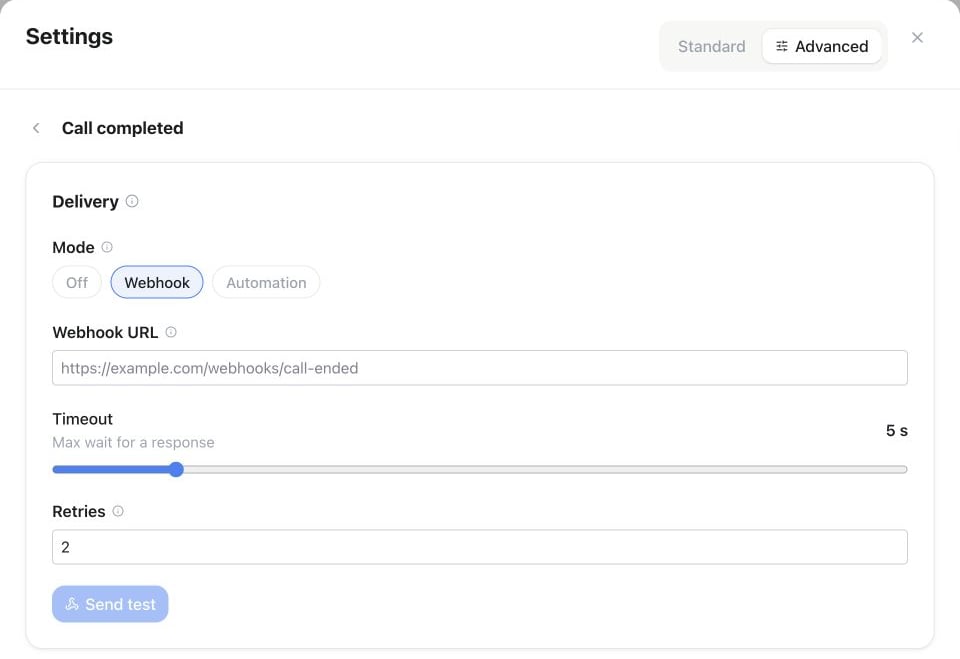
Assistant Settings → Automations → Call completed: choose Webhook, enter the Webhook URL and review Timeout and Retries before using Send test.
Use Test in the editor to send an example payload to an unsaved or saved URL (respects the timeout slider).
This URL is unsigned and specific to this assistant. Famulor has no workspace-wide webhook subscription — call results are always delivered per assistant.
Example webhook payload
Acall.completed delivery looks like this:
variables and input_variables follow the same call variables used elsewhere on the assistant. analysis and qa_scorecard are only populated once post-call processing finishes. When an outbound call didn’t connect, a failure object is added alongside the result — see above.
API & MCP
UsePATCH /api/v1/assistants/{id} or the MCP update_assistant tool. Delivery can be off, the assistant webhook URL, or a bound automation. See the API schema for the current field contract.