

Parallel dialing (concurrency)
- Set Parallel calls (concurrency) per campaign. The slider ends at your workspace’s available Concurrent Lines, including purchased add-ons. Workspaces with unlimited lines use a number input.
- New settings cannot exceed the current workspace allowance. If the allowance later falls, active dialing respects the lower limit. Lines are shared by every live assistant session — inbound and outbound calls, web calls, WhatsApp voice, and web chat. Campaigns wait for a free line without consuming a lead’s retry attempts. Calls start in batches, so the selected concurrency is a ceiling rather than a promise that all calls start at once.
- Inbound phone callers who reach you while every line is busy are not turned away: they keep hearing the normal ringing tone and are connected as soon as a line frees up. The wait stays within the assistant’s Inbound ringing duration (60 s by default, up to 120 s); if no line frees up in time, the caller hears a busy signal. When as many callers are already waiting as the workspace has lines (between 2 and 20), further callers hear busy right away. Calls that a Famulor Loop routing rule forwards to an assistant also get busy right away, so the rule can continue with its next step. Ringing time is not billed, because the call is only answered once a line is free.
- The small info icon explains this allowance and links to Settings → Plan to add Concurrent Lines.
- Concurrent Lines is a paid, tiered add-on bought from Settings → Plan for workspaces that need more simultaneous capacity than the plan includes. Each purchased line raises the workspace ceiling by one.
- Calls that never connect are cleared automatically so they do not occupy a slot indefinitely.
This is a different limit from the daily outbound call cap: concurrency governs how many calls run at the same moment, the daily cap governs how many calls may start over a whole day.
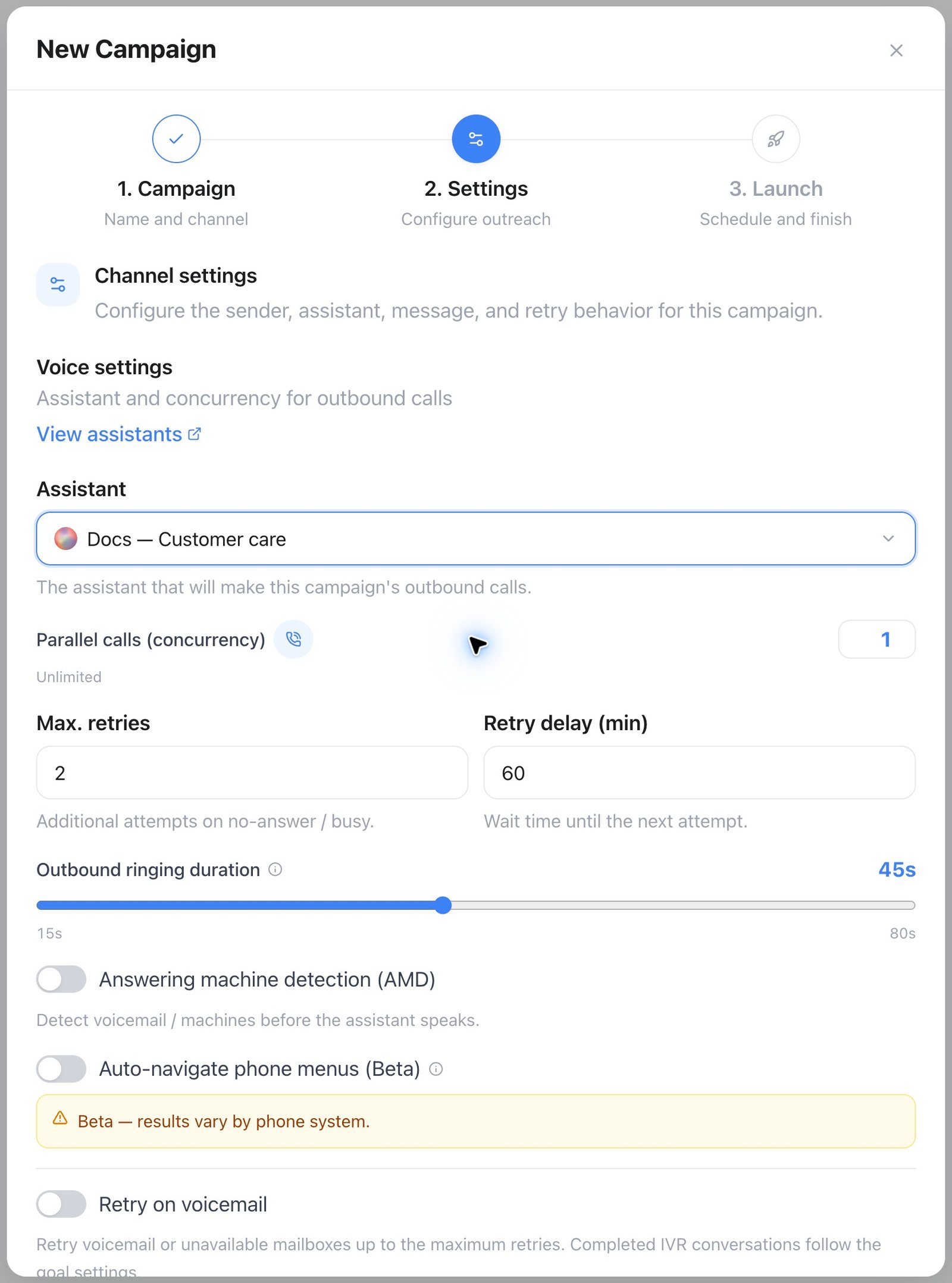
Campaigns → New Campaign → Settings: choose the assistant, set Parallel calls, then configure Max. retries and Retry delay. Values shown are examples.
Retry logic
Unanswered leads are retried automatically:- Max. retries counts additional attempts after the first dial. The default is 2, so a lead is dialed up to three times.
- Retry delay (min) is the wait before the next attempt (default 60) — the retry lands at a different time of day, which measurably improves reach.
- A lead that answers stops being retried;
busy,no answer, andfailedoutcomes schedule the next attempt until the budget is exhausted. - The full attempt history is visible per lead.
Retry on voicemail
Turn on Retry on voicemail to retry calls that reach a voicemail or unavailable mailbox, within the maximum retries. A completed conversation with an interactive receptionist is evaluated using the configured goal; an IVR classification alone does not trigger another call.Retry until the goal is achieved
Two settings work together to keep dialing a lead until a defined outcome is met:- Retry until goal completed (“Continue calling until the goal is achieved”) — marks a lead completed only when the selected goal evaluates to true; otherwise another attempt is scheduled within the maximum.
- Goal variable — pick one of the assistant’s yes/no post-call evaluation fields, or the built-in Call successful result. If the list is empty, add a boolean field under the assistant’s Analysis tab first.
Calling windows
Define when the campaign may dial, per weekday, in the campaign’s timezone — e.g. Mon–Fri 09:30–18:00. Outside the window the dialer pauses and resumes automatically.In Germany, unsolicited calls outside reasonable hours violate the UWG. Calling windows aren’t just a courtesy feature — configure them for every campaign that dials consumers.
Do-not-call (DNC)

Settings → Suppression → Add contact: enter the phone number and an optional reason, then choose Add to exclude it from campaign dialing.
- Universal mode blocks every linked channel after an opt-out on any one channel.
- Per-channel mode blocks only the channel where the opt-out was received.
- Phone, email, contact identity, scope, source, reason, and the mode at opt-out are retained for auditability.
- Campaign dialing checks the active voice suppression immediately before dispatch and fails closed when consent status cannot be verified.
GET /api/v1/suppression-list— list active recordsPOST /api/v1/suppression-list— record an opt-outDELETE /api/v1/suppression-list/{id}— restore consent without deleting the audit history
AMD & voicemail
Turn on Answering machine detection (AMD) in the campaign’s settings to detect a machine before the assistant speaks, and pick Conservative (fewer false hang-ups) or Aggressive (faster detection at higher volume). AMD classifies who picked up into one of five categories:
Campaign calls use On voicemail and Voicemail message in Campaign Settings. These override the assistant for that campaign. Direct calls use Assistant settings → Conversation → Voicemail. An empty message falls back to the greeting. A message counts as left only when playback finishes. An unavailable mailbox cannot receive a message.
Automatic IVR navigation enables detection and presses menu digits when workspace Beta Features are enabled. With navigation off, an interactive receptionist remains on the normal conversation path. Call Screen handling takes priority. Turning campaign AMD off disables detection unless automatic IVR navigation or Call Screen handling is enabled.
The AMD result appears with the call and helps retry logic distinguish a mailbox from an unanswered call. Turn on Retry on voicemail when appropriate.
Put together, one dial attempt for a lead follows this path:
Troubleshooting
Campaign won’t start
A scheduled campaign runs through the same checks when its start time arrives. If one of them fails, the campaign moves to Paused instead of Running and keeps the error — so a campaign that was Scheduled yesterday and is Paused today usually hit one of the rows above.
No calls happening
A running campaign that isn’t placing calls usually comes down to one of these:- Outside the calling window — check the current time against the campaign’s calling window and timezone.
- Queue exhausted — every lead has either used up its Max. retries or is waiting for its next retry. Import more leads, or review the retry settings.
- Suppressed — leads on the do-not-call list are skipped, not retried.
Goal-completion debugging
If Retry until goal completed marks leads complete unexpectedly — or never marks them complete — the usual cause is the goal variable itself, not the retry logic:- Review recent call transcripts for extraction errors on the goal variable.
- Place a few test calls and check what the assistant actually extracts.
- Tighten the variable’s description and the prompt language around it so the criteria are unambiguous.
Starting a campaign dials its first wave immediately, and the dialer re-checks every running campaign about once a minute after that. If nothing has happened within a few minutes, work through the checks above rather than assuming it needs more time.
External phone audiences (Beta)
In the existing campaign Settings, choose an eligible Shopify or Klaviyo connection and a live source segment. Local-lead campaigns retain their existing behavior. Shopify supports selected segments, including merchant-defined VIP segments, win-back, replenishment, abandoned checkout and the supported failed-payment scenario. Klaviyo currently supports selected segments only. Select the replenishment product from the live product picker. Win-back and replenishment need access to older orders. Failed payment means a supported unpaid, uncancelled, non-test order with complete failed transaction evidence and no subsequent successful/pending payment or newer order; subscription events and unsaved checkouts are not included. Phone calls only; set follow-up to Off. Before each attempt, Famulor checks current segment membership, scenario eligibility, phone and an explicit positive voice-marketing grant. Email/SMS subscription, caller ID and absence from a suppression list do not establish voice permission. Missing proof excludes the recipient. Calling windows, suppression, retries and capacity still apply. Connection and audience settings cannot change once source execution starts. Map an authoritative source JSON record using the permission namespace and key (namespace is required for Shopify). The record must contain the exact currentsubject_ref and phone, channel: "voice", purpose: "marketing", granted: true, revoked: false, a non-future granted_at, an evidence_ref and a current source_revision. Famulor stores operational references and execution state, not a customer/order/catalog replica.