

Recommended profile
- In Twilio Elastic SIP Trunking, add an Origination SIP URI in the form
sip:<platform-sip-fqdn>;transport=tcpand assign the DID to the trunk. - In the platform, enter the exact
+E.164DID and select Provider source IPs. - Do not use platform inbound digest. Twilio credential lists authenticate customer-to-Twilio termination, not Twilio-to-platform origination.
<name>.pstn.twilio.com; do not paste an Origination SIP URI into that field.
Two call directions — conceptual diagram
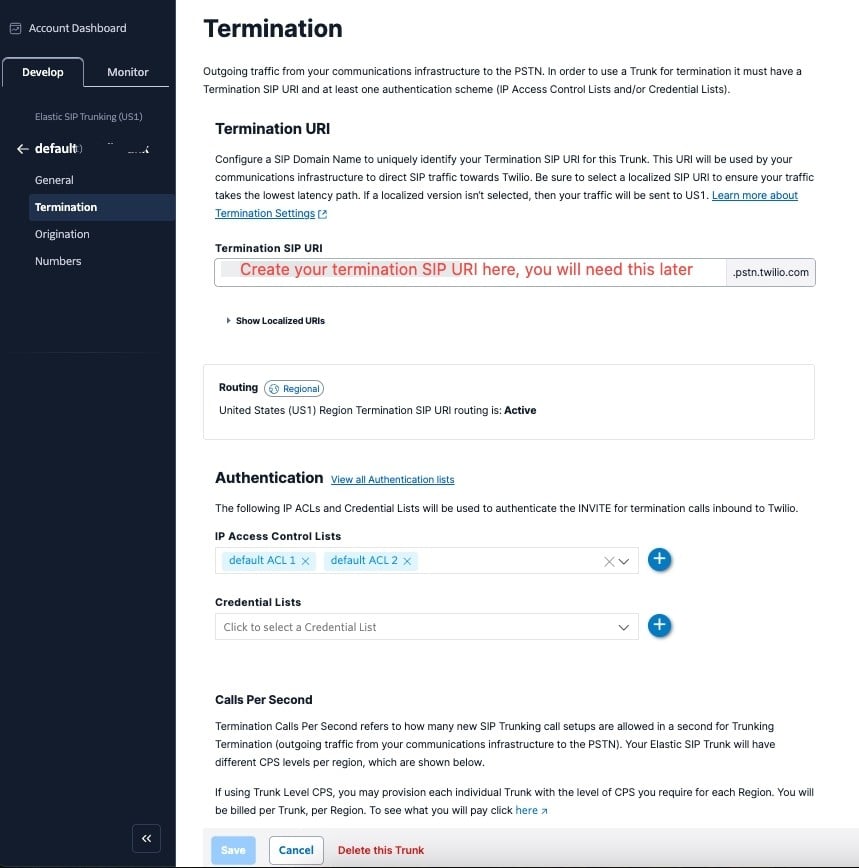
Configuration example — Twilio's Termination page — where the outbound SIP URI and IP ACLs live
Troubleshooting
Outbound calls don’t connect, but inbound works — check the Termination SIP URI first for a stray space or a copy-paste error; it must be exact (<name>.pstn.twilio.com), with no extra whitespace. Twilio also publishes localized termination URIs — use the one closest to your own region rather than the default global host before you start changing credentials.
International calls fail or are rejected — open Voice → Settings → Geo permissions in Twilio Console and allow the destination countries and number ranges you need. These permissions apply to both Programmable Voice and Elastic SIP Trunking. Twilio’s current instructions.