

A call that is still running shows a Listen live button in its row when your plan includes Live monitoring. See Live monitoring & supervisor for listening in, whispering, barging in, or taking over.
The list
Each row shows the contact, the assistant that handled it, type, direction, status, duration, date, a short summary, and the contact’s tags. Reply threads — every inbound and outbound turn on the same email thread or messaging conversation — are grouped into one row, so a back-and-forth reads like a single conversation instead of one row per message. Direction appears as an icon before the contact; hover or focus it to see its name.Conversation summaries
Conversation Summary shows a generated recap only. If none is available, the list cell stays empty and the summary section is hidden. The email subject, original messages and transcript remain available in the details. Success explanations stay in Analysis.- Calls, widget conversations and WhatsApp voice: a summary is generated after the conversation ends when a usable transcript is available. Older calls may finish processing after you open their details; refresh to see a newly saved summary.
- Messaging channels, including Instagram, Gmail, Outlook and Zendesk: analysis runs when the conversation ends, either manually or after the connection’s configured inactivity period.
- Native email: the thread is analyzed after a successful automatic reply. Skipped or failed replies and outbound-only threads can have no summary.
Filtering
Filters sit in one row above the list. Choose Filter in the toolbar or Add filter in the filter row, pick a category, and select values. Lists apply as you click; a custom date range or duration applies with Apply. Each filter becomes a chip such as Type · Email, and +2 on a chip means more values are selected. Click a chip to change it, × to remove it, or Clear all to reset every filter. The number on Filter counts the active filters.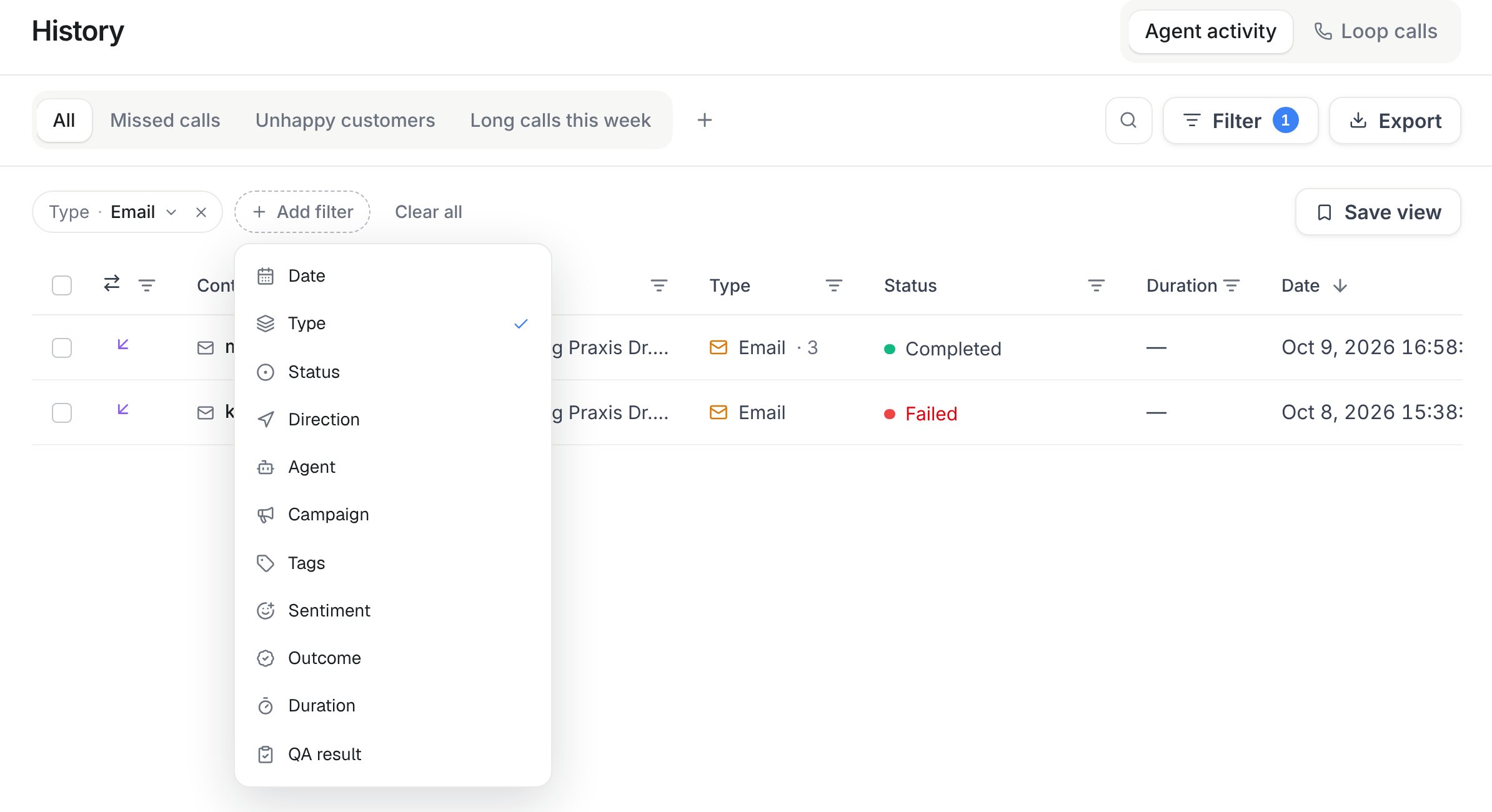
History → Add filter: Type → Email shows only email conversations. Add more filters, then save the combination as a view.
Within one filter, any selected value matches: Status set to failed and no answer shows both. Different filters combine, so Type · Phone call with Sentiment · Negative shows only negative phone calls. Campaign, Duration and QA result exist only for calls, so they leave chats and email out.
Search (the magnifier) matches phone numbers and call summaries, the contact name or handle on messaging channels, and email addresses, subjects, and message bodies. Opening History from an Audience contact narrows the list to that one contact.
Filters are part of the page address, so you can bookmark a filtered list or send it to a teammate.
Saved views
A saved view keeps a set of filters under a name, such as Missed calls or Unhappy customers. Views appear as tabs next to All and belong to the workspace: everyone in it sees the same tabs.- Save a view: set filters on All, choose Save view, and name it. + next to the tabs also saves the current filters as a new view.
- Change a view: open its tab and adjust the filters. A dot on the tab marks unsaved changes. Save updates the view for everyone, Save as new keeps the original and creates another view, and Discard returns to the saved filters.
- Rename, duplicate or delete: open the menu on the active tab. Deleting a view never deletes conversations.
Conversation detail
On desktop, Overview, Insights (voice calls) and Details switch the left column. The recording and transcript stay visible on the right, and the bottom action buttons reveal their labels on hover or keyboard focus. On mobile, call details are organized into Overview (contact, summary and analysis), Transcript (recording and conversation), Insights (voice measurements), and Details (call information, usage and automation). Open Actions at the bottom to see the available operations and their credit costs. Open a row for the full picture:- Recording and transcript (calls) — play the recording in the built-in player or download the audio file. The transcript follows the playback, and selecting a line jumps the audio to that moment. After a call you can request an Enhanced transcript re-generated from the recording and switch between it and the live one.
- Input variables — values passed into the conversation before it started (pre-chat form answers, campaign lead data, API-supplied variables).
- Analysis — sentiment, the success verdict with its reason, any structured fields your assistant’s post-call analysis is configured to extract, and the per-call AI QA scorecard (score, pass or fail, and the criteria behind it) when your assistant has scorecards enabled.
- Webhook & Automation — on every channel: whether a webhook, an automation or both run at the start and at the end of the conversation (call start and call end for voice and live chat, conversation start and end for messaging channels such as WhatsApp, email received and conversation end for email), with the latest delivery or run status.
- Usage & cost — credits billed for that conversation on every channel: call credits for voice and live chat; received and sent messages plus Re-evaluate runs for messaging channels and email.
billing and automations on GET /api/v1/history/messaging/{id} and GET /api/v1/history/emails/{id} (MCP get_messaging_history_item and get_email_history_item, CLI famulor get-messaging-history-item <id> and famulor get-email-history-item <id>).
Actions
Select one or more rows — or act on the open conversation directly — to:Re-evaluate and Re-transcribe consume credits — the button shows the cost before you run it. Re-evaluate bills at the workspace’s History re-evaluate rate per run and Re-transcribe at its Re-transcribe rate per recorded minute; current rates are on the Usage page. Re-transcribe appears only for calls that have a recording and haven’t been re-transcribed yet.
Exporting
The Export button downloads the current filtered page as a CSV (contact, assistant, type, direction, status, duration, date, and summary). Apply filters first to scope what’s included, then export — each page of results exports separately.Activity notifications
Each assistant carries its own notification matrix, configured from Assistant → Settings → Automations → Notifications, that controls whether workspace owners and admins get an email when new activity lands in History for that assistant. The matrix has one row per channel — Calls, Avatar, Live chat, WhatsApp voice, WhatsApp, Telegram, Slack, Messenger, Teams, Discord, Google Chat, X, and Email — and a checkbox turns email on or off per channel, independently for each assistant. Every channel starts switched on, so this is a list to opt out of rather than into. The same per-channel switch also governs the device alerts a member can turn on for their own browser or installed app under Browser notifications.The matrix also shows an SMS column, but it isn’t active yet — every checkbox in that column is disabled.
Related channel views
- Email history covers the email-specific reading view (reply states, sender/recipient/subject, attachments) in more depth.
- Live monitoring & supervisor covers listening in on and intervening in a call while it’s still happening.
API and MCP
- REST:
GET /api/v1/history(calls:read) — filter withtype,direction,status,assistant_id,campaign_id,lead_id,tags,sentiment,outcome,qa,min_duration,max_duration,search,date_range,from,to,limit,offset. List filters take one value or a comma-separated list and match any of them.fromandtoaccept a date-time or a calendar date (YYYY-MM-DD) in the workspace time zone. For a period that moves with the current date, senddate_range(today,last_7_days,this_month, …) instead offromandto. Addview_idto apply a saved view; filters you also send override the view’s values. - REST: saved views —
GET /api/v1/history/viewsandGET /api/v1/history/views/{id}(calls:read),POST /api/v1/history/views,PATCH /api/v1/history/views/{id}andDELETE /api/v1/history/views/{id}(calls:write). - REST:
GET /api/v1/history/emails/{id}reads one email thread’s full detail. - REST:
POST /api/v1/history/actionsruns the actions above —reanalyze,retranscribe,resend_webhook,resume_ai,blacklist_add,blacklist_remove— on up to 50 records at a time, addressed bykind(call,messaging, oremail).retranscribeis the exception: it takes exactly one call id per request. - REST:
GET /api/v1/calls,GET /api/v1/calls/{id}, andGET /api/v1/calls/{id}/recordingcover the call-specific view, including the recording file, fortype: callrows. - MCP:
list_history(withview_idfor a saved view),list_history_views,create_history_view,update_history_view,delete_history_view,get_email_history_item,run_history_actions, pluslist_calls/get_callfor the call-specific view. - CLI:
famulor list-history --type call --status no_answer,busy --date-range last_7_days,famulor list-history --view-id <view-id>,famulor list-history-views,famulor create-history-view --name "Missed calls" --filters '{"status":["no_answer","busy"]}',famulor get-history-view <id>,famulor update-history-view <id> --name "Missed calls (all agents)", andfamulor delete-history-view <id>.
Message labels
New incoming messages can receive a Possible scam label. Unsolicited sales pitches, SEO offers and paid award promotions in email can receive Advertising. Labels appear beside the message and in the History list after background processing. These are advisory hints and may be wrong. Messages remain visible, replies continue as usual, and no message is moved, deleted or marked as spam in a connected mailbox, including Gmail. No label does not mean a message is safe. Booking and customer enquiries should remain unlabelled. Workspace owners and admins can switch Message labels on or off in Settings → Workspace, when included in their plan. Changes apply to new messages; existing labels remain. Members with write access can dismiss an incorrect label in the message details. History API responses and the history MCP tools include active labels. Usedismiss_inbox_label to dismiss one, and get_inbox_label_settings / update_inbox_label_settings to manage the workspace setting.
Remove conversations from History
Workspace owners and admins can select one or more conversations and choose Remove, or use the same action in a conversation’s details. Active conversations must finish first. The selected conversations are removed for the whole workspace: they disappear from History and new exports, and their call/history API and MCP detail links return not found. Stored conversation content remains subject to your workspace’s existing retention policy. Removal does not reset that policy’s clock, erase data immediately, refund credits, or change historical usage and statistics. Previously issued download links remain valid until they expire; existing exports and copies sent to connected systems are unaffected. UsePOST /api/v1/history/actions with action: "remove", the conversation kind, and up to 50 ids. The MCP equivalent is run_history_actions. A child email message ID removes its whole thread. Check per-record results when processing a batch. The action requires calls:write; user-owned credentials additionally require workspace owner/admin access.
A new incoming message makes a removed email or messaging thread visible again. Old message imports and outgoing messages do not.
Call insights
Open a voice call in History, then choose Insights. On desktop, the recording and transcript remain visible beside the insights. On mobile, selecting a measured reply opens its transcript location.Recording and transcript
Select a recorded transcript turn or timeline marker to listen at that point. Download sits beside playback speed, with elapsed and total time underneath. Audio output delay appears beneath the player on hover or keyboard focus, and remains visible on touch devices. Speech before the recording starts is marked Before recording and has no playback target. Consent and recording settings continue to govern which audio is available. Create Simulation Test and Add to FAQ are in the same action area as the other call operations. Hover or focus an icon to see its label; on mobile, open Actions. FAQ requires workspace Beta Features and a usable conversation. Review the proposed answer before publishing it.Availability and older calls
Voice insights cover phone calls, web voice and WhatsApp voice calls. Text chats do not display voice timing or recording controls. The exact measurements depend on the conversation mode and which data was captured; unavailable values are not treated as zero. Older calls can display insights from data already stored. Opening an old call does not recover missing measurements or trigger a historical synchronization. New calls can include more measurements. No assistant setting change is required to view available insights. The public call-detail API and the MCP Get call tool include the same customer-facing insights.Reply with attachments
Use Add attachment in the reply box to send a file through WhatsApp, Telegram, Slack or Discord. Email replies support up to five files. The total attachment size is limited to 3 MB; unsupported channels show a text-only reply box. Existing channel permissions and reply windows still apply. Files remain available in History under the workspace retention rules. If delivery cannot be confirmed, check the external channel before sending again. Programmatically, usePOST /api/v1/history/reply, the MCP tool reply_to_conversation, or famulor reply-to-history-conversation --kind messaging --id <conversation-id> --text "Hello". Supply --attachments as a JSON array with filename, type and base64 content for files.