

When to use it
Use it when customers already reach you on Telegram: order status, a short support question, or a front door that does not need a phone call. The assistant answers the person who messages the bot. Connecting an assistant means that chat is handled with the same instructions, tools and history as your other channels.What the assistant hears
The assistant receives the messages Telegram delivers to the bot. Famulor registers the webhook when you save. You do not paste a webhook address into BotFather.Where the keys come from
The linked provider guide shows the screens for these clicks. Follow the clicks below together with those pictures. Open Telegram and talk to @BotFather. The token is shown once, after you create the bot. Official guides, with the screens for this chat: BotFather and the bot tutorial.Create it at the provider
- Open Telegram and search for @BotFather.
- Send
/newbot. - Send a display name, then a username that ends in
bot. - Copy the token BotFather shows. It looks like
123456:ABC…and is shown once.
Connect it in Famulor
Your plan includes this channel. Open Settings → Channels, choose the card, name the connection, pick an assistant and save. The shared conversation settings — response delay (default 5 seconds) and inactivity timeout (default 30 minutes) — are described on the messaging channels page. On the Telegram card paste Bot token. Bot username (optional) is the username without@, if you want it stored on the connection.
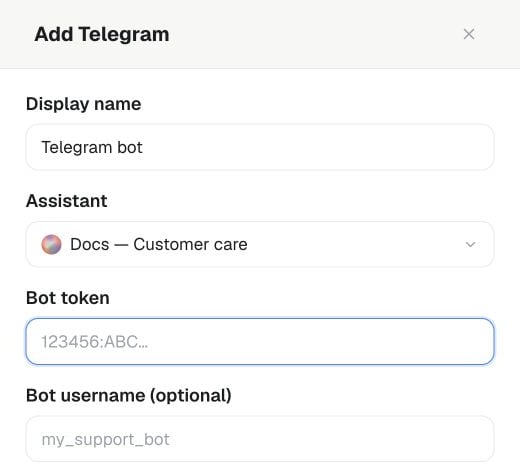
Settings → Channels → Telegram → Add: enter a Display name, choose the Assistant and paste the bot token.
Point the provider at Famulor
There is nothing to paste back into Telegram. After you save, Famulor tells Telegram where to deliver messages for this bot. Send the bot a new message and it appears in History.History
Open History and filter by Telegram. The thread, the assistant reply and any analysis appear there. You can pause the assistant and answer manually.API, MCP and command line
The same connection can be created with the public API, the MCP toolcreate_messaging_connector, or the command line. Replace the placeholders with your own values.