Jira Integration Template
Integriere Jira Issue-Tracking in deine Mid-call Actions mit drei leistungsstarken Funktionen: Issues suchen, aktualisieren und erstellen. Perfekt für DevOps-Teams, Support-Organisationen und agile Entwicklungsprozesse.Überblick & Funktionen
Issues suchen
- JQL-basierte Issue-Suche
- Echtzeit-Status-Abfragen
- Assignee und Priority-Filtering
- Custom Field-Queries
Issues aktualisieren
- Status-Transitions verwalten
- Comments und Zeiterfassung
- Resolution-Updates
- Field-Modifications
Issues erstellen
- Bug-Reports aus Kundenmeldungen
- Feature-Requests dokumentieren
- Support-Tickets erstellen
- Incident-Management
Jira Cloud API Setup
1. Jira API-Zugang einrichten
1
Jira Cloud Instance vorbereiten
- Stelle sicher, dass du Admin-Rechte hast
- Notiere deine Jira-Instance-URL:
https://ihrefirma.atlassian.net - Instance-Name für API-Calls:
ihrefirma(ohne .atlassian.net)
2
API Token erstellen
Token-Generation:
1. Account-Settings → "Security" → "API tokens"
2. "Create API token" klicken
3. Label: "Famulor Mid-Call Integration"
4. Token kopieren (wird nur einmal angezeigt!)
5. Sicher speichern für Konfiguration
3
Basic Auth String erstellen
Authentication-Setup:
Format: "email:api_token"
Beispiel: "admin@firma.de:ATATT3xFfGF0T5..."
Base64-Encoding:
echo -n "admin@firma.de:ATATT3xFfGF0T5..." | base64
Resultat: "YWRtaW5AZmlybWEuZGU6QVRBVFQzeEZmR0YwVDUuLi4="
4
Projekt-Keys identifizieren
- Navigiere zu deinen Jira-Projekten
- Projekt-Keys notieren (z.B. “PROJ”, “SUP”, “DEV”)
- Issue-Types pro Projekt dokumentieren
- Custom Fields und Workflows analysieren
Tool 1: Issues suchen
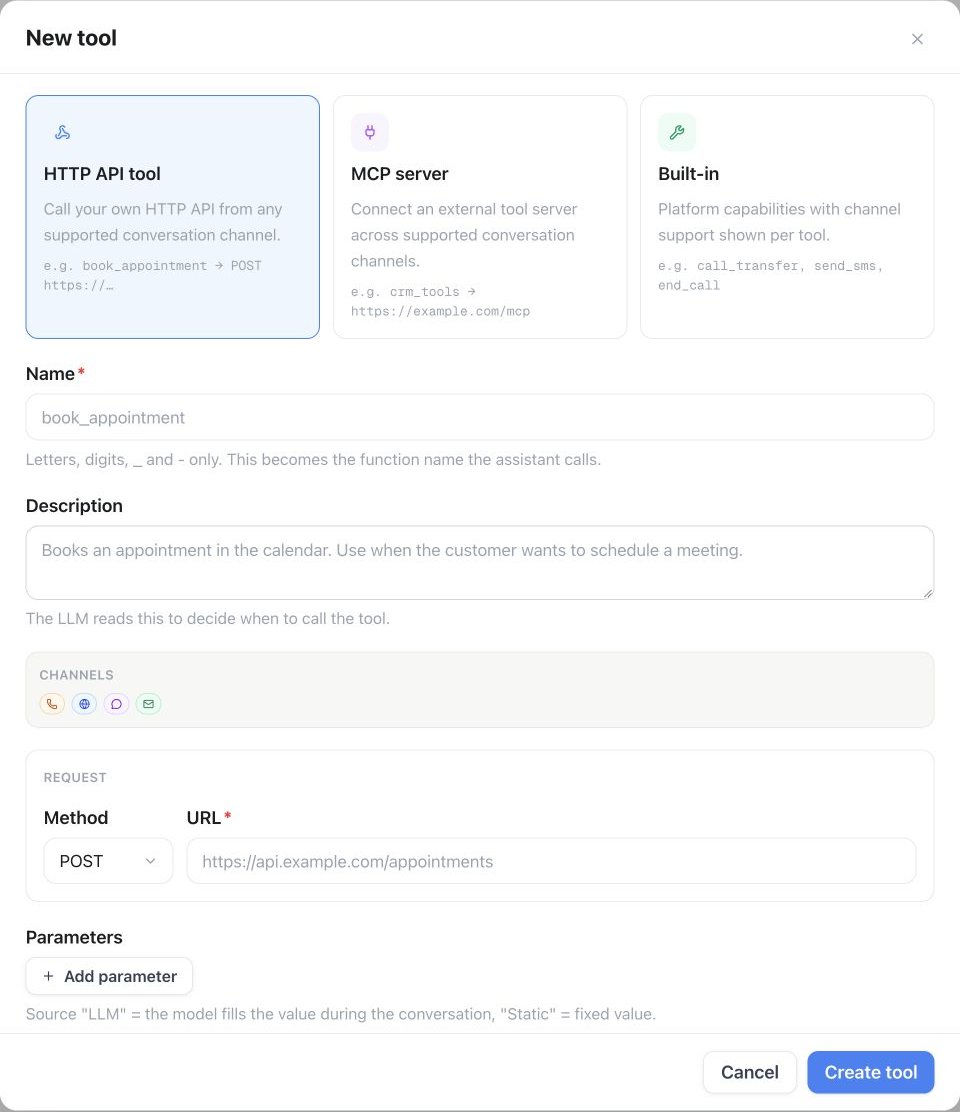
Konfiguration im Famulor Interface
- Werkzeugdetails
- Header-Konfiguration
- Query-Parameter
| Feld | Wert |
|---|---|
| Name* | Jira Issues suchen |
| Beschreibung | ”Sucht Issues mit JQL (Jira Query Language) für Status-Updates und Tracking” |
| Funktionsname* | search_jira_issues |
| Funktionsbeschreibung* | “Durchsucht Jira mit JQL. Verwenden Sie dies, um den Status von Bug-Reports, Feature-Requests oder Support-Tickets zu prüfen.” |
| HTTP-Methode | GET |
| Timeout (ms) | 5000 |
| Endpoint* | https://{{JIRA_INSTANCE}}.atlassian.net/rest/api/3/search |
{
"Authorization": "Basic {{JIRA_AUTH}}",
"Content-Type": "application/json",
"User-Agent": "Famulor-MidCall-Jira/1.0"
}
{
"jql": "{jql_query}",
"maxResults": "{max_results}",
"fields": "summary,status,assignee,priority,created,updated,resolution,description"
}
Parameter-Schema für Issue-Suche
{
"type": "object",
"properties": {
"jql_query": {
"type": "string",
"description": "JQL Query für die Issue-Suche",
"examples": [
"assignee = currentUser() AND status != Done",
"project = SUP AND status = 'In Progress'",
"summary ~ 'API' AND created >= -7d",
"reporter = 'customer@example.com'"
]
},
"max_results": {
"type": "integer",
"description": "Maximale Anzahl der zurückgegebenen Issues",
"default": 10,
"minimum": 1,
"maximum": 100
}
},
"required": ["jql_query"]
}
Response-Mapping
{
"issues": "issues",
"total": "total"
}
Tool 2: Issue aktualisieren
Konfiguration im Famulor Interface
- Werkzeugdetails
- Request Body Template
| Feld | Wert |
|---|---|
| Name* | Jira Issue aktualisieren |
| Beschreibung | ”Aktualisiert Status oder Details eines bestehenden Jira Issues” |
| Funktionsname* | update_jira_issue |
| Funktionsbeschreibung* | “Aktualisiert ein Jira Issue. Verwenden Sie dies, um Status zu ändern, Kommentare hinzuzufügen oder Issue-Details zu aktualisieren.” |
| HTTP-Methode | PUT |
| Timeout (ms) | 5000 |
| Endpoint* | https://{{JIRA_INSTANCE}}.atlassian.net/rest/api/3/issue/{issue_key} |
{
"fields": {
"status": {
"name": "{status}"
},
"resolution": {
"name": "{resolution}"
},
"assignee": {
"accountId": "{assignee_id}"
},
"priority": {
"name": "{priority}"
},
"timetracking": {
"originalEstimate": "{estimate}",
"remainingEstimate": "{remaining}"
}
},
"update": {
"comment": [
{
"add": {
"body": {
"type": "doc",
"version": 1,
"content": [
{
"type": "paragraph",
"content": [
{
"type": "text",
"text": "{comment}"
}
]
}
]
}
}
}
]
}
}
Parameter-Schema für Issue-Updates
{
"type": "object",
"properties": {
"issue_key": {
"type": "string",
"description": "Jira Issue Key (z.B. 'PROJ-123', 'SUP-456')",
"pattern": "^[A-Z]+-[0-9]+$"
},
"status": {
"type": "string",
"enum": ["To Do", "In Progress", "Code Review", "Testing", "Done", "Closed"],
"description": "Neuer Issue-Status"
},
"resolution": {
"type": "string",
"enum": ["Fixed", "Won't Fix", "Duplicate", "Cannot Reproduce", "Won't Do"],
"description": "Resolution-Status (optional)"
},
"comment": {
"type": "string",
"description": "Kommentar zum Update (z.B. Gesprächskontext, Lösungsdetails)"
},
"priority": {
"type": "string",
"enum": ["Highest", "High", "Medium", "Low", "Lowest"],
"description": "Neue Priorität (optional)"
},
"assignee_id": {
"type": "string",
"description": "Jira Account-ID des neuen Assignees (optional)"
},
"estimate": {
"type": "string",
"description": "Zeit-Schätzung (z.B. '2h', '1d', '3w')",
"examples": ["30m", "2h", "1d", "2w"]
},
"remaining": {
"type": "string",
"description": "Verbleibende Zeit (z.B. '1h', '30m')"
}
},
"required": ["issue_key"]
}
Tool 3: Issue erstellen
Konfiguration im Famulor Interface
- Werkzeugdetails
- Request Body Template
| Feld | Wert |
|---|---|
| Name* | Jira Issue erstellen |
| Beschreibung | ”Erstellt ein neues Issue (Bug, Task, Story) in Jira basierend auf Kundeninput” |
| Funktionsname* | create_jira_issue |
| Funktionsbeschreibung* | “Erstellt ein neues Jira Issue. Verwenden Sie dies für Bug-Reports aus Kundenmeldungen, Feature-Requests oder Support-Tickets.” |
| HTTP-Methode | POST |
| Timeout (ms) | 5000 |
| Endpoint* | https://{{JIRA_INSTANCE}}.atlassian.net/rest/api/3/issue |
{
"fields": {
"project": {
"key": "{project_key}"
},
"issuetype": {
"name": "{issue_type}"
},
"summary": "{summary}",
"description": {
"type": "doc",
"version": 1,
"content": [
{
"type": "paragraph",
"content": [
{
"type": "text",
"text": "{description}"
}
]
}
]
},
"priority": {
"name": "{priority}"
},
"assignee": {
"accountId": "{assignee_id}"
},
"labels": "{labels}",
"components": [
{
"name": "{component}"
}
],
"customfield_10001": "{customer_name}",
"customfield_10002": "{phone_number}"
}
}
Parameter-Schema für Issue-Creation
{
"type": "object",
"properties": {
"project_key": {
"type": "string",
"description": "Jira-Projekt-Schlüssel (z.B. 'SUP' für Support, 'DEV' für Development)",
"examples": ["SUP", "DEV", "PROJ", "BUG"]
},
"issue_type": {
"type": "string",
"enum": ["Bug", "Task", "Story", "Epic", "Incident", "Support Request"],
"description": "Typ des zu erstellenden Issues"
},
"summary": {
"type": "string",
"description": "Kurze, präzise Zusammenfassung des Issues",
"examples": ["API Gateway Fehler bei Login", "Feature Request: Excel-Export", "Customer Report: Performance-Problem"]
},
"description": {
"type": "string",
"description": "Detaillierte Beschreibung mit Kontext aus dem Gespräch"
},
"priority": {
"type": "string",
"enum": ["Highest", "High", "Medium", "Low", "Lowest"],
"description": "Priorität basierend auf Customer-Impact",
"default": "Medium"
},
"assignee_id": {
"type": "string",
"description": "Jira Account-ID des Verantwortlichen (optional)"
},
"labels": {
"type": "array",
"items": {"type": "string"},
"description": "Labels für Kategorisierung",
"examples": [["customer-reported", "mid-call"], ["feature-request", "high-priority"], ["bug", "production"]]
},
"component": {
"type": "string",
"description": "Jira Component (z.B. 'API', 'Frontend', 'Backend')",
"examples": ["API", "Frontend", "Backend", "Database", "Security"]
},
"customer_name": {
"type": "string",
"description": "Name des meldenden Kunden (Custom Field)"
},
"phone_number": {
"type": "string",
"description": "Telefonnummer für Rückfragen (Custom Field)"
}
},
"required": ["project_key", "issue_type", "summary", "description"]
}
Praktische Anwendungsszenarien
Szenario 1: Bug-Report aus Kundengespräch
1
Problem-Identifikation
Kunde meldet Problem:
"Seit heute Morgen kann ich mich nicht mehr einloggen.
Die Seite lädt einfach nicht."
KI-Analysis:
- Problem: Login-Fehler
- Zeitrahmen: Seit heute Morgen
- Impact: Customer kann System nicht nutzen
- Urgency: Hoch (Business-Critical)
2
Automatische Bug-Creation
create_jira_issue Parameter:
project_key: "BUG"
issue_type: "Bug"
summary: "Login-Fehler: Seite lädt nicht - Customer Max Mustermann"
description: "## Problem
Kunde kann sich seit heute Morgen nicht mehr einloggen.
## Symptome
- Login-Seite lädt nicht vollständig
- Fehlermeldung: Keine spezifische Meldung
- Browser: Verschiedene Browser getestet
## Customer-Details
- Name: Max Mustermann
- Firma: Beispiel AG
- Phone: +49 123 456789
- Gemeldeter Zeitpunkt: 15.01.2024 09:00
## Business-Impact
- Produktions-System nicht nutzbar
- Revenue-Impact: Hoch
- Customer-Tier: Enterprise
## Next Steps
1. Sofortige technische Analyse
2. Customer-Update innerhalb 1h
3. Workaround bereitstellen"
priority: "High"
labels: ["customer-reported", "login-issue", "production"]
component: "Authentication"
customer_name: "Max Mustermann (Beispiel AG)"
Szenario 2: Feature-Request-Management
Customer-Feature-Request
Feature-Request-Workflow:
Kunde: "Könnten Sie eine Integration zu Salesforce hinzufügen?"
KI: "Das ist eine großartige Idee! Ich dokumentiere das als Feature-Request..."
create_jira_issue:
project_key: "FEAT"
issue_type: "Story"
summary: "Feature Request: Salesforce Integration"
description: "## Customer Request
Integration zu Salesforce CRM für bidirektionale Daten-Sync.
## Business Case
- Customer: Beispiel AG (Enterprise-Kunde)
- Current Pain: Manuelle Daten-Übertragung
- Expected Benefit: 40h/Monat Zeitersparnis
- Revenue Impact: Customer-Retention-kritisch
## Technical Requirements
- Bidirectional Sync (Contacts, Deals, Activities)
- Real-time oder Batch-Updates
- Field-Mapping-Konfiguration
- Error-Handling und Conflict-Resolution
## Acceptance Criteria
- [ ] Salesforce OAuth-Integration
- [ ] Contact-Sync implementiert
- [ ] Deal-Sync implementiert
- [ ] Admin-UI für Field-Mapping"
priority: "High"
labels: ["feature-request", "integration", "customer-driven"]
assignee_id: "product-manager-account-id"
Competitive-Feature-Tracking
Competitive-Intelligence:
Kunde: "Competitor XY hat Feature Z - haben Sie das auch?"
Issue-Creation:
issue_type: "Epic"
summary: "Competitive Analysis: Feature Z Implementation"
labels: ["competitive", "feature-gap", "market-research"]
Linked-Issues:
- Research Task: Competitive Analysis
- Technical Task: Feasibility Study
- Business Task: ROI-Calculation
- Product Task: Roadmap-Integration
JQL-Templates für häufige Abfragen
Vordefinierte JQL-Queries
Customer-bezogene Queries
Customer-Issue-Lookup:
"customfield_10001 ~ '{customer_name}' ORDER BY created DESC"
Open-Issues-für-Customer:
"customfield_10001 ~ '{customer_name}' AND status != Done"
Recent-Customer-Issues:
"customfield_10001 ~ '{customer_name}' AND created >= -30d"
Critical-Customer-Issues:
"customfield_10001 ~ '{customer_name}' AND priority = Highest"
Team-Management-Queries
Team-Workload-Queries:
Überfällige-Issues:
"assignee = currentUser() AND due <= now() AND status != Done"
Heute-zu-erledigen:
"assignee = currentUser() AND due <= endOfDay() AND status != Done"
High-Priority-Backlog:
"project = DEV AND priority >= High AND status = 'To Do'"
Review-Required:
"status = 'Code Review' AND assignee = currentUser()"
Monitoring & Analytics
Performance-Tracking-Queries:
Bug-Rate-Last-Week:
"issuetype = Bug AND created >= -7d"
Feature-Completion-Rate:
"issuetype = Story AND resolved >= -30d"
Customer-Satisfaction-Issues:
"labels = customer-escalation AND created >= -7d"
SLA-Violations:
"priority = Highest AND created <= -4h AND status != Done"
Response-Verarbeitung & Integration
Issue-Search Response
{
"total": 3,
"maxResults": 10,
"issues": [
{
"key": "SUP-123",
"fields": {
"summary": "API Gateway timeout issues",
"status": {
"name": "In Progress",
"statusColor": "blue"
},
"assignee": {
"displayName": "Tech Support Team",
"accountId": "abc123def456"
},
"priority": {
"name": "High",
"iconUrl": "https://..."
},
"created": "2024-01-15T08:30:00.000+0000",
"updated": "2024-01-15T10:15:00.000+0000"
}
}
]
}
Natürliche Sprachintegration
- Issue-Suche-Integration
- Issue-Update-Integration
- Issue-Creation-Integration
Agent-Messages:
Vor Search: "Ich durchsuche Jira..."
Erfolgreiche Suche:
"{{total}} Issues gefunden. Top Ergebnisse:
{{#each issues}}{{this.key}}: {{this.fields.summary}} ({{this.fields.status.name}}){{/each}}"
Beispiel:
"3 Issues gefunden. Top Ergebnisse:
SUP-123: API Gateway timeout issues (In Progress)
SUP-124: Login-Probleme Frontend (To Do)
SUP-125: Performance-Optimierung (Code Review)"
Update-Confirmations:
Template: "Issue {{issue_key}} wurde aktualisiert{{#if status}} - Status: {{status}}{{/if}}"
Beispiele:
"Issue SUP-123 wurde aktualisiert - Status: Done"
"Bug PROJ-456 wurde auf High-Priority gesetzt"
"Feature DEV-789 wurde dem Frontend-Team zugewiesen"
Pre-Action: "Ich erstelle das {{issue_type}} in Jira..."
Success: "Issue {{issueKey}} erstellt: {{summary}}"
Mit Follow-up:
"Bug-Report SUP-567 wurde erstellt.
Das Support-Team wird das Problem innerhalb von 4 Stunden bearbeiten."
Mit Customer-Context:
"Ihr Problem wurde als SUP-567 dokumentiert.
Sie erhalten Updates zum Bearbeitungsfortschritt."
Integration mit anderen Mid-call Actions
Multi-System-Workflow
Performance & Monitoring
Jira-Integration-KPIs
| Metrik | Beschreibung | Zielwert |
|---|---|---|
| Issue Creation Success Rate | % erfolgreich erstellter Issues | >99% |
| Search Query Performance | Durchschnittliche JQL-Response-Zeit | <2 Sekunden |
| Update Success Rate | % erfolgreiche Issue-Updates | >98% |
| Customer Issue Resolution | Durchschnittliche Resolution-Zeit für Customer-Issues | <4 Stunden |
Business Impact Analytics
1
Customer-Satisfaction-Tracking
Customer-Issue-Metriken:
- Time-to-Issue-Creation (Call → Jira)
- Time-to-First-Response (Issue → Dev-Action)
- Time-to-Resolution (Issue → Closed)
- Customer-Communication-Frequency
2
Development-Efficiency
Development-KPIs:
- Customer-Reported vs. Internal-Found-Bugs Ratio
- Feature-Request-to-Implementation Conversion
- Bug-Fix-Rate-Improvement durch bessere Dokumentation
- Developer-Productivity-Impact
Fehlerbehandlung
Häufige Jira-API-Probleme
Authentication Error (401)
Ursache: API-Token ungültig oder Basic-Auth falsch
Jira-Response:
"errorMessages": ["You do not have the permission to see the specified issue."]
Fallback:
"Jira-Zugriff nicht möglich. Ich dokumentiere das Problem
für manuelle Bearbeitung durch das Tech-Team."
Resolution:
- API-Token neu generieren
- Basic-Auth-String validieren
- User-Permissions überprüfen
Project nicht gefunden (404)
Ursache: Project-Key existiert nicht oder kein Zugriff
Graceful-Handling:
"Das spezifische Projekt ist nicht verfügbar.
Ich erstelle das Issue im Standard-Support-Projekt."
Fallback-Logic:
- Default-Project verwenden
- Issue-Type auf "Task" ändern
- Admin-Benachrichtigung über Konfigurationsfehler
Invalid JQL (400)
Invalid JQL (400)
Ursache: JQL-Syntax-Fehler oder ungültige Field-Names
Common-JQL-Errors:
- Typos in Field-Names
- Ungültige Operatoren
- Falsche String-Escaping
- Non-existent Values
Error-Recovery:
- Fallback auf einfachere JQL-Query
- Text-based Search als Alternative
- User-friendly Error-Message
Advanced Features
Custom Fields & Workflows
Customer-specific Custom Fields
Custom-Field-Configuration:
Customer-Information:
customfield_10001: "Customer Name" (Text)
customfield_10002: "Customer Phone" (Text)
customfield_10003: "Customer Email" (Text)
customfield_10004: "Customer Tier" (Select: Basic/Pro/Enterprise)
Business-Context:
customfield_10005: "Revenue Impact" (Select: Low/Medium/High)
customfield_10006: "Urgency Level" (Select: 1-5)
customfield_10007: "Call Source" (Text: "Mid-call Action")
customfield_10008: "Resolution Deadline" (Date/Time)
Workflow-Automation
Workflow-Automation
Jira-Workflow-Rules:
Customer-Issue-Workflow:
Wenn Customer-Tier = "Enterprise":
→ Status automatisch auf "High Priority"
→ Assignee: Senior Support Engineer
→ SLA: 2 Stunden First Response
Mid-Call-Issue-Workflow:
Wenn Labels contains "mid-call":
→ Priority mindestens "High"
→ Sofortige Assignee-Benachrichtigung
→ Customer-Update binnen 1 Stunde
Escalation-Rules:
Wenn Priority = "Highest" UND 4h offen:
→ Auto-assign zu Manager
→ Customer-Benachrichtigung
→ Executive-Escalation
Advanced JQL Patterns
- Complex Customer Queries
- Team-Performance-Queries
-- Issues für spezifischen Kunden mit Status-Filter
customfield_10001 ~ "Beispiel AG" AND status IN ("To Do", "In Progress") ORDER BY priority DESC
-- Überfällige Customer-Issues
customfield_10001 IS NOT EMPTY AND due <= now() AND status != Done
-- High-Impact Customer-Issues
customfield_10005 = "High" AND customfield_10001 IS NOT EMPTY
-- Issues aus letzten Mid-Call-Sessions
labels = "mid-call" AND created >= -24h
-- Team-Workload-Balance
assignee IN (team-member-1, team-member-2) AND status != Done
-- Sprint-Planning-Queries
project = DEV AND fixVersion = "Sprint 23" AND status IN ("To Do", "In Progress")
-- Bug-vs-Feature Ratio
project = DEV AND created >= startOfMonth() AND issuetype IN (Bug, Story)
-- Customer-Escalation-Tracking
priority = Highest AND labels IN ("customer-escalation", "mid-call")
Jira-Permissions: Stelle sicher, dass der verwendete API-User Berechtigung für alle relevanten Projekte hat und Custom Fields lesen/schreiben kann. Überprüfe regelmäßig die Workflow-Permissions.
JQL-Performance-Tipp: Verwende spezifische Project-Keys und Date-Ranges in JQL-Queries, um die Performance zu optimieren. Vermeide sehr breite Suchen ohne Filter.
Passende Seiten: Introduction und Building Flows und Debugging Runs.
Statt einzelner HTTP-Aktionen ein ganzes Toolset auf einmal? Externen MCP-Server verbinden — Tools werden automatisch erkannt. Siehe MCP-Server.