

/tools in der Seitenleiste, unter Agents) baust du eigene Tools einmal und verbindest vorgefertigte, sodass jeder Assistent im Workspace sie nutzen kann.
Agent Tools ist workspace-weit: Ein Tool existiert hier einmal und wird beliebig vielen Assistenten zugewiesen. Der eigene Tools-Tab eines Assistenten ist die Ansicht je Assistent, in der du Plattformaktionen wie Anrufweiterleitung, SMS und Anruf beenden für genau diesen einen Assistenten ein- oder ausschaltest – siehe Integrierte Tools.
Agent Tools vs. Automatisierungen
Beide sind Wege für einen Assistenten, auf externe Systeme einzuwirken, laufen aber zu unterschiedlichen Zeitpunkten. Ein Tool auf dieser Seite ist etwas, das sich der Assistent selbst live holt, während er bereits mit jemandem spricht – er entscheidet im Moment, dass er etwas nachschlagen oder einen Datensatz anlegen muss. Eine Automatisierung ist eine feste Schrittfolge, die du (oder Milian) im Voraus entwirfst, meist ausgelöst durch ein Hintergrundereignis wie das Ende eines Anrufs.
Beide treffen an einer Stelle aufeinander: Eine Automatisierung, die du für den Assistenten aufrufbar machst, erscheint in Installed als Automation-managed-Tool – hier gelistet, aber bearbeitet wird sie in der Automatisierung selbst. Für Hintergrund-Workflows, die durch Ereignisse wie On Call Completed oder einen neuen Kontakt gestartet werden, siehe Automatisierungen.
Installed
Die eigenen Tools deines Workspace, gruppiert nach Typ:- HTTP API tools – rufen deinen eigenen HTTP-Endpunkt aus jedem unterstützten Gesprächskanal auf, zum Beispiel
book_appointment → POST https://…. - MCP servers – verbinden einen externen MCP-Server und erlauben jedes angebotene Tool oder nur ausgewählte.
- Built-in – Plattformfunktionen wie Anrufweiterleitung, SMS oder Anruf beenden, einmal hier eingerichtet und über Assistenten hinweg wiederverwendet. Dieselben Aktionen lassen sich stattdessen auch je Assistent konfigurieren – siehe Integrierte Tools.
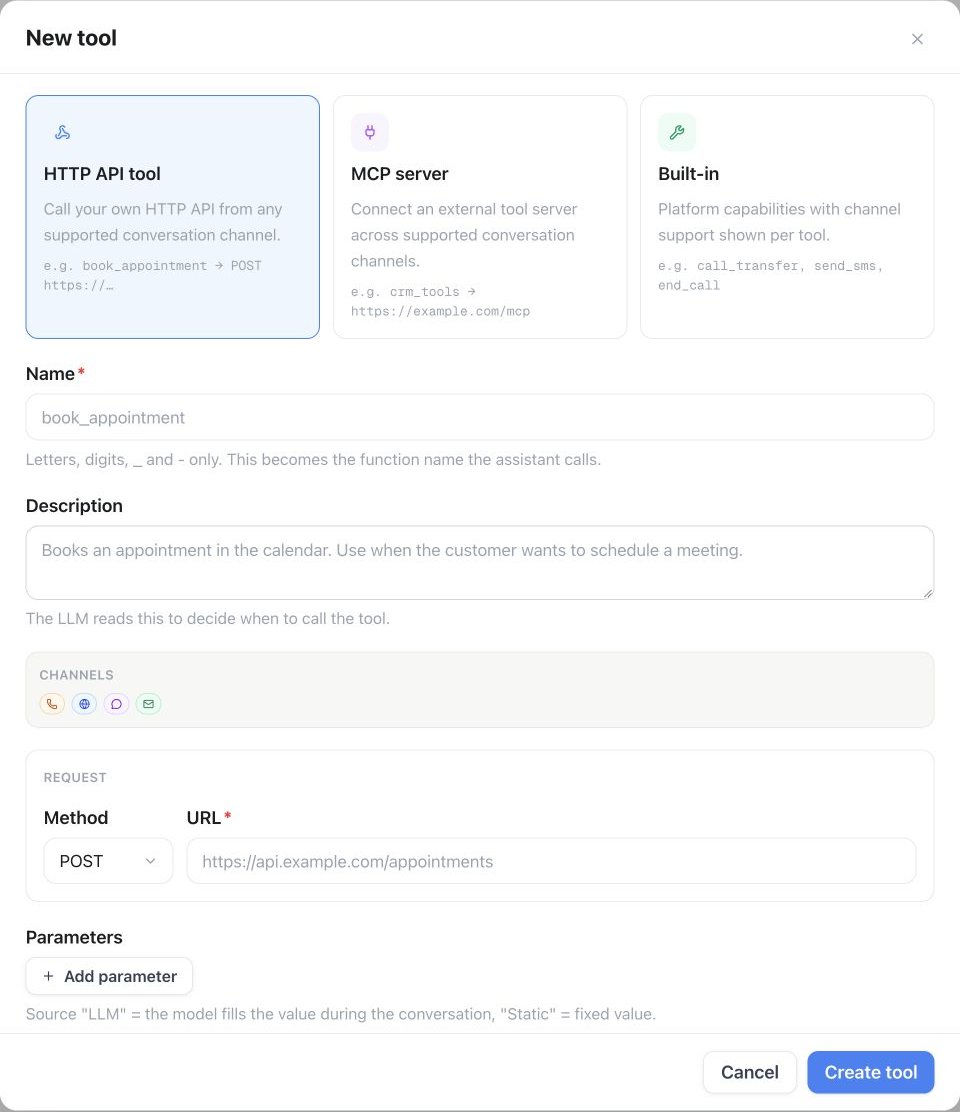
Agent Tools → Installed → API → Custom Agent Tool: Wähle HTTP API tool, benenne das Tool, beschreibe seinen Einsatz und lege Methode, URL und Parameter fest.
Agent Connectors
Der Tab Agent Connectors ist ein durchsuchbarer App Store vorgefertigter Integrationen – CRM, Kalender, Telefonie, Automatisierung, Produktivität, Utilities und weitere Apps, filterbar nach Kategorie oder eingeschränkt auf nur MCP –, die sich in wenigen Klicks als aufrufbares Tool an einen Assistenten anhängen lassen, statt ein API-Tool von Hand zu bauen. Verbinde dich je nach App per API-Key oder OAuth-Anmeldung.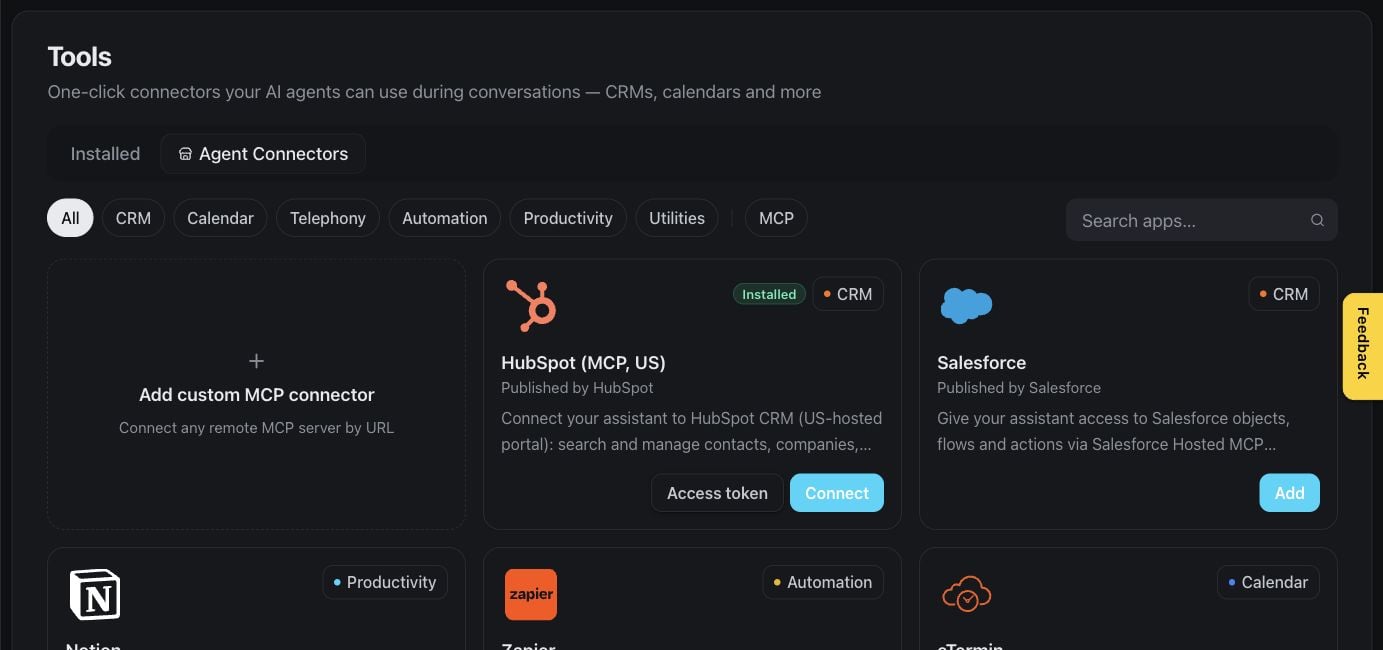
Tools — unterstützte Konnektoren entdecken
Warteverhalten
Jedes HTTP-API-Tool hat einen Abschnitt Voice behavior, der steuert, was Anrufer hören, während die Anfrage läuft. Diese Einstellungen gelten nur für Sprachgespräche:- Talk While Waiting – das Gespräch läuft weiter, während die Anfrage arbeitet. Sobald das Ergebnis da ist, teilt der Assistent es in der nächsten Gesprächspause mit. Schalte das für Anfragen ein, die länger als ein paar Sekunden dauern.
- Filler phrase – wird gesagt, wenn die Anfrage startet, zum Beispiel „Einen Moment, ich prüfe das kurz.“ Ist Talk While Waiting an, nutzt ein leeres Feld einen Standardsatz; ist es aus, wird bei leerem Feld nichts gesagt.
- Talk After Action Completed – standardmäßig an: Der Assistent macht weiter, sobald die Anfrage abgeschlossen ist, zum Beispiel um das Ergebnis mitzuteilen oder es im nächsten Schritt zu nutzen, etwa für eine Weiterleitung. Schalte es aus, um die Aktion ohne Antwort abzuschließen: Der Assistent erhält das Ergebnis trotzdem, wartet aber, bis der Anrufer wieder spricht.
Ausführungsverhalten
Jedes Tool, das ein MCP-Server anbietet, hat im Editor des Servers einen eigenen Abschnitt Execution behavior, der steuert, wie dieses Tool während eines Anrufs oder Chats läuft:- Allow cancellation – erlaubt dem Assistenten, einen laufenden Aufruf abzubrechen. Ein Abbruch kann eine bereits vom Tool vorgenommene Änderung auf der Gegenseite nicht rückgängig machen.
- Duplicate calls – legt fest, was passiert, wenn der Assistent versucht, dasselbe Tool erneut aufzurufen, während es noch läuft: zulassen, ablehnen, den laufenden Aufruf ersetzen oder den Assistenten vorher bestätigen lassen.
- Speak progress updates – liest den Fortschrittstext vor, den der MCP-Server während der Tool-Ausführung sendet. Aktiviere das nur für Server, denen du vertraust, da dieser Text Teil des Gesprächs wird.
Immer verfügbar
Einige Tools hängt die Plattform selbst an — sie erscheinen nie unter Installed, müssen nicht zugewiesen werden und lassen sich nicht entfernen:
Ein Prompt, der den Assistenten anweist, eines dieser Tools aufzurufen, funktioniert ohne jede Tool-Zuweisung. Alles andere — Built-ins, API-Tools, MCP-Server, Connectors — muss installiert und zugewiesen werden.
Max tool steps
Jeder Assistent hat eine eigene Einstellung Max tool steps in seinem Tools-Tab – wie viele Tool-Aufrufe er innerhalb einer einzigen Runde verketten darf, bevor er antworten muss, ohne ein weiteres Tool aufzurufen. Bereich 1–20, Standard 3.Tool-Versionen
Jede Änderung an einem Tool wird versioniert. Nutze die API oder MCP, um die Historie eines Tools einzusehen und eine frühere Version wiederherzustellen, falls eine kürzliche Änderung etwas kaputtgemacht hat.Tools verwalten
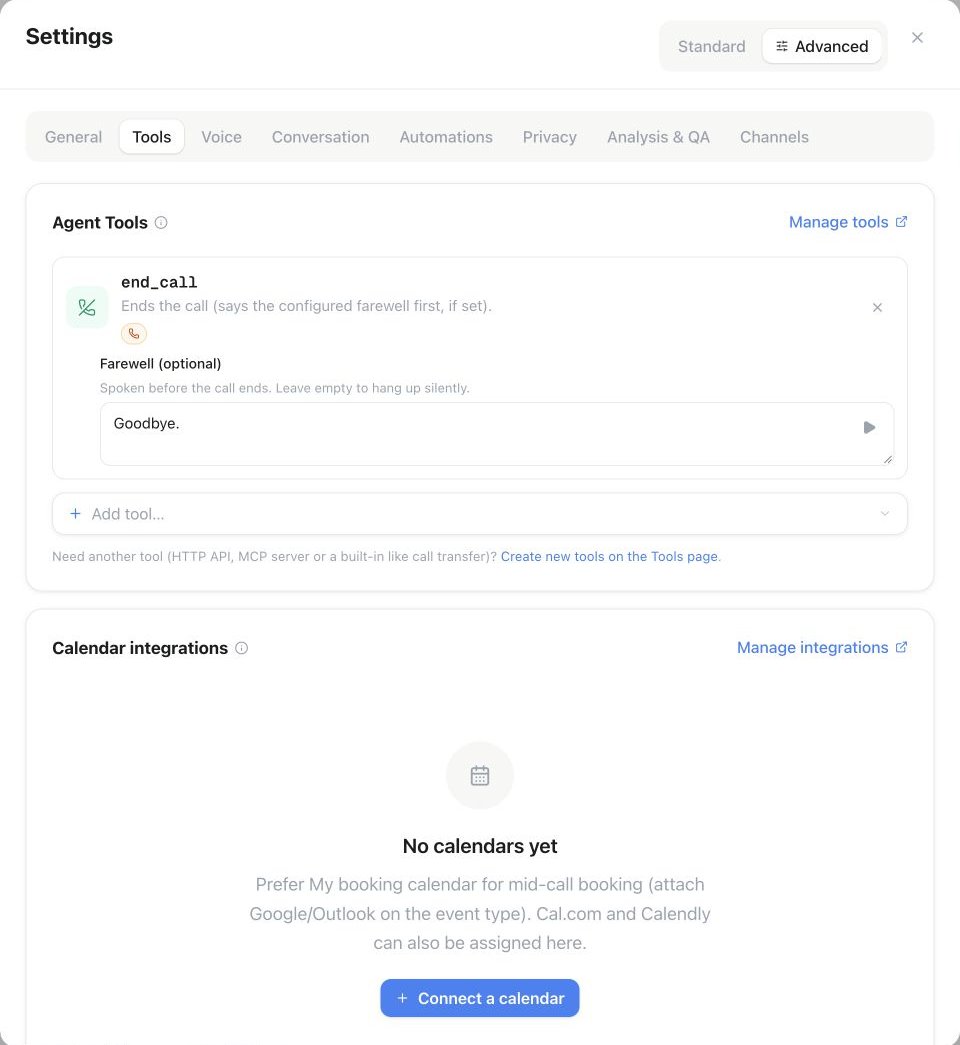
Assistenten-Settings → Advanced → Tools: Weise über Add tool ein Tool zu und prüfe seine Einstellungen. Das Beispiel zeigt Farewell für das Gesprächsende.
Verfügbarkeit
Das Limit Tools & MCP deines Plans begrenzt, wie viele Tools der Workspace gleichzeitig installiert haben kann. MCP-Server benötigen zusätzlich das Plan-Feature Connect AI (MCP) – ohne dieses wird das Anlegen eines MCP-Tools verweigert. Beides siehst du unter Settings → Plan. Wiederverwendbare Tools und MCP-Verbindungen von Assistenten teilen sich das Workspace-Limit Tools & MCP. Ein Tool, das mehreren Assistenten zugewiesen ist, zählt einmal. Reseller-Kunden erhalten mit Plan- oder Prepaid-Zugang fünf enthaltene Tools; kostenpflichtige Extra Tools-Add-ons erweitern das Kontingent. Connect AI (MCP) muss zusätzlich im zugewiesenen Plan oder in den Prepaid-Defaults aktiviert sein. Dein Kontingent findest du unter Settings → Plan.API & MCP
Details zu Request und Response findest du unter Tools & Webhooks.
Nächste Schritte
Integrierte Tools
Anrufweiterleitung, SMS, E-Mail und andere Plattformaktionen je Assistent aktivieren
Tools & Webhooks
Vollständige API- und MCP-Referenz zum Bauen und Zuweisen von Tools